An agent opens a pull request, posts “done” in Slack, and then the team hits the familiar wall. Nobody can click the branch. The app isn't running anywhere useful. The database isn't there. The logs are buried in a shell session on a disposable box someone spun up in a hurry.
That gap is where most AI agent projects stop being impressive and start being operationally expensive.
Teams usually think they're choosing a model or an agent framework. In practice, they're choosing whether code written by an agent becomes a real preview URL, whether state survives restarts, whether browser sessions and tool credentials stay isolated, and whether someone can debug the thing without rebuilding half a platform team. That's what AI agent hosting decides.
Table of Contents
<a id="why-ai-agent-hosting-decides-whether-work-actually-ships"></a>
Why AI Agent Hosting Decides Whether Work Actually Ships
The shipping problem isn't that agents can't write code. It's that most setups still treat agents like chat sessions.
A chat session can draft a patch, summarize logs, or suggest a migration. An always-on coding or operations agent has a different job. It has to hold state, use tools repeatedly, survive disconnects, remember what changed, and hand work to humans in a form they can verify. For product teams, that usually means a branch becomes a running environment with a clickable URL. For ops teams, it means the bot stays connected to Slack, Telegram, or Discord and can keep acting safely over time.
That's why AI agent hosting has split off from generic inference hosting. Enterprise usage is no longer light experimentation. In 2025, 73% of enterprises were reported to be running AI in production, average large-enterprise AI spending reached $18.2 million, ChatGPT message volume grew 8x year over year, and API reasoning-token consumption per organization rose 320x year over year, according to the 2025 enterprise AI report summarized by Quapton. At the same time, a separate 2025 business-study PDF in that same summary found only 5% of evaluated AI tools reached production after many were only investigated or piloted. Usage is rising faster than operations maturity.
The practical consequence is simple. A team doesn't need “a place to run prompts.” It needs a host that can keep an agent alive long enough to be useful and structured enough to be trusted.
The painful version of AI agent hosting is babysitting boxes, hand-loading secrets, and discovering too late that the branch your agent wrote has nowhere to run.
The preview gap is what turns enthusiasm into skepticism. If the agent says it fixed the bug but QA can't open the app, the team still has manual work ahead. If the host can provision an isolated workspace, keep memory around, and expose a controlled preview, the agent becomes part of delivery rather than a side experiment.
Compliance pressure makes the choice sharper. Residency, auditability, and access control now sit next to uptime on the checklist. Hosting isn't just an infrastructure detail anymore. It determines whether an agent can move from “interesting demo” to “something the team uses every week.”
<a id="what-always-on-ai-agent-hosting-really-means"></a>
What Always On AI Agent Hosting Really Means
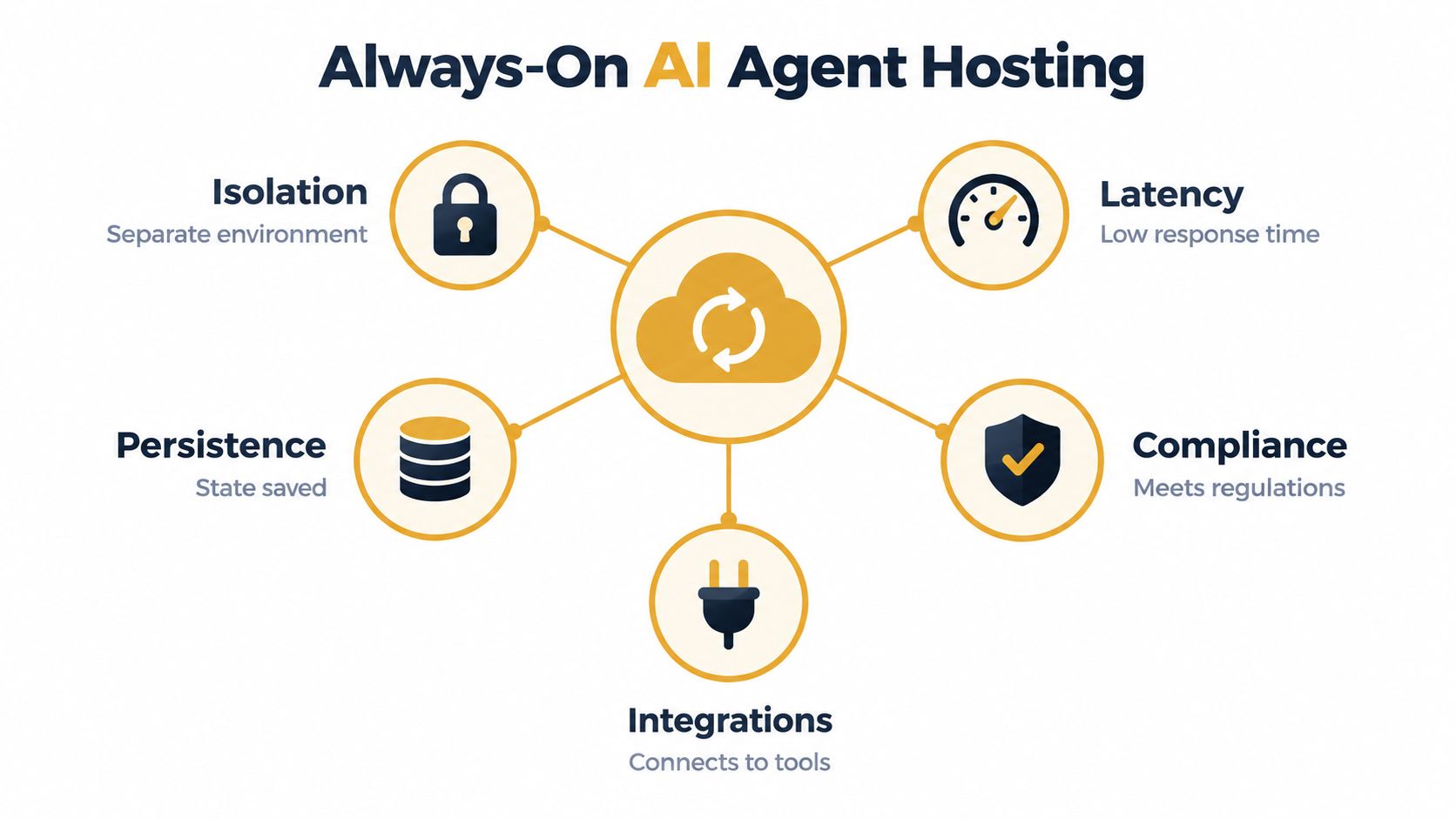
Always-on AI agent hosting means running an agent as a durable service, not as a one-off request. The agent keeps its runtime, memory, credentials, sessions, and tool access available across hours or days, often while executing code, browsing, watching repositories, or responding inside workplace tools.
That changes the design constraints completely.
<a id="isolation-matters-more-than-most-teams-expect"></a>
Isolation matters more than most teams expect
When an agent can run shell commands, install dependencies, browse the web, and access internal systems, isolation stops being a nice-to-have. It's the control that keeps one bad process, dependency mess, or compromised tool call from contaminating another runtime.
Modern sandboxing isn't automatically slow. A 2026 arXiv evaluation of confidential and isolated agent execution reported less than 5.15% runtime overhead versus commodity OS multi-process deployments and under 2.53% end-to-end overhead versus nested VMs in multi-cVM and microVM-style setups, as described in the arXiv evaluation of isolated agent execution. That's a useful signal for practitioners. You can usually buy much stronger per-agent boundaries without wrecking throughput.
In production, the question isn't “container or VM” in the abstract. It's whether each agent gets enough separation that a noisy browser task, a bad npm install, or a runaway code path doesn't degrade everyone else.
<a id="latency-isnt-only-an-llm-problem"></a>
Latency isn't only an LLM problem
Teams often blame the model when the delay comes from provisioning. Spinning up workspace state, restoring files, reconnecting tools, and warming browser dependencies can dominate the first useful response.
A 2026 benchmark write-up on sandboxing and snapshots reported sub-500 ms sandbox allocation latency, suspend times around 100 ms, restore times in the 200-280 ms range, about 90% lower compute consumption through suspend/resume cycles, support for hundreds to thousands of concurrent isolated agent runtimes, and an 89% reduction in time-to-first-token for model serving, according to ZenML's benchmark summary on agent infrastructure with sandboxing and snapshots.
Practical rule: measure workspace allocation, restore time, and model latency separately. If you combine them into one number, you won't know what to fix.
<a id="the-five-checks-i-use-for-any-host"></a>
The five checks I use for any host
When evaluating AI agent hosting, I reduce it to five production questions:
Isolation: Can one agent run code, browse, and mutate files without affecting another agent?
Latency: How fast does the runtime become usable, not just how fast does the model answer?
Persistence: Do memory, files, and sessions survive restarts or idle cycles cleanly?
Integrations: Can the agent work where your team already works, including GitHub, Slack, Notion, and calendars?
Compliance: Can you control region, auditability, identity, and approval boundaries well enough for your environment?
A runtime alone doesn't answer those questions. The hosting layer does.
<a id="managed-self-hosted-and-hybrid-hosting-compared-head-to-head"></a>
Managed Self Hosted and Hybrid Hosting Compared Head to Head
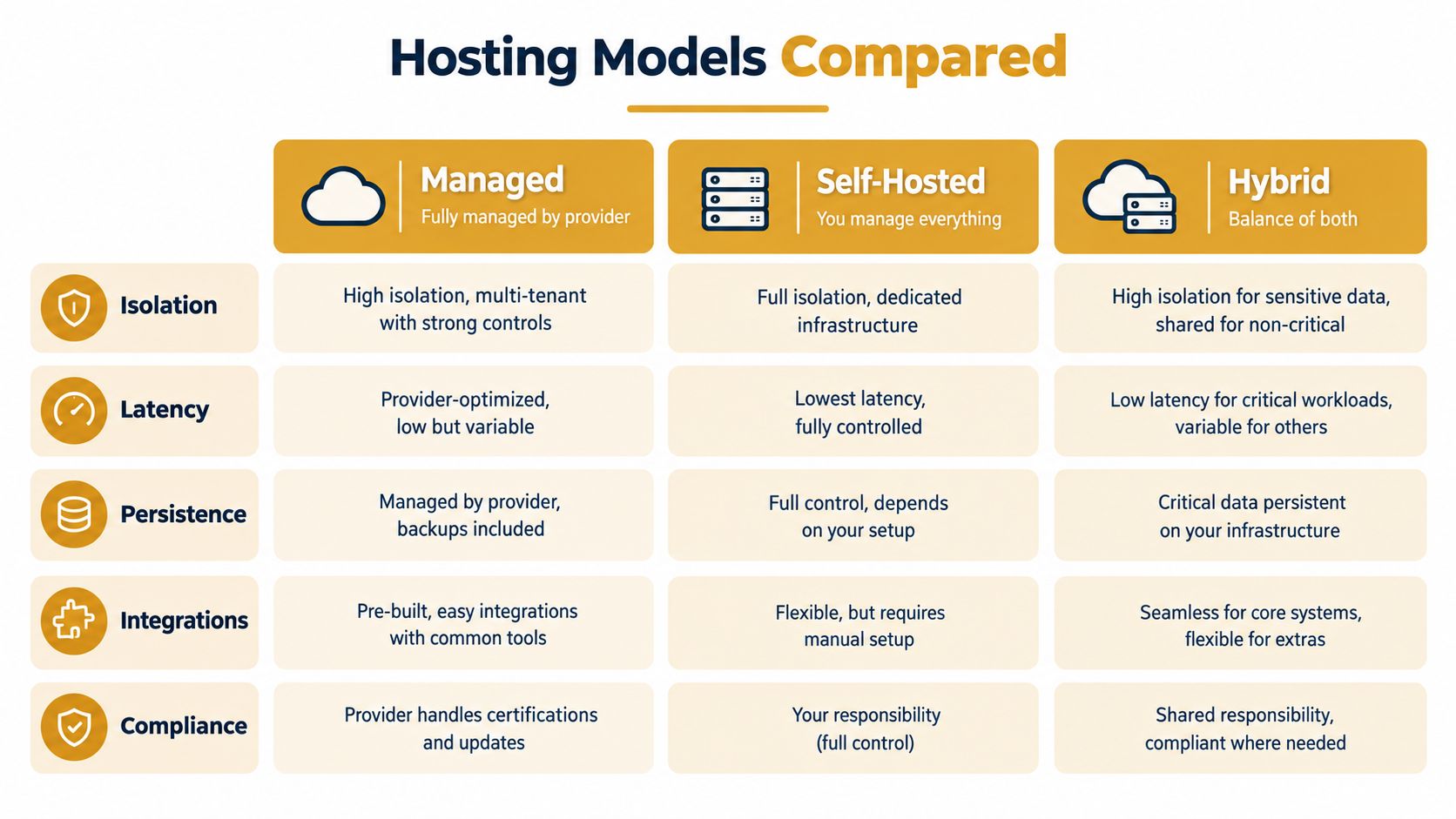
Teams end up choosing among managed, self-hosted, and hybrid models. The right answer usually comes down to where you want to spend engineering effort: platform operations, workflow speed, or boundary control.
| Criterion | Managed | Self-Hosted | Hybrid |
|---|---|---|---|
| Isolation | Provider-defined isolation, usually easier to standardize | Full control over runtime boundaries and network shape | Split isolation model, often managed control plane with private execution |
| Latency | Usually fast to start, but tied to provider lifecycle choices | Can be tuned deeply, but you own cold starts and capacity planning | Good balance if you place persistent workloads close to private systems |
| Persistence | Often built in, but with provider conventions | Fully customizable storage and retention | Flexible, but more moving parts across storage boundaries |
| Integrations | Fastest path for GitHub, chat, and dashboard workflows | Strong for bespoke internal systems | Best when you need both SaaS integrations and private network access |
| Compliance | Easier audits if the provider already exposes controls | Maximum policy control, highest implementation burden | Best fit for teams balancing residency and provider convenience |
AI Agent Hosting Models Compared by Core Criteria
<a id="managed-hosting"></a>
Managed hosting
Managed hosting is the fastest route from zero to a working agent. You get deployment workflows, logs, lifecycle controls, and common integrations without building them yourself.
That matters because infrastructure readiness is still a bottleneck. Independent 2025 to 2026 coverage says 80% of organizations lack mature AI infrastructure, fewer than 20% report high data-readiness, and Google Cloud reports 83% of organizations require infrastructure upgrades for production-grade autonomous systems, according to Capgemini's coverage of AI agent infrastructure readiness. In plain terms, teams aren't underbuilt on models. They're underbuilt on operations.
Managed works best when the team needs:
Fast setup: Someone should be able to deploy without learning cloud plumbing first.
Predictable workflows: Console access, logs, terminals, connectors, and lifecycle defaults matter more than bespoke infra.
Less babysitting: Patching runtimes and recovering failed hosts shouldn't consume your staff engineer time.
A concrete example is Sokko's comparison of self-hosted vs managed AI agents, which is useful if your actual choice is between building the stack yourself or offloading the runtime while keeping open-source agents.
<a id="self-hosted"></a>
Self-hosted
Self-hosted gives you the deepest control over network topology, data handling, custom images, and internal integrations. It's often the right answer when agents need direct access to private systems that can't traverse an external provider boundary cleanly.
The downside is operational drag. You own:
image hygiene
secret rotation paths
patching
host-level debugging
restore procedures
preview environment plumbing if the agent writes app code
Self-hosting isn't hard at small scale. Keeping it boring after the fifth runtime, second region, and first compliance review is the hard part.
Self-hosted is usually strongest for infra-heavy teams that already run internal developer platforms or need exact network and storage behavior.
<a id="hybrid"></a>
Hybrid
Hybrid is the model people arrive at after trying to force everything into one side. The control plane or user-facing layer lives with a managed provider, while execution, storage, or private integrations remain inside your boundary.
This works well for regulated environments and teams that need residency plus burst capacity. It also maps well to the branch-preview problem. Public collaboration can sit in a managed plane, while sensitive data paths or fully private previews stay in your own network.
<a id="the-real-differentiator"></a>
The real differentiator
The biggest mistake in these comparisons is focusing only on uptime. The better lens is workflow closure.
If the host can't take an agent's branch and turn it into something a human can verify, latency and control don't matter much. If it can close that loop, managed often wins on velocity, self-hosted wins on deep customization, and hybrid wins when compliance and collaboration have to coexist.
<a id="how-sokko-one-agent-per-machine-and-the-devbox-loop-work"></a>
How Sokko One Agent Per Machine and the Devbox Loop Work
Most hosts stop at “your agent is running.” The more useful pattern is “your agent is running, and the thing it changed is now testable.”
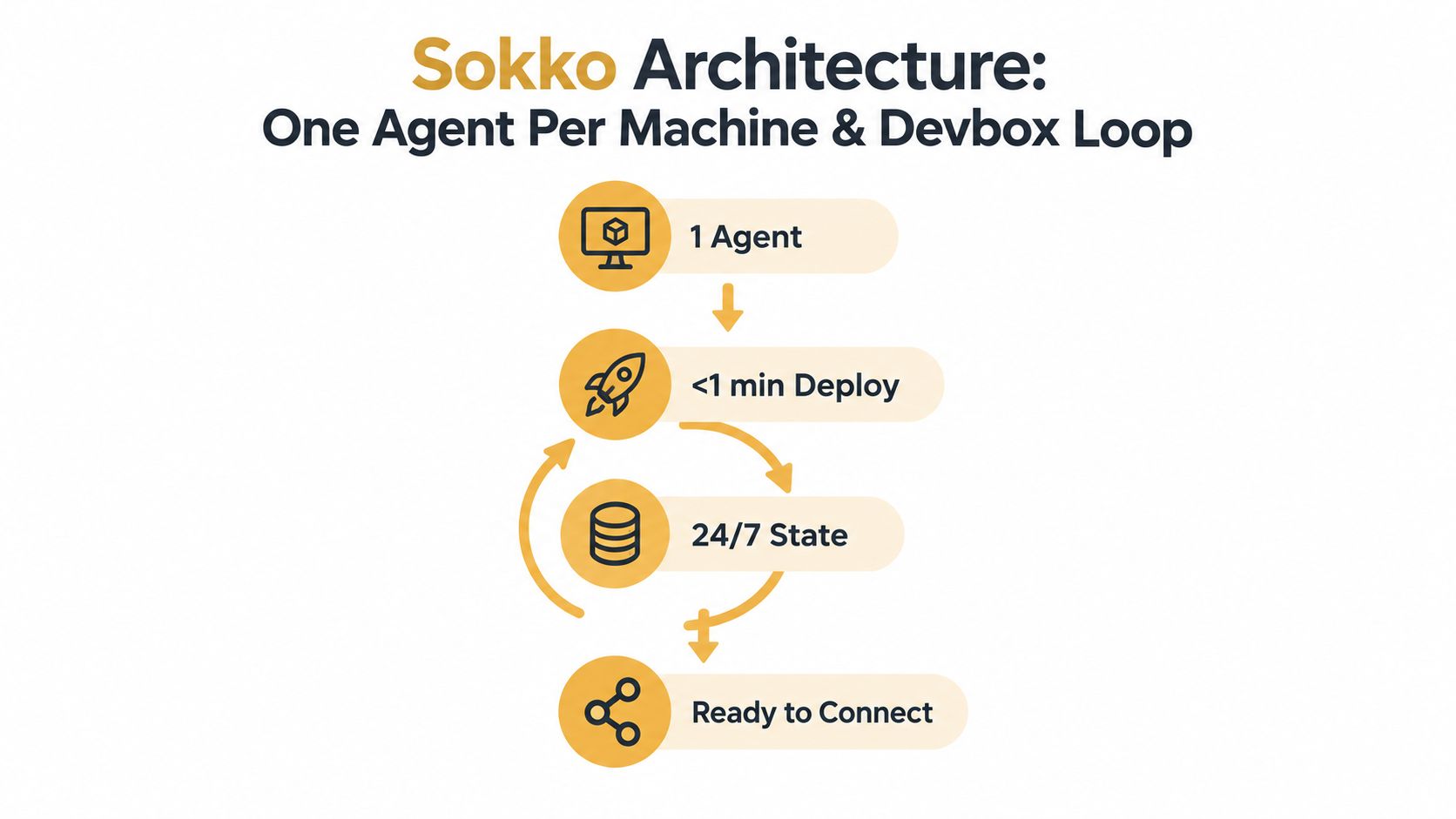
That's the interesting part of Sokko's design. It runs one agent per machine, keeps the agent alive continuously, and pairs the agent runtime with a devbox loop that can turn repository work into a browser-accessible preview. For teams using coding agents, that closes the operational gap between code generation and human verification.
<a id="one-agent-per-machine-changes-failure-modes"></a>
One agent per machine changes failure modes
A shared host is efficient until one agent starts doing real work. Browser automation, package installs, code indexing, or a bad dependency chain can turn a multi-tenant runtime into a noisy-neighbor problem fast.
One-agent-per-machine avoids that class of interference. If a devbox is building a branch or a coding agent is churning through repository tasks, it doesn't steal CPU and memory from another agent on the same node. That matters more in practice than many benchmark charts suggest, because the failure mode people notice is not average speed. It's unpredictability.
Sokko also claims one-click deployments typically complete in 38 to 52 seconds and that agents run 24/7 without sleep, based on its product details. For a platform engineer, the more important point is consistency. Fast deployment only matters if the runtime comes up with working logs, terminal access, and stable state.
<a id="the-agent-to-devbox-loop"></a>
The agent to devbox loop
The distinctive workflow is the agent-to-devbox loop.
OpenClaw, Hermes, and Paperclip can create a devbox over MCP, deploy a branch, inspect logs, extend lifetime, or tear it down. The practical effect is that the agent doesn't stop at writing code. It can hand the team a live environment. Instead of “I pushed a branch,” you get “open this preview and test it.”
For coding workflows, that is the difference between assistance and delivery.
A devbox in this model is a disposable machine for one repository's full stack. It can run the app and its supporting services behind a real URL. The access mode can be a team-gated public preview on sokko.run or a fully private mode inside Tailscale. That maps directly to two common review flows: product teams who need a quick browser link and internal teams who can't expose a public preview at all.
If you're comparing coding runtimes specifically, Sokko's write-up on AI code agents gives the right context for why hosting and verification belong in the same loop.
A branch isn't useful because it exists. It's useful when someone outside the terminal can click it.
<a id="whats-automated-and-what-stays-configurable"></a>
What's automated and what stays configurable
The platform includes zero-config stack detection across common setups such as docker-compose, Next.js, Django, Rails, Go, FastAPI, and Vite, with a healthy setup saved per organization and reused. That's the kind of small operational choice that saves a lot of repeated setup work.
Other mechanics matter too:
Lifecycle defaults: Devboxes have a default lifetime, idle-stop behavior, and extendable duration. That keeps preview environments from becoming forgotten pets while preserving useful state.
Persistent memory: Shared persistent memory can be attached so one agent or a fleet can reuse context without manual file shuffling.
Bring your own keys: Teams can use their own provider keys rather than collapsing everything into a platform-specific billing path.
Transparent debugging: A web console and live terminal give operators direct visibility when an agent stalls, installs the wrong dependency, or gets stuck on an integration.
This is also where the one-agent-per-machine design helps again. A busy devbox doesn't slow the agent, and a busy agent doesn't jam the preview machine. The isolation maps to workflow, not just security.
<a id="which-hosting-model-fits-your-team-and-use-case"></a>
Which Hosting Model Fits Your Team and Use Case
The right hosting model gets obvious once you look at the work the agent needs to finish.
<a id="software-teams-shipping-product-changes"></a>
Software teams shipping product changes
Your agent opens pull requests, reviews code, edits branches, and occasionally breaks local assumptions in the process. The decisive factor isn't just runtime uptime. It's whether each branch becomes a preview the team can test in a browser.
Managed or hybrid usually fits best here. Managed works when you want the shortest path from repository task to preview URL. Hybrid fits when the application depends on private services or you need previews inside your own network boundary.
Watch for these failure modes:
Preview drift: The branch exists but nobody can verify the full stack.
Shared-host contention: One heavy build slows unrelated agents.
Opaque logs: The team can't see why the deploy failed without SSH gymnastics.
<a id="ops-and-support-teams-running-chat-connected-assistants"></a>
Ops and support teams running chat-connected assistants
This team cares less about branch previews and more about reliability, chat presence, and tool integrations. The agent needs to stay connected to Slack, Telegram, or Discord, post updates, search docs, and trigger actions across systems without losing context midstream.
Managed hosting tends to win unless you have unusual network constraints. The productivity gain comes from getting integrations, restarts, and observability without inventing another internal service. Self-hosted only pulls ahead when the bot has to live deep inside a private environment or authenticate against systems that are painful to expose safely.
<a id="agencies-msps-and-eu-regulated-teams"></a>
Agencies MSPs and EU regulated teams
These teams usually need stronger boundaries between clients or business units. White-label domains, invite-only access, regional control, and data residency often matter more than raw setup speed.
Hybrid is frequently the cleanest choice. You can keep sensitive execution or storage in-region while still using a managed surface for deployment flow and collaboration. For EU-heavy work, the important questions are straightforward: where does memory live, where does inference run, who can access previews, and what audit trail exists when the agent takes action?
Residency decisions become workflow decisions fast. If reviewers can't access the preview under the right policy boundary, the branch still hasn't shipped.
<a id="pricing-persistence-and-governance-without-surprises"></a>
Pricing Persistence and Governance Without Surprises
Always-on agents look cheap if you price them like chatbots. They aren't.
Independent reporting notes that agentic systems can consume 20 to 30 times more tokens than standard generative AI workflows, and enterprise studies continue to flag skills, observability, integration, and cost as the main blockers beyond pilots, with 55% citing lack of skilled personnel and 67% saying users need more training, according to Introl's review of AI agent infrastructure economics and governance. That's why the headline monthly price rarely tells the whole story.
<a id="what-actually-drives-cost"></a>
What actually drives cost
The visible line item is the agent plan. The hidden line items are usually:
Persistent state: Memory volumes, file storage, and retained workspaces cost money but save repeated setup and context loss.
Workspace compute: A coding agent that also needs branch previews effectively uses two operational surfaces. The runtime and the environment it ships to.
Observability and debugging: Logs, terminals, audit trails, and approval paths are overhead until the first failure. Then they're the only reason you can recover fast.
Governance friction: Identity rules, approval flows, and residency controls slow you down if they're bolted on later.
For teams comparing flat-plan offers, Sokko's AI agent pricing comparison is the kind of framing that helps because it separates plan pricing from model-token spend and operational extras.
<a id="a-budget-and-governance-checklist"></a>
A budget and governance checklist
Before committing to any host, answer these in writing:
What persists by default. Files, memory, browser state, repo secrets, and conversation history shouldn't be ambiguous.
What gets billed separately. Model tokens, extra compute, storage growth, and private networking can change total cost quickly.
Who approves actions. If the agent can open PRs, send messages, or touch production-adjacent tools, approval boundaries need to be explicit.
How you inspect failures. A live terminal, readable config, and audit logs beat black-box retries every time.
Which region handles data and inference. Residency claims need to cover both stored context and model execution paths.
The teams that get surprised by AI agent costs usually didn't under-buy compute. They under-scoped persistence and governance.
<a id="choosing-your-ai-agent-hosting-path-with-confidence"></a>
Choosing Your AI Agent Hosting Path With Confidence
Choose managed hosting when your main problem is speed. You want an agent running quickly, with logs, integrations, and a sane operating surface, and you don't want to build another internal platform to support it.
Choose self-hosted when your team already has strong infrastructure muscle and the agent must live inside custom network, storage, or policy boundaries that a provider won't match cleanly. This path works, but only if you're honest about the operational tail.
Choose hybrid when collaboration and control both matter. It's the right fit when agents need managed workflow ergonomics but execution, previews, or memory must stay within a private or regional boundary.
For software teams, I'd use one extra test. Ask whether the host closes the branch-to-preview loop. If the answer is no, the team will keep paying a manual verification tax. If the answer is yes, the agent can participate in actual delivery.
Use this short checklist before you commit:
Measure p95 provisioning separately from model latency
Verify whether state survives idle and restart cycles
Test one real integration path, not just a demo connector
Confirm how previews are exposed and who can access them
Inspect the debugging surface before the first outage
Validate residency and audit controls with the people who own compliance
The right AI agent hosting setup should make an agent boring to operate and easy to verify. That's the standard that matters. Not whether the demo looked fast, but whether the work ships.
Sokko offers managed hosting for always-on agents like OpenClaw, Hermes, Paperclip, and Cursor, plus the devboxes those agents can ship branches to for live preview and testing. If your team needs isolated runtimes, persistent memory, and a tighter loop from agent output to something humans can click, it's worth trying Sokko.