Your coding agent can write a convincing landing page on Monday and still ask what your company sells by Wednesday. The same thing happens with support bots that forget a customer's preferred workflow, research agents that repeat yesterday's investigation, and review agents that reintroduce a decision the team already rejected.
The problem usually isn't the model's intelligence. It's the storage design around the model. A context window is a temporary workbench, not a filing cabinet. Once a session ends, the agent needs an external place to preserve useful facts, decisions, procedures, and experiences.
AI agent persistent memory provides that durable layer. It lets an agent read and update state across sessions, restarts, and, when designed correctly, other agents. The practical challenge is that memory isn't one feature called “remember everything.” Production systems divide it into layers with different ownership, freshness, retrieval, and security rules.
Table of Contents
<a id="why-your-ai-agent-forgets-and-how-persistent-memory-fixes-it"></a>
Why Your AI Agent Forgets and How Persistent Memory Fixes It
A four-person growth team has connected a coding agent to its repository. On Monday, the agent studies the project structure, rereads the style guide, and asks the team to explain the product. On Tuesday, someone decides in Slack that every landing page should use a shorter hero section and a specific customer vocabulary. By Wednesday, the agent has forgotten the decision and drafts another page in the old style.
From the team's perspective, the agent seems inconsistent. At the storage level, its behavior is predictable. The current conversation lives in a working context buffer. That buffer helps the model reason about the task in front of it, but it isn't automatically a durable knowledge base. When the session ends, the next run may receive a clean prompt with no reliable record of the earlier decision.
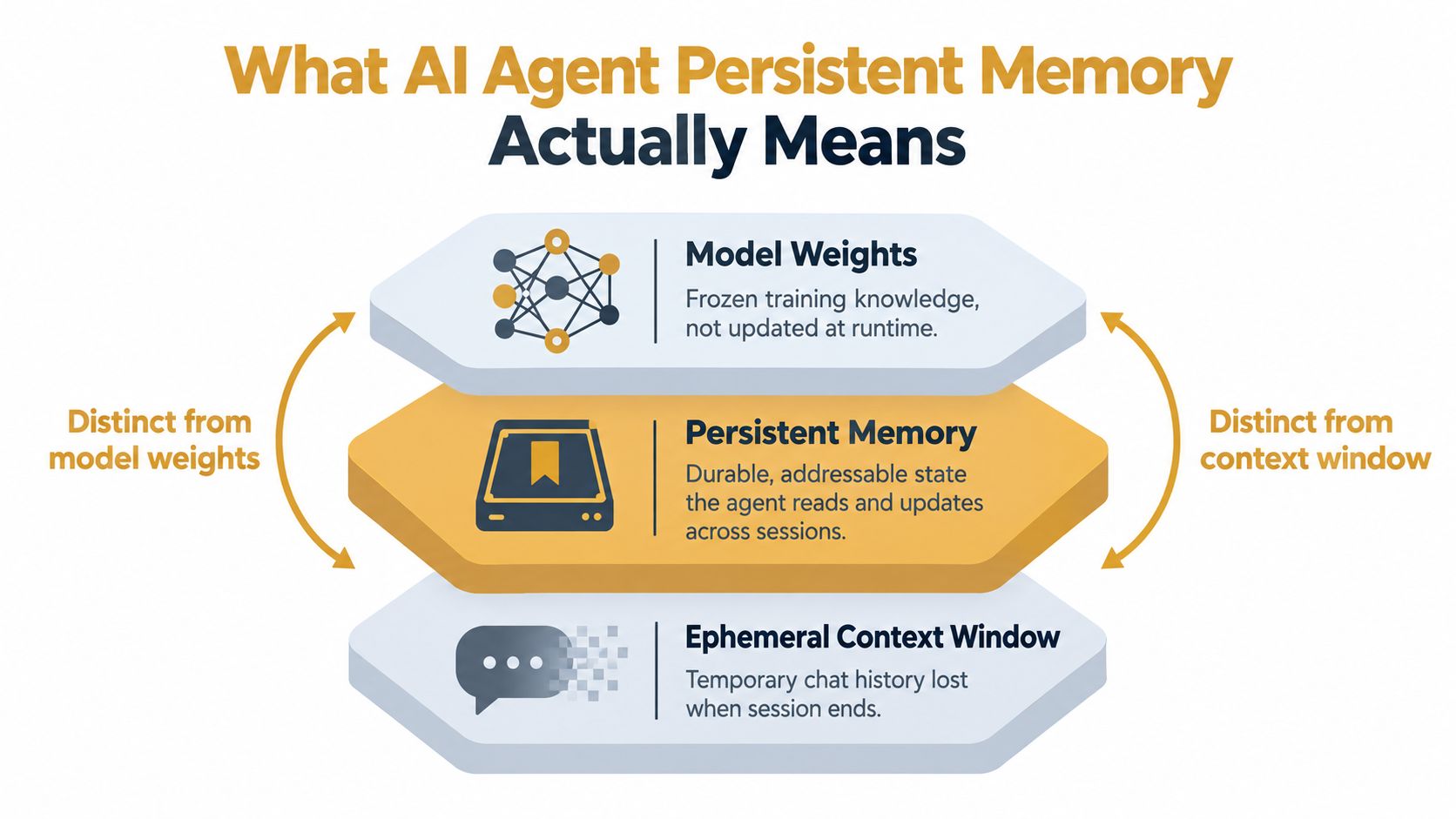
A longer context window doesn't solve the whole problem. It can hold more material during one interaction, but the agent still needs a mechanism that selects important information, stores it outside the active prompt, and retrieves it later. Research on memory scaling distinguishes external memory from both model weights and the current context window, because each serves a different purpose. The model supplies general learned capability, the context supplies immediate working material, and persistent memory supplies deployment-specific state. Databricks' explanation of memory scaling makes this distinction clear.
<a id="treat-memory-like-team-documentation"></a>
Treat memory like team documentation
The useful analogy is an engineering team's knowledge system:
The context window is the desk covered with today's tickets, logs, and open files.
Persistent memory is the project wiki, decision log, and personal notebook.
Model weights are the engineer's general training and experience before joining your company.
A durable memory entry might say that the product targets finance teams, that the repository uses a particular package manager, or that a previous migration failed because a service assumed local time. The agent can load that entry only when the current task makes it relevant, rather than stuffing every historical interaction into every prompt.
Practical rule: Store decisions and reusable facts, not an unfiltered transcript of everything the agent has ever seen.
This turns memory into an extension of existing team practice. A USER.md file can hold preferences, an IDENTITY.md file can define the agent's role and guardrails, and a project record can capture architecture decisions. The storage can begin as readable Markdown, then evolve into structured records and semantic indexes as the workload grows.
The rest of the design follows one question: what kind of knowledge is this, who owns it, and how long should it remain useful?
<a id="what-ai-agent-persistent-memory-actually-means"></a>
What AI Agent Persistent Memory Actually Means
Persistent memory is durable, addressable state that an agent can read and update across sessions. “Durable” means it survives the end of a conversation or a process restart. “Addressable” means the agent or its runtime can locate a specific record, profile, event, or semantic match instead of hoping the information happens to remain in the prompt.
That definition separates memory from two commonly confused systems. A context window contains temporary conversation material, while model weights contain the knowledge encoded during training. Persistent memory sits outside both. It can change at runtime without retraining the model, and it can be scoped to a person, project, workspace, or organization.
<a id="start-with-a-small-explicit-schema"></a>
Start with a small, explicit schema
A practical memory system needs more than a text dump. It needs categories that help the runtime decide what to retrieve and what the agent is allowed to change.
Identity describes the agent's role, tone, capabilities, and operating boundaries.
User profile records durable preferences and relevant working context.
Long-term facts capture stable information about a product, customer, repository, or environment.
Episodic records preserve what happened during earlier runs, including decisions, errors, and outcomes.
Procedural rules describe how work must be performed, such as review steps or commit conventions.
Think of these as different pages in an engineer's notebook. A project wiki stores shared facts. A run history resembles grep-able command output. A procedure document tells the engineer what to do next time. Combining those records gives the agent a usable state model instead of a giant, ambiguous archive.
<a id="choose-storage-for-the-access-pattern"></a>
Choose storage for the access pattern
Plain Markdown files are easy for people to inspect and version in git. SQLite or another relational database adds typed fields, indexes, transactions, and reliable updates. Key-value stores suit quick lookups such as a user's preferred environment. Document databases handle profiles whose fields change over time. Vector databases support semantic recall when the user's question doesn't share the same words as the stored memory.
The right choice depends on how often the data changes, how many agents need access, how precise retrieval must be, and how much governance the team needs. A small coding workflow can start with files. A busy multi-agent workspace may need structured records, access controls, provenance, and a retrieval layer.
<a id="the-five-storage-tiers-production-agents-use"></a>
The Five Storage Tiers Production Agents Use
A 2026 survey of persistent-agent memory examined Claude Code, OpenClaw, ChatGPT, Cursor, and Windsurf. It found that production systems commonly separate durable memory into at least five categories, while keeping working memory ephemeral. The documented patterns include Markdown files such as CLAUDE.md and .cursorrules, JSONL session journals for episodic records, and indexed vector stores for semantic memory. The persistent-agent memory survey shows why a single “memory” field rarely matches production needs.
The categories below are a useful operating model. They describe what the memory means, not necessarily five separate databases.
<a id="identity-memory"></a>
Identity memory
Identity memory defines how the agent should behave. It can contain the agent's role, tone, tools, escalation boundaries, and essential guardrails.
A design agency might give its copywriting agent a client voice guide, banned phrases, and the rule that claims requiring approval must be flagged rather than invented. This memory changes infrequently, but an administrator should control updates because a casual edit can affect every future deliverable.
<a id="user-memory"></a>
User memory
User memory represents the person receiving help. It can include communication preferences, working hours, technical stack, preferred package manager, or accessibility requirements.
For a support agent, a durable preference might tell the system that a customer wants troubleshooting steps in a particular format. The entry belongs to that customer, not to the entire organization, so retrieval must respect user scope.
<a id="project-memory"></a>
Project memory
Project memory captures the current environment. A coding agent may need a repository map, active milestones, architectural decisions, service ownership, and known constraints.
A growth team could store the approved product positioning and the relationship between its content repository and deployment workflow. Project memory changes as work progresses, so each update should carry an author, timestamp, and source.
<a id="episodic-memory"></a>
Episodic memory
Episodic memory records events in sequence. It might describe a failed deployment, a research run, a customer interaction, or a decision made during a review.
Chronology matters here. “The migration failed after a schema mismatch” is different from “the system always fails migrations.” The first is an event. The second is a generalized rule that should only be created after careful validation.
<a id="procedural-memory"></a>
Procedural memory
Procedural memory stores repeatable instructions. Examples include how to run tests, how to format commits, which approval threshold applies to production changes, and how an editor should review a draft.
A content workflow could use procedural memory to require source verification before publication. Unlike an episodic log, this layer tells the agent how to act in future tasks.
| Memory Tier | What It Stores | Update Frequency | Team Example |
|---|---|---|---|
| Identity | Role, tone, capabilities, guardrails | Infrequent | Agency voice and approval boundaries |
| User | Preferences and personal working context | Occasional | Customer response format |
| Project | Repository, decisions, tasks, constraints | Ongoing | Service ownership and architecture notes |
| Episodic | Past runs, events, errors, outcomes | Frequent | Deployment and investigation history |
| Procedural | Rules, workflows, and runbooks | Controlled | Commit and release requirements |
The value comes from keeping these meanings separate. A stale task shouldn't override an identity rule, and a private user preference shouldn't become a shared project fact.
<a id="multi-agent-coordination-with-shared-memory"></a>
Multi-Agent Coordination With Shared Memory
A multi-agent system often fails at the handoff, not at the individual task. A researcher finds a useful source, a drafter produces copy, and an editor reviews the result. If each agent stores knowledge privately, the user becomes the message bus.
Three memory models expose the tradeoff:
| Dimension | Isolated | Copied | Shared |
|---|---|---|---|
| Visibility | Each agent sees its own records | Agents receive duplicated records | Agents query a common workspace |
| Coordination | Users repeat context | Copies can diverge | Agents inherit current shared state |
| Update ownership | Simple per-agent ownership | Conflicts spread across copies | Explicit read and write scopes |
| Main failure | Blind spots | Version drift | Conflicting writes and permission errors |
| Auditability | Local history only | Difficult to reconstruct | Central record with provenance |
Isolated memory is straightforward to reason about, but it keeps teammates blind to one another. The editor won't know that the researcher already rejected a source, and the drafter may ask for facts the research agent has already collected.
Copied memory appears to solve that problem by passing files or summaries between agents. In practice, each copy becomes a fork. One agent updates the product positioning, another retains the old version, and the system has no dependable answer about which record is authoritative.
Shared persistent memory gives the workflow a common state layer. The researcher writes sourced facts and source metadata. The drafter reads approved research and records which claims it used. The editor writes revision decisions, allowing the next cycle to inherit both the accepted language and the reasons behind earlier changes. Teams can use a shared-memory design for multi-agent workflows when several agents need coordinated access.
<a id="shared-doesnt-mean-unrestricted"></a>
Shared doesn't mean unrestricted
A common store still needs ownership rules. The researcher might write research records but only read editorial notes. The editor might update publication status but not alter raw source evidence. An administrator can change procedural rules, while ordinary agents can only consume them.
Without those boundaries, shared memory creates its own problems:
Conflicting updates: Two agents write incompatible facts at nearly the same time.
Version drift: A copied summary remains in circulation after the source record changes.
Audit gaps: The team can't identify which agent introduced a bad rule.
Scope leakage: A private customer detail appears in an organization-wide retrieval result.
Shared memory becomes useful when the team treats it as a controlled system of record, not a communal scratchpad.
<a id="implementation-patterns-from-markdown-to-vector-stores"></a>
Implementation Patterns From Markdown to Vector Stores
Teams shouldn't begin with the most complex memory architecture. Start with the format that makes mistakes visible, then add structure when the workload demands it.
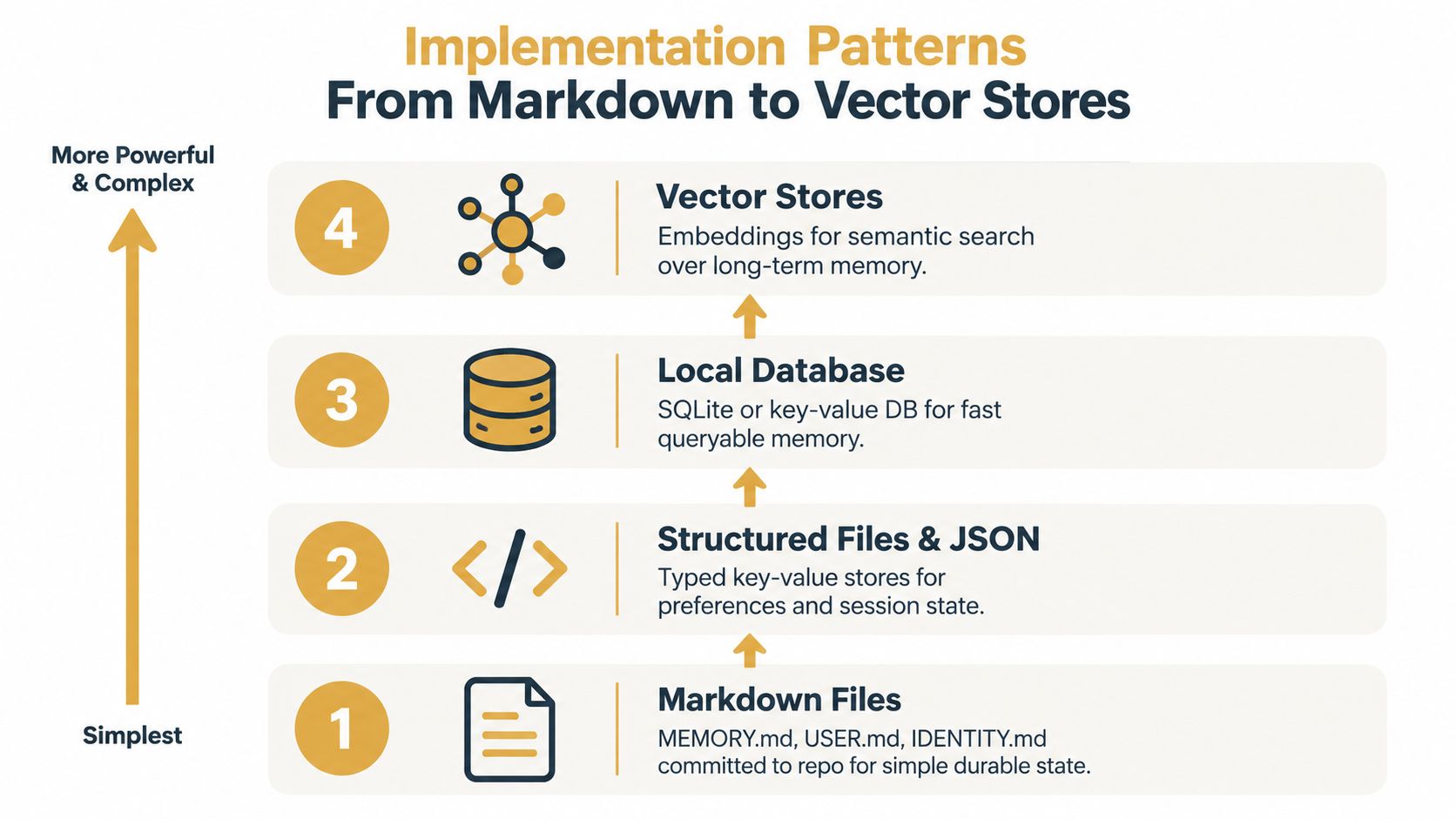
Markdown files are the natural first layer for a small team. Files such as MEMORY.md, USER.md, and IDENTITY.md are readable, reviewable, and easy to commit to git. An agency can store shared voice rules in IDENTITY.md, client preferences in scoped user files, and durable project decisions in MEMORY.md.
Structured files and JSON help when the agent needs predictable fields. A typed record can distinguish a preference from an event, attach a timestamp, or mark an entry as private. This approach works well for session state and settings that don't justify a database yet.
<a id="add-a-database-when-updates-need-coordination"></a>
Add a database when updates need coordination
SQLite suits a local or single-service workflow that needs indexed queries and transactional writes. A research agent could maintain a source registry with URLs, titles, review status, and provenance. A relational database becomes more attractive when several agents update the same records and the team needs constraints, joins, or audit history.
Key-value storage is useful for fast, direct lookups. A runtime can retrieve a user's preferred locale or an active task state without searching a large corpus. Document databases fit evolving entity profiles, especially when different customers or projects have different fields.
Vector stores become useful when semantic recall matters. A support agent may need to find an earlier ticket about “renewal access” even when the stored record uses “subscription entitlement.” Embeddings help match related meaning, but the vector query should be paired with metadata filters for workspace, user, sensitivity, and freshness. A vector database for AI agent memory is a retrieval component, not a complete governance strategy.
Design principle: Use exact fields for facts you can name, and semantic search for memories you can only describe indirectly.
A useful progression is therefore:
Files: Human-readable rules and small shared state.
Structured records: Typed preferences, events, and ownership metadata.
Database: Transactional updates and coordinated access.
Vector retrieval: Semantic search across larger episodic and semantic collections.
This video provides another visual explanation of the progression from simple durable files to more capable memory systems.
<iframe width="100%" style="aspect-ratio: 16 / 9;" src="https://www.youtube.com/embed/aYfZN8t6AQs" frameborder="0" allow="autoplay; encrypted-media" allowfullscreen></iframe><a id="security-residency-and-memory-governance"></a>
Security, Residency and Memory Governance
Persistent memory changes the security question from “what did the model see in this prompt?” to “what durable information can this agent retrieve later?” That difference matters because memory can accumulate credentials, personal data, client secrets, proprietary workflows, and private conversations if ingestion has no boundaries.
Recent research frames long-term agent memory as a data-management workload. One 2026 survey formalized persistent state across six diagnostic axes, authority, scope, mutability, provenance, recoverability, and actionability, while another research line described memory's evolution through Storage, Reflection, and Experience. The survey on persistent state and agent memory supports a more useful framing: teams must govern memory as durable state, not treat it as a prompt trick.
<a id="decide-what-stays-changes-and-disappears"></a>
Decide what stays, changes, and disappears
The central governance questions are simple to state:
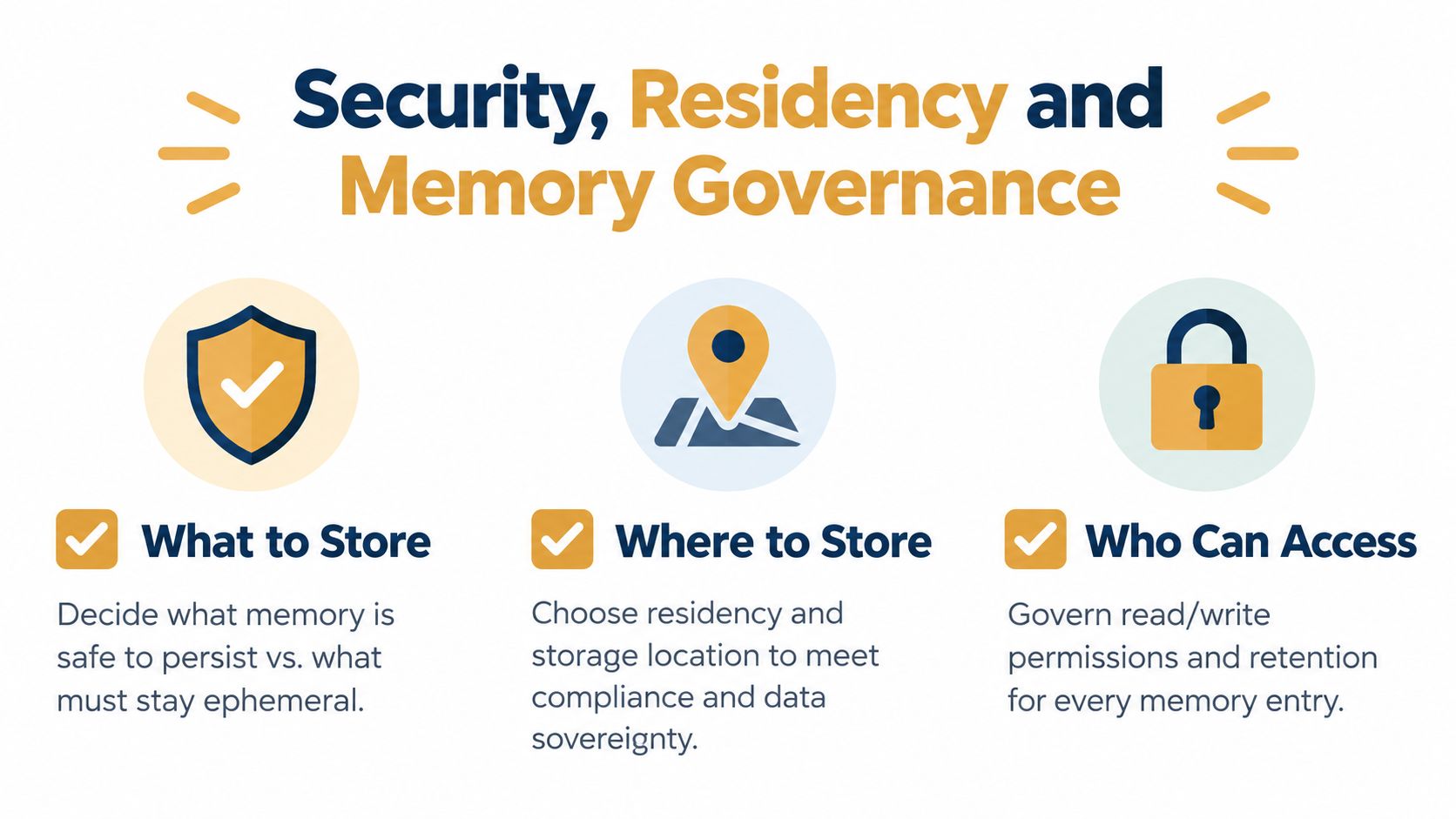
What should be stored? Keep durable facts, approved procedures, and useful decisions. Keep credentials and unnecessary sensitive content out of long-term memory.
What should be compressed? Turn repetitive episodic records into carefully reviewed summaries or semantic rules, while preserving provenance.
What should be forgotten? Remove records that are obsolete, private, legally restricted, or no longer useful.
Vector storage adds another consideration. Embeddings can preserve sensitive relationships even when the original text isn't displayed directly, so access controls must apply to the underlying memory and to retrieval results. A semantic match should never bypass workspace, customer, or regional permissions.
<a id="make-residency-and-access-explicit"></a>
Make residency and access explicit
Teams handling regulated or contractual data need to know where raw memories, indexes, backups, and inference requests are processed. A storage region alone may not answer cross-border inference questions. The system should document regional boundaries and preserve an audit trail showing who created, changed, retrieved, or deleted a memory.
Practical controls include:
Redaction pipelines: Remove secrets and unnecessary personal data before persistence.
Retention rules: Assign time-to-live policies to transient events and review dates to durable facts.
Role-based writes: Limit which agents can create or change shared procedures.
Human review: Require approval for high-risk updates involving customers, production systems, or compliance decisions.
Provenance fields: Store the source, author, timestamp, and superseded record for each important entry.
Teams with European data requirements can use data residency requirements for AI workloads as a planning input, but the implementation still needs a concrete inventory of storage, retrieval, inference, and deletion paths.
<a id="sokko-shared-persistent-memory-for-teams-and-agencies"></a>
Sokko Shared Persistent Memory for Teams and Agencies
A practical deployment path is to keep the first memory layer in Markdown and make it available to the agents that need it. Sokko offers a shared persistent memory add-on that agents can read and write across sessions and restarts. Existing MEMORY.md, USER.md, and IDENTITY.md files can be imported, so a team doesn't have to rewrite its initial knowledge base into a proprietary format.
The useful workflow is straightforward. An administrator prepares the files, separates organization-wide rules from user-specific preferences, and imports them into the relevant workspace. The platform can then expose shared state to a single agent or to a fleet, while the team decides which agents may read or update each scope.
For a four-person agency, the first pass might include a shared identity file containing client voice rules, project memory for active campaigns, and user files for individual working preferences. The agency can keep source files in git, review changes through its normal process, and use shared memory for runtime access. A research lab with multiple specialized agents can apply the same model, giving analysts read access to approved research while reserving write access for the ingestion or review agent.
<a id="size-the-rollout-around-memory-shape"></a>
Size the rollout around memory shape
Storage planning should begin with the files and records the agents create. A small pilot may need only the included base capacity. A larger workspace should estimate the average size of its Markdown files, episodic history, semantic indexes, and retained audit records, then add room for growth and exports.
The available add-on is priced at $25 per month with 5 GB included, plus $3 per additional GB, as described in Sokko's publisher information. That pricing separates memory capacity from the number of hosted agents, which lets a team choose shared state based on the amount of knowledge it needs to retain rather than copying a separate store for every runtime.
| Plan | Seats | Storage | Recommended Agents | Monthly Price |
|---|---|---|---|---|
| Shared memory add-on | Workspace-based | 5 GB included | A single agent or a shared fleet | $25 per month, plus $3 per additional GB |
The table describes the memory add-on, not the full hosting plan. Teams should confirm current product terms before budgeting, especially when combining shared memory with hosted runtimes, regional requirements, or additional compute.
<a id="best-practices-and-a-one-week-adoption-checklist"></a>
Best Practices and a One-Week Adoption Checklist
A disciplined file-based pilot teaches more than an ambitious memory platform built without review habits. The team should be able to answer three questions for every entry: who owns it, when does it expire, and what evidence supports it? Those answers make later migration to a database or vector store much safer.
<a id="use-the-first-week-to-establish-habits"></a>
Use the first week to establish habits
Day one, name the files. Create consistent MEMORY.md, USER.md, and IDENTITY.md conventions. Define which file holds shared project facts, which holds personal preferences, and which contains agent behavior.
Day two, define scope. Mark records as private, workspace-shared, agent-specific, or session-only. Deliver a small access map that states which runtime can read and write each scope.
Day three, connect one read-only pilot. Give a single agent access to approved memory without allowing automatic writes. Ask it to retrieve known project facts and record where its answers disagree with the files.
Day four, add controlled writes. Permit updates only for a narrow category, such as episodic run summaries. Require the agent to include a source, timestamp, and confidence or review status.
Day five, test recall across a restart. End the session, start a new one, and ask questions whose answers exist only in persistent memory. Test both successful retrieval and deliberate non-retrieval for private or expired records.
Day six, review and compress. Remove duplicates, mark stale entries, and turn repeated events into reviewed procedures only when the evidence supports the general rule.
Day seven, export the audit. Produce a list of stored entries, owners, scopes, sources, and retention decisions. This becomes the baseline for security review and future migrations.
Keep the first write scope narrow. A memory system earns trust when the team can explain every change.
<a id="know-when-files-have-reached-their-limit"></a>
Know when files have reached their limit
Stay with Markdown when people still need to review most entries manually, the workflow has a small number of agents, and exact retrieval is enough. Add structured storage when agents need transactions, typed fields, conflict handling, or reliable ownership checks.
Move toward vector retrieval when users ask broad questions over a substantial episodic history, stored wording differs regularly from query wording, and manual browsing no longer surfaces the right record. Benchmarking research reinforces the reason for this caution: memory quality includes factual and reflective memory, participation and observation scenarios, transfer, repair, adaptation, and conflict resolution, not recall alone. The benchmark work on agent memory quality shows why a retrieval demo isn't sufficient production validation.
A 2025 survey also identifies memory automation, reinforcement learning integration, multimodal memory, multi-agent memory, and trustworthiness as active areas, while noting that current systems don't master every important competency, including selective forgetting. The survey on persistent memory governance and capabilities points to the same operational conclusion: the hard part is deciding what the agent should remember and forget.
Sokko provides hosted AI agents with an optional shared persistent memory layer that can import MEMORY.md, USER.md, and IDENTITY.md files for coordinated use across sessions and agents. Visit Sokko to connect a small pilot, define shared scopes, and give your team a durable memory foundation it can inspect and govern.