Your agent is running continuously, calling a hosted model, and producing useful work. Then someone asks the uncomfortable questions: Which credential paid for those requests? Can you revoke access for one agent without interrupting the rest? What happens when the provider rotates the key, changes a quota, or rejects a regional request?
Bring your own keys, or BYOK, answers only part of that problem. It gives your team control over provider credentials and billing, but it also makes key scope, rotation, auditability, and failure recovery your responsibility. A pasted secret is not a governance model.
Table of Contents
<a id="what-bring-your-own-keys-means-on-sokko"></a>
What Bring Your Own Keys Means on Sokko
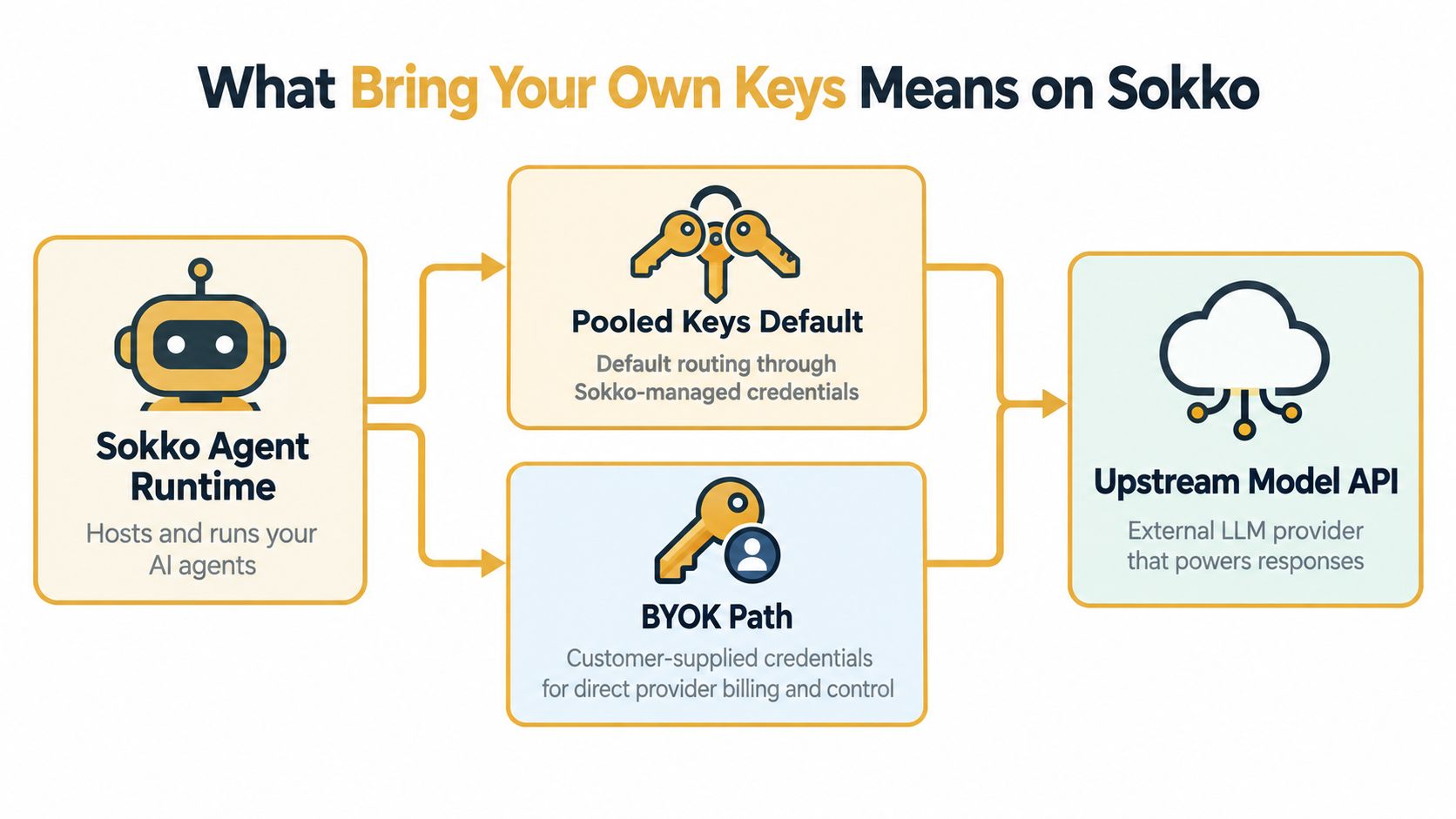
Bring your own keys is a customer-controlled credential model. Instead of having Sokko route an agent through pooled credentials, you supply the API key issued by your model provider. The agent still runs in Sokko's hosted runtime, but the upstream provider authenticates the request with your credential.
That creates a split trust boundary:
Sokko runs the agent logic and retrieves the encrypted secret when the agent needs to call a model.
The provider authenticates and bills the request against your account and its own usage policies.
The plaintext key isn't exposed in normal transit to the runtime user interface, while the stored secret remains protected at rest.
Your team remains responsible for provider permissions, quotas, rotation, revocation, and audit settings.
The practical benefit is direct control. Provider-side dashboards can show activity associated with your account, negotiated rate limits can apply to your organization, and regional or residency decisions can be made with the provider rather than hidden behind a platform-wide credential. IBM describes BYOK as a model where the cloud customer generates and manages encryption keys instead of the cloud provider, and Microsoft documents related controls around permissions, rotation, deletion, and auditing in Azure Key Vault. The same governance principle applies here, even though an AI API key isn't the same thing as a customer-managed encryption key. See IBM's explanation of BYOK for the broader model.
<a id="what-byok-doesnt-solve"></a>
What BYOK doesn't solve
BYOK doesn't replace identity and access management, network egress controls, prompt injection defenses, tool permissions, or human approval for destructive actions. An agent with a narrowly scoped model key can still misuse legitimate tool access, leak sensitive context, or make too many requests.
The useful end state is concrete. You should be able to bind one agent to a self-managed provider credential, run a controlled request, and reconcile the run with usage visible in the provider console. Treat the key as one component of the agent's trust boundary, not as proof that the whole system is secure.
<a id="preparing-your-provider-keys-before-you-start"></a>
Preparing Your Provider Keys Before You Start
Prepare the credential outside the agent configuration flow. You'll need an active Sokko workspace with an agent slot, an administrator or owner role, and a provider account with billing enabled. The supported setup covers Anthropic Claude, OpenAI GPT, Google Gemini, Mistral, and OpenAI-compatible endpoints, although each provider issues and scopes credentials differently.
Create the key in the provider's own console, copy the secret when it is displayed, and immediately label it with the target agent and environment. Store it in a password manager or approved secrets vault, not in a notes file, ticket, chat thread, shell history, or repository. If the provider only shows the secret once, assume recovery means replacement, not retrieval.
Request the smallest permission set that can support inference. Prefer inference-only access, avoid administrative and billing scopes, and don't use organization-wide tokens when a project or workspace credential will work. A key that can call a model but cannot alter account settings gives an exposed credential a smaller blast radius.
| Provider | Where to Issue the Key | Minimum Recommended Scope | Notes |
|---|---|---|---|
| Anthropic | Anthropic Console | Model inference only | Confirm the selected Claude model is enabled for the account. |
| OpenAI | OpenAI platform dashboard | Project-level inference access | Use a project credential rather than a broad organization token where available. |
| Google Gemini | Google AI or Cloud console | Generative model invocation only | Check that the selected project and regional endpoint match. |
| Mistral | Mistral platform console | Inference access for the required workspace | Keep labels specific to the agent and environment. |
| OpenAI-compatible endpoint | The endpoint provider's dashboard | Request or completion access only | Verify the base URL, model identifier, and authentication format. |
Before opening Sokko, verify five things:
The provider account can make a test request.
Billing or usable quota is enabled.
The intended model is available to the credential.
The key label identifies its agent and environment.
The secret is stored in an approved vault.
Sokko's secrets guide is the right reference for the workspace-side storage conventions. Don't proceed until you know who can replace the credential and who can revoke it.
<a id="attaching-a-custom-key-to-your-sokko-agent"></a>
Attaching a Custom Key to Your Sokko Agent
There are two practical ways to bind a provider key to an agent. Use the dashboard when an operator needs a guided change. Use Markdown configuration when the binding belongs in version-controlled deployment work.
<a id="dashboard-configuration"></a>
Dashboard configuration
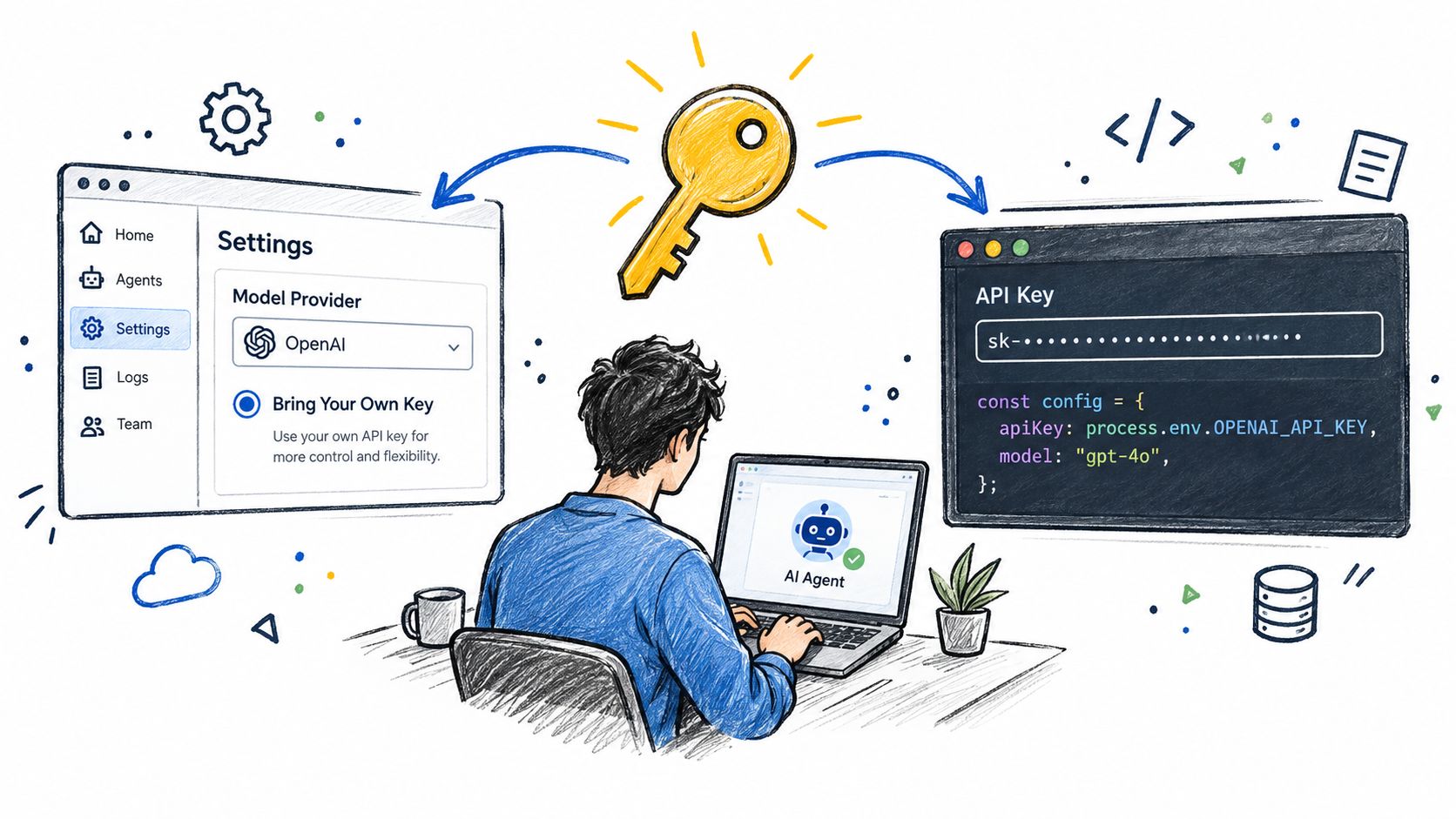
Open the target agent and go to Settings, then Model Provider, then Bring Your Own Key. Paste the provider secret, select the model family, and save the binding. The secret should be encrypted when stored, and the interface should show the selected provider and model without exposing the value itself.
After saving, inspect the agent metadata. You want to see a reference to the configured provider or secret, not the plaintext credential. If the metadata still shows pooled routing, the agent isn't using the path you intended. Don't assume that a successful save means the next request will use the custom key. Confirm the effective provider in the run details.
<a id="markdown-configuration"></a>
Markdown configuration
For configuration-as-code, add a model block that identifies the provider, model, and workspace secret reference:
model:
  provider: anthropic
  model_id: claude-model-id
  api_key_ref: workspace-secret-name
The exact model identifier and secret reference must match the provider and workspace configuration. The important design choice is api_key_ref, which keeps the Markdown file declarative without placing the secret in Git. Commit the configuration, redeploy the agent, and verify that the runtime reloads the updated binding.
The runtime should fetch the encrypted secret only when it needs to make the upstream call. A successful deployment isn't enough. Run a connection test afterward, then check the agent metadata and logs for the resolved provider path.
<iframe width="100%" style="aspect-ratio: 16 / 9;" src="https://www.youtube.com/embed/wKPAYYUBGq8" frameborder="0" allow="autoplay; encrypted-media" allowfullscreen></iframe><a id="keep-environments-separate"></a>
Keep environments separate
Bind staging and production independently, even if both use the same provider family. Development keys shouldn't be promoted unchanged, and production credentials shouldn't be pasted into shared workspace agents. A shared agent can expose a valid credential to more people, tools, and workflows than the original owner intended.
Record the binding, deploy the configuration, and move directly to end-to-end validation. The next question isn't whether the form accepted the key. It's whether the agent used the right credential for the right model.
<a id="validating-the-connection-and-watching-usage"></a>
Validating the Connection and Watching Usage
Start with a deliberately small smoke test. Ask the agent for a short, non-sensitive response that exercises the selected model without invoking tools, reading private repositories, or generating a large output. This isolates authentication and model selection from the rest of the agent's behavior.
A healthy test should produce a completed response and a corresponding run record. Inspect the Sokko usage panel for token consumption, request counts, cost estimates, and run status, then compare the event with the provider's own dashboard. Sokko helps you understand the agent execution path. The provider console remains the accounting authority for requests charged to your account.
<a id="read-the-signals-not-just-the-response"></a>
Read the signals, not just the response
A successful answer with no provider-side activity deserves investigation. It can indicate pooled-key fallback, a stale deployment, or a model selector that bypassed the BYOK binding. Repeated 401 responses usually point to a revoked, malformed, or incorrectly copied credential. A zero-token completion can indicate that the request failed before inference rather than that the model returned an empty answer.
Quota exhaustion often looks like latency or intermittent failure. Check provider-side limits before changing prompts or increasing runtime resources. Regional mismatches can produce confusing authentication or availability errors when the key belongs to one endpoint or project and the agent calls another.
Capture a baseline after the first valid run. Record the provider, model, agent, request status, token activity, estimated cost, and provider-side event. When you rotate the key or change its scope, repeat the same test and compare the two records. The API key rotation guide provides a useful operational reference for making that comparison repeatable.
<a id="security-practices-that-actually-matter"></a>
Security Practices That Actually Matter
BYOK changes who controls the credential. It doesn't automatically reduce the consequences of excessive permissions or poor agent design. The durable security model combines a restricted provider key with constrained tools, isolated environments, observable execution, and a tested response to compromise.
<a id="reduce-the-blast-radius-before-deployment"></a>
Reduce the blast radius before deployment
Minimum scope comes first. Request inference permissions only, avoid administrative and billing access, and prefer a project or workspace boundary over an organization-wide token. This prevents a model credential from becoming an account-management credential.
Separate environments. Development, staging, and production should have distinct secrets wherever the provider supports that pattern. If a development workflow leaks its credential, production should keep running and remain outside the exposed permission boundary.
Track ownership. Maintain an inventory that maps each key to its provider, model family, environment, owning team, creation date, rotation date, and bound agents. Without that record, a revocation request becomes a discovery exercise during an incident.
Practical rule: If you can't name every agent that will stop when a key is revoked, the key is shared too broadly.
<a id="rotation-must-include-recovery"></a>
Rotation must include recovery
Set a rotation schedule that fits the credential's sensitivity and your provider's capabilities. Store the replacement before disabling the old key, bind it to a non-production agent, run the smoke test, and then move the production binding. Keep the old credential available only for the shortest controlled overlap needed to avoid an outage, then revoke it and confirm that provider-side activity stops.
Revocation needs its own runbook. It should identify the provider console owner, the Sokko workspace owner, the replacement secret, affected agents, and the validation test. The goal isn't to rotate a string. The goal is to replace access without leaving an agent using a fallback credential.
<a id="audit-usage-as-an-agent-behavior"></a>
Audit usage as an agent behavior
Provider logs tell you which credential generated requests. Sokko logs add execution context, such as which run, workflow, or agent initiated the call. Review both when an always-on agent behaves unexpectedly.
A valid key can still support harmful behavior. Limit tool permissions, restrict repository access, require approval for write actions, and monitor unusual request volume or model selection. The credential security guidance covers the storage and access controls that support this broader boundary.
The industry evidence supports treating BYOK as an operational capability, not a cosmetic setting. A 2026 census of 125 published listings in The Agents Index found 54 listings, or 43%, answered yes to user-supplied model credentials, while 38, or 30%, were qualified and 25, or 20%, were marked no. Across that settled set, 74% allowed BYOK in at least some form. The Agents Index BYOK census makes the selection trend visible, but adoption doesn't remove the engineering work. It increases the need for clear ownership and reliable controls.
<a id="troubleshooting-the-issues-teams-hit-most"></a>
Troubleshooting the Issues Teams Hit Most
Most BYOK incidents have a recognizable shape. Start with the Sokko run logs, identify the actual provider path and status, then check the provider console before changing the agent prompt.
| Symptom | Likely cause | Corrective action |
|---|---|---|
| 401 authentication error | The key was revoked, copied with whitespace, expired, or issued for another account. | Create or copy a clean credential, replace the stored secret, and rerun the smoke test. |
| Provider activity appears under an unexpected account | The model selector or deployment resolved to pooled credentials instead of the BYOK binding. | Inspect agent metadata and model settings, then redeploy the explicit provider binding. |
| Requests hang or fail intermittently | The provider quota is exhausted or the account has a rate limit. | Check provider limits and usage, then reduce concurrency or adjust the provider plan. |
| The key works elsewhere but not in Sokko | The endpoint region, base URL, or model family doesn't match the credential. | Align the endpoint, project, region, and model identifier before testing again. |
| Markdown changes have no effect | The agent wasn't redeployed or the runtime didn't reload the secret reference. | Redeploy the agent and confirm the new binding in metadata and logs. |
Whitespace errors are easy to miss because the secret looks correct in a password manager. Copy it directly from the provider console when possible, and don't add quotation marks unless the configuration format explicitly requires them.
Silent fallback is more dangerous than a visible failure. The agent may continue working while charges and audit records appear under the wrong credential. Treat an unexpected provider-side account as a routing defect, not a successful test.
Quota problems also need separate handling from infrastructure latency. A healthy runtime can't overcome a provider-side limit. Confirm the provider response code and account status before changing compute or network settings.
<a id="a-short-operating-checklist-for-new-agents"></a>
A Short Operating Checklist for New Agents
Before an agent goes live, run this sequence:
Confirm the credential: Verify the provider, model access, minimum scope, billing status, and intended spend control.
Attach deliberately: Use the Sokko console or Markdown configuration, then record which agent and environment hold the binding.
Test end to end: Send one small prompt and inspect the response, token activity, estimated cost, provider event, and run logs.
Plan replacement: Set a rotation date and document who can revoke the key and install its replacement.
Review access: Check provider and runtime logs for unexpected callers, fallback routing, or activity outside the agent's expected schedule.
This checklist turns BYOK from a one-time onboarding step into routine operational hygiene. If a check fails, stop the deployment and fix the control before adding tools, repositories, or autonomous write actions.
Sokko hosts always-on agents on isolated machines, supports customer-supplied model keys, and provides dashboard logs plus versionable Markdown configuration for inspecting how agents run. Visit Sokko to connect your provider credentials with a hosted agent workflow and put key governance into the deployment process rather than leaving it in a settings page.