Your team has probably seen the same failure more than once. A new developer clones the repository, follows the setup guide, installs a slightly different runtime, and spends the rest of the morning fixing a dependency that worked perfectly on someone else's laptop. A feature branch then needs a database, a queue, and a safe place to preview the result, so the team starts sharing screenshots instead of testing the running application.
Cloud development environments address that friction by moving the complete development workspace into the cloud. The developer still writes code, runs commands, and inspects logs, but the machine running those tasks is provisioned remotely and consistently. In a modern workflow, the workspace can also host the branch's full stack behind a real URL, so another person can open the application without reproducing the developer's setup.
The core promise: give every developer, branch, or AI agent a clean, controlled machine that can be created when needed, used remotely, and removed without leaving configuration drift behind.
This matters beyond convenience. One independent industry survey reported that 66% of large organizations were already using cloud development environments, while the same source cited a Gartner projection that 60% of cloud workloads would be built and deployed using CDEs by 2026 industry adoption and forecast data. The category has moved from an experimental browser editor to an enterprise workflow involving infrastructure, governance, collaboration, and increasingly autonomous coding.
You'll need more than a definition to decide whether a CDE fits your team. The important questions are practical: what lives inside one, how VM and container models differ, when remote development beats a standardized laptop setup, how a branch becomes a preview URL, and why the same machinery is becoming a useful control plane for AI agents.
Table of Contents
<a id="what-cloud-development-environments-really-are"></a>
What Cloud Development Environments Really Are
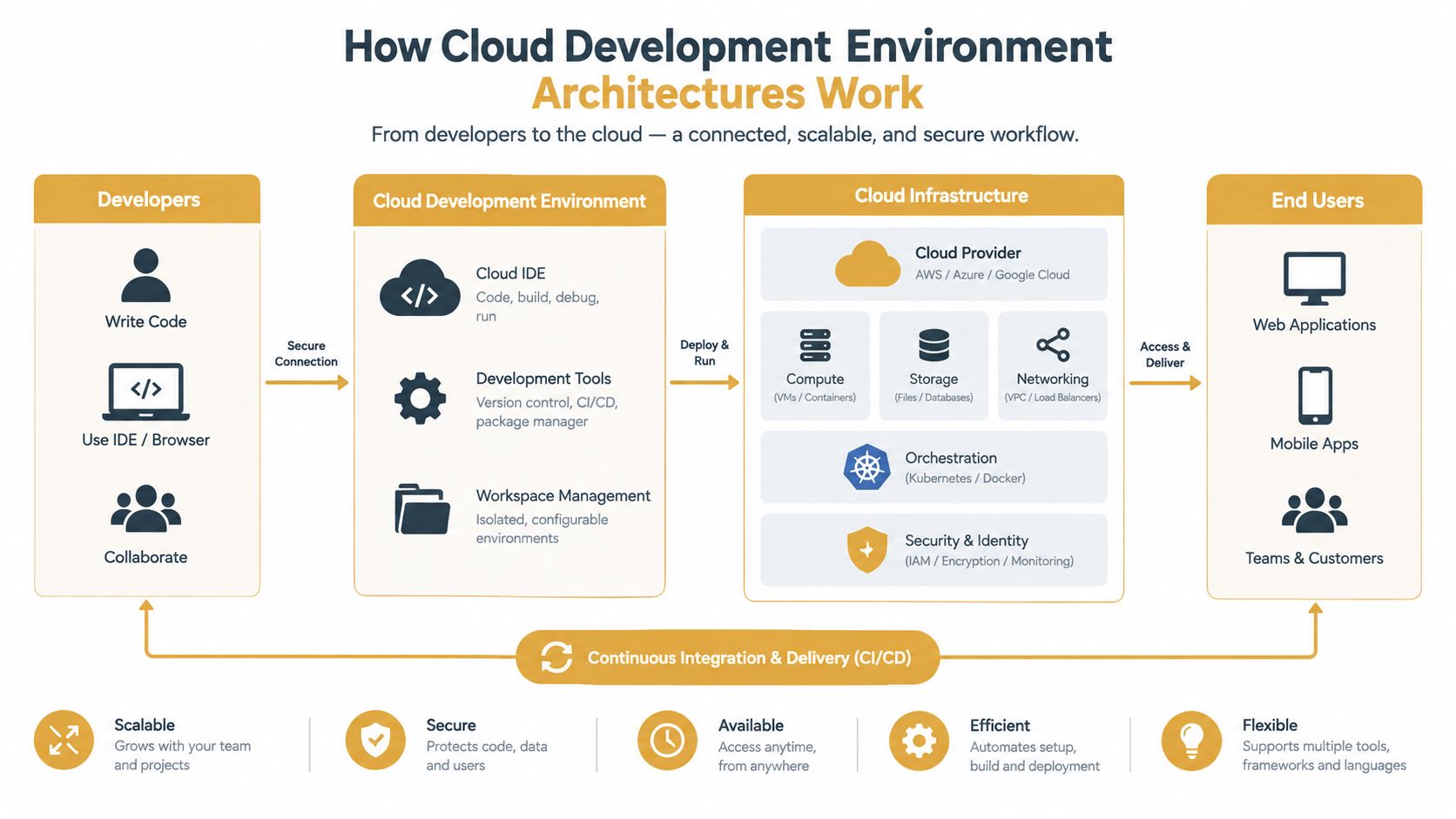
Start with a simple mental model: a cloud development environment is a laptop in the cloud that your team can create and access remotely. It has processing power, storage, a network connection, an operating system or container runtime, your repository, and the tools needed to build the application. Instead of carrying that machine under your desk, you connect to it through a browser, an editor, a terminal, or another supported client.
That analogy is useful, but it misses an important detail. A serious CDE isn't only a remote editor. It includes the services around the editor, such as the application runtime, databases, queues, environment variables, secrets, and networking. A Next.js branch might need a Node runtime, Postgres, Redis, a package cache, and a publicly reachable preview. The value comes from making those pieces appear together as one repeatable workspace.
The environment is usually created from a container image, a virtual machine image, or a declarative configuration. That configuration can install dependencies, start services, connect a Git branch, and apply access rules. Because the environment runs online, a teammate can inspect the same branch without installing the project locally or guessing which database version the author used.
<a id="the-difference-between-a-cde-and-a-browser-editor"></a>
The difference between a CDE and a browser editor
A browser editor gives you an interface for editing files. A CDE gives you a managed development machine and its surrounding application stack. The distinction becomes obvious when a project needs native packages, background workers, database migrations, test services, or credentials that shouldn't live on a personal laptop.
Cloud-hosted environments also fit the broader expansion of cloud infrastructure. Independent reporting says cloud infrastructure services generated $143.4 billion in revenue in Q2 2026, up 43% year over year, and reached $500 billion over the 12 months ending June 2026 cloud infrastructure market reporting. That same reporting describes cloud-native developers growing from 15.6 million in Q3 2025 to 19.9 million in Q1 2026, a 28% increase over six months. These figures don't prove that every team needs a CDE, but they explain why development workflows increasingly need to sit close to cloud-native systems.
<a id="a-quick-test-for-a-true-cde"></a>
A quick test for a true CDE
A platform is closer to a full CDE when it provides most of the following:
Reproducible workspace: The machine can be recreated from a known image or configuration.
Repository awareness: The environment follows a project, branch, or commit rather than acting as an unrelated server.
Development services: It can run the application and supporting services needed for ordinary work.
Remote access: Developers can reach the editor, terminal, logs, and application from their usual devices.
Lifecycle control: The environment can be started, paused, extended, reset, or deleted.
Governance: Access, secrets, networking, and resource usage are managed rather than improvised.
If all you receive is a web-based code editor connected to files, you may have a cloud IDE. If you receive a ready-to-use machine that runs the full stack and follows the branch, you're working with a cloud development environment.
<a id="how-cloud-development-environment-architectures-work"></a>
How Cloud Development Environment Architectures Work
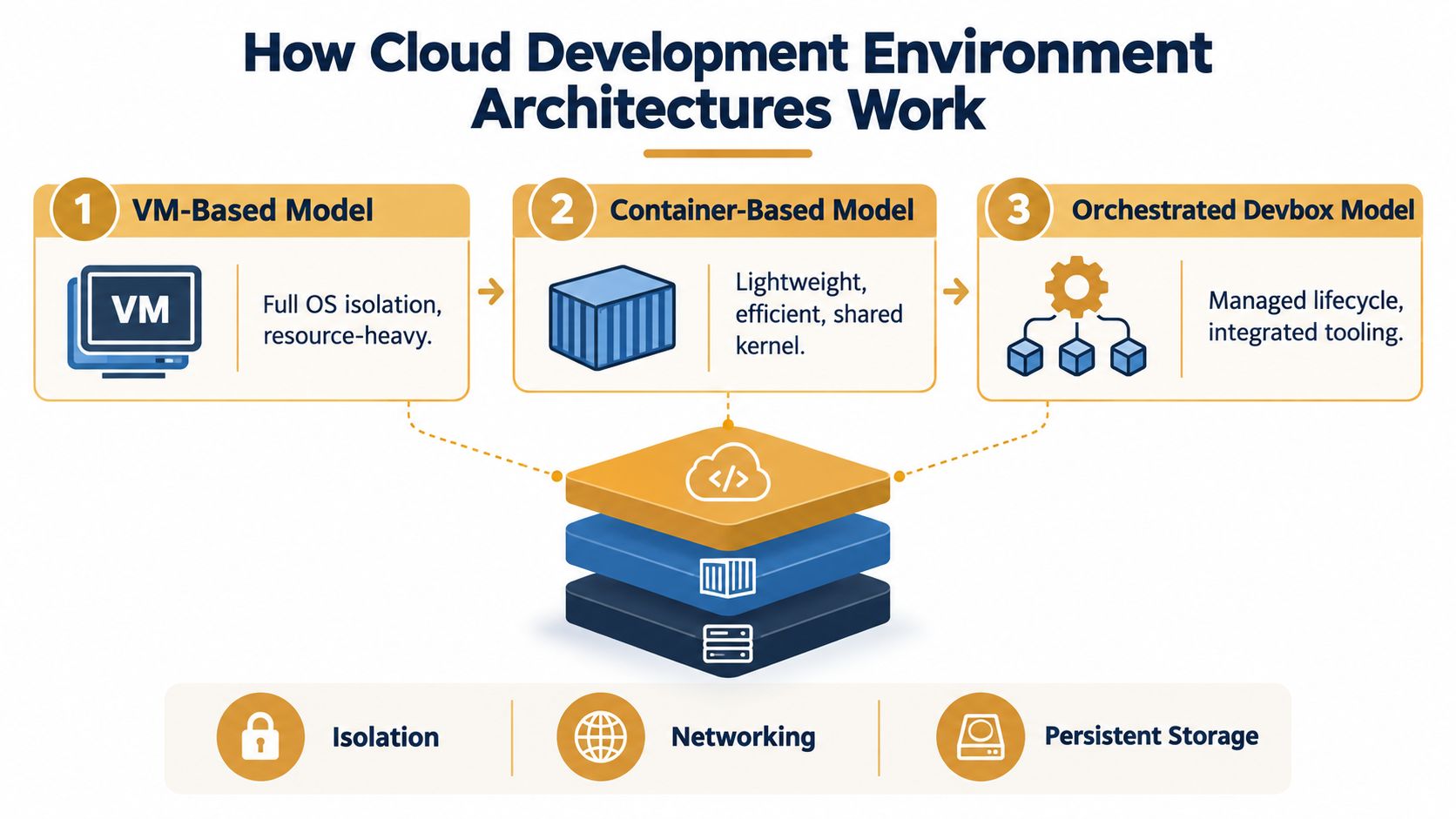
A CDE architecture has several layers, and each layer answers a different operational question. Compute determines where code runs. Storage determines what survives a restart. Networking determines which services and people can communicate. Lifecycle orchestration determines how the workspace is created, updated, secured, and removed.
A VM-based model gives each workspace a complete virtual machine and operating system. That approach offers strong boundaries and broad compatibility, but it can consume more resources and take longer to initialize. It makes sense when developers need kernel-level tools, unusual system packages, or operating-system behavior that containers can't provide.
A container-based model packages the workspace into one or more containers sharing the host kernel. Containers generally start quickly and use resources efficiently, but the shared kernel changes the isolation model. The platform must carefully control namespaces, privileges, mounted files, network paths, and access to host services.
An orchestrated devbox model adds a management layer over those building blocks. The orchestrator may select a machine, attach persistent storage, apply a template, inject approved secrets, expose a preview, collect logs, and stop the workspace when it becomes idle. That automation is what turns a collection of cloud resources into a usable team workflow.
<a id="isolation-storage-and-network-distance"></a>
Isolation, storage, and network distance
Isolation deserves architectural attention, not just a compliance checkbox. Shared physical resources can expose side-channel risks through caches and virtualization layers, so teams should ask whether workspaces receive separate VMs, hardened containers, dedicated nodes, or another documented boundary. The answer should match the sensitivity of source code, credentials, customer data, and agent permissions.
Storage needs a more nuanced design. Source code may be recreated from Git, while package caches, database fixtures, uploaded files, and agent memory may need persistence. A good CDE distinguishes disposable compute from data that should survive a restart, expiry, or rebuild.
Network placement affects how the environment feels. JetBrains recommends keeping latency under 100 ms for a smooth remote-development workflow and warns that higher latency can disrupt coding responsiveness JetBrains guidance on remote development latency. CPU can be plentiful, yet an editor still feels sluggish if every file interaction, terminal command, or language-server response travels too far.
Practical rule: measure the path from the developer to the workspace, not only the size of the workspace. A nearby, moderately sized machine can feel better than a powerful machine across a high-latency connection.
<a id="delivery-controls-can-reinforce-performance"></a>
Delivery controls can reinforce performance
Security controls don't automatically make delivery slower. A study on secure deployment automation reported 32.8 daily deployments, a 22% reduction in lead time from 3.7 days to 2.9 days, failed deployments falling from 8.4% to 5.1%, and a 79% decrease in security-related rollbacks when controls were integrated into the deployment workflow secure deployment automation study. Those results concern deployment automation rather than every CDE implementation, so they shouldn't be treated as a promise for a particular platform. They do support a useful design principle: put security checks into the path developers already use instead of adding a disconnected approval ritual.
When evaluating a provider, ask:
Which isolation boundary protects one workspace from another?
Where do persistent files and databases live?
Can you choose a region close to developers and dependent services?
How are secrets issued, rotated, and prevented from appearing in logs?
What happens when a workspace is idle, expired, or deleted?
Can platform engineers inspect the underlying configuration and activity?
Documentation for Sokko devboxes provides one example of a product-oriented lifecycle built around isolated, remotely accessible machines and branch previews.
<a id="local-machines-versus-cloud-development-environments"></a>
Local Machines Versus Cloud Development Environments
Local development remains the right choice for many teams. A laptop offers immediate interaction, works during network interruptions, and avoids paying for remote compute while a developer is thinking, debugging, or away from the keyboard. If the project is small, dependencies are stable, onboarding is easy, and the team rarely needs shared previews, moving to a CDE may add operational work without solving a meaningful problem.
The decision changes when the team repeatedly rebuilds environments, supports distributed contributors, handles sensitive repositories, or wants agents to work in parallel. A traditional cloud VM solves the compute-location problem, but it often leaves setup, access, cleanup, and branch management to the team. A CDE adds those workflow controls.
| Criteria | Local Development | Traditional Cloud VM | Cloud Development Environment |
|---|---|---|---|
| Setup | Installed and maintained on each laptop | Installed on a remote server, often manually | Created from a managed template or image |
| Reproducibility | Depends on local documentation and discipline | Depends on VM configuration and scripts | Built into the workspace definition |
| Sharing | Usually requires separate deployment or screen sharing | Possible through server access, but often awkward | A branch environment can expose a shared preview |
| Security | Source code and credentials spread across endpoints | Centralized, but access and isolation need design | Centralized policy can cover workspaces, secrets, and networks |
| Cost model | Laptop and local tools | Continuous VM and storage usage | Usage depends on lifecycle, sizing, and platform controls |
| AI-agent readiness | Agents share the laptop's access and resources | Possible, but isolation and cleanup are manual | Separate workspaces can give agents scoped machines and lifecycles |
<a id="where-the-return-becomes-visible"></a>
Where the return becomes visible
The ROI question deserves more attention than “does a browser editor feel convenient?” A survey reported that 95% of respondents were familiar with CDEs, yet only 15% cited faster environment setup and 14% cited easier onboarding or remote access as adoption reasons survey on cloud developer environment adoption. The fragmented reasons suggest that mature teams shouldn't buy a CDE because it sounds modern. They should connect it to a specific bottleneck.
A CDE is more likely to pay off when:
Onboarding consumes senior engineer time: New contributors need a reliable path from repository access to a running application.
Branches need independent infrastructure: Developers regularly require separate databases, queues, or preview URLs.
The team works across locations: Shared environments reduce assumptions about operating systems and local toolchains.
Agents need boundaries: Each agent can work in a controlled workspace rather than sharing a developer's laptop.
Compliance limits endpoint sprawl: Central access, logging, and secrets management matter more than local convenience.
For a deeper look at the relationship between local machines and AI coding workflows, see local AI agents and their development trade-offs. The practical test is simple: measure the time and interruptions caused by your current workflow, then pilot the smallest CDE setup that targets those costs.
<a id="inside-the-devbox-lifecycle-from-branch-to-preview-url"></a>
Inside the Devbox Lifecycle From Branch to Preview URL
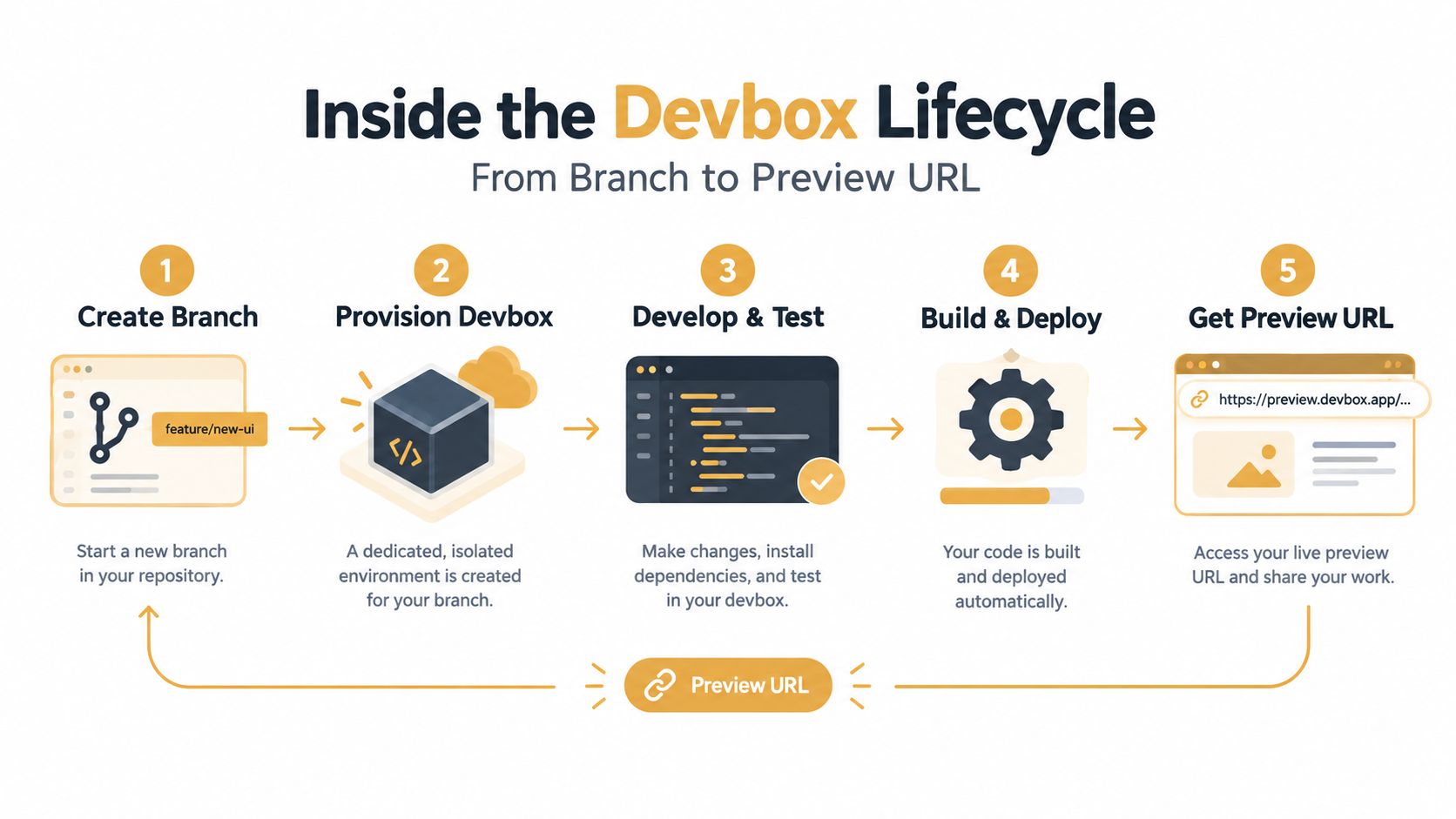
A useful way to understand a devbox is to follow one feature branch. A developer or agent starts with a repository and a requested change. The platform creates a disposable machine, connects the branch, detects the application stack, starts the required services, and returns a URL that a human can open.
<a id="creation-and-deployment"></a>
Creation and deployment
The first step can happen in a dashboard or through an automation interface. The requester chooses the repository, branch, access mode, and relevant lifecycle settings. A zero-configuration workflow can inspect familiar project signals, select a compatible setup, and save a healthy configuration for later use. Manual overrides still matter when the repository has unusual build commands, private services, or special networking requirements.
The machine then receives the branch and launches the application stack. A full-stack preview might include the web process, a database, a queue worker, and supporting services. The key distinction is that the preview isn't a screenshot or a local tunnel. It is a running instance that reviewers can exercise in a browser.
Read how AI code agents work with repository tasks for the broader connection between branch changes, automation, and reviewable output.
<a id="access-and-daily-controls"></a>
Access and daily controls
A preview should be reachable by the right people, not merely reachable. One access pattern uses a gated public link where signed-in organization members can enter. Another keeps the devbox private inside a team network such as Tailscale. The choice depends on whether the review group includes external stakeholders, whether the application handles sensitive data, and whether the team needs a public-looking URL.
The lifecycle also needs explicit controls. A preview can stop after inactivity while keeping its data, be extended during a review, or be torn down after the branch is merged. A development machine has value while someone is using it, but it shouldn't remain active forever just because nobody remembered to delete it.
A good preview workflow separates temporary compute from important state. The machine can disappear while approved secrets, source history, or deliberately persistent test data remain governed elsewhere.
The final step is teardown. Once the branch is merged or abandoned, the platform removes its compute and networking resources, records the relevant activity, and prevents a forgotten preview from becoming an unmanaged service. That clean ending is as important as fast creation.
<iframe width="100%" style="aspect-ratio: 16 / 9;" src="https://www.youtube.com/embed/89qkfRFWhy0" frameborder="0" allow="autoplay; encrypted-media" allowfullscreen></iframe><a id="sokko-devboxes-and-the-agent-to-preview-loop-in-action"></a>
Sokko Devboxes and the Agent to Preview Loop in Action
The most interesting CDE pattern today isn't “developer opens a remote editor.” It's agent writes code, devbox runs the branch, human opens the result. That loop gives an AI agent a concrete delivery target and gives a person a way to judge behavior instead of trusting a completion message.
With Sokko, OpenClaw, Hermes, and Paperclip can drive devboxes through MCP. An agent can create a machine, deploy a branch, inspect logs, extend the lifetime, and tear the environment down. Cursor can be used through the dashboard for branch deployment, but it doesn't drive devboxes today.
Consider a feature request for a checkout form. The agent creates a branch, places it on its own devbox, and receives a preview such as dbx-yourapp.sokko.run. A product manager clicks the form, enters test data, checks validation behavior, and reports a concrete issue. The agent then updates the branch and redeploys. The human interacts with a live application, while the agent handles the repetitive repository and environment work.
<a id="why-the-control-plane-idea-matters"></a>
Why the control-plane idea matters
Each devbox runs on its own machine, so a busy preview doesn't have to compete with the agent's primary runtime. Sokko's devboxes support automatically detected stacks, including projects built with Docker Compose, Next.js, Django, Rails, Go, FastAPI, and Vite. The platform also supports shared persistent memory for agents, bring-your-own model keys, custom domains, and United States or European hosting options with EU data residency and EU-hosted inference options.
The distinction is architectural. A remote editor is a place to type. A control plane coordinates machines, branches, agents, permissions, logs, previews, and shutdown. That coordination becomes more important when multiple agents work on separate tasks, because each task needs a clean workspace and a visible result.
The agent's output isn't complete when it says “implemented.” It becomes reviewable when a person can open the running branch and test what changed.
This approach also changes the unit of collaboration. Instead of asking a developer to reproduce an agent's state, the team shares the preview URL and the branch context. The URL becomes a compact handoff between code generation and human judgment.
<a id="choosing-your-cloud-development-environment-and-next-steps"></a>
Choosing Your Cloud Development Environment and Next Steps
Choose a CDE by starting with the failure you want to remove, not with the provider's feature list. If local setup drift is the problem, inspect templates, repository integration, dependency management, and rebuild behavior. If remote collaboration is the problem, test preview access, latency, permissions, and the experience for someone who isn't a developer.
Security decisions should be explicit. Verify isolation boundaries, secret handling, audit logs, network controls, data residency, and the procedure for deleting a workspace. For AI-agent workflows, add scoped credentials, separate machines, readable configuration, log access, and a clear approval point before changes reach shared environments.
A small pilot is more useful than a broad migration. Pick one repository with a real setup or review bottleneck, create environments for representative branches, and ask developers and reviewers to use them during normal work. Track qualitative signals such as how quickly a new contributor reaches a running application, how easily a reviewer tests a change, and whether agents can recover from failed commands without human server maintenance.
The strongest setup will make its lifecycle visible. You should know who created the environment, which branch it runs, what it can access, when it will stop, what data persists, and how to remove it. Once those answers are clear, cloud development environments stop looking like remote laptops and start looking like managed execution spaces for both people and agents.
Sokko provides managed devboxes where AI agents can deploy repository branches to isolated machines and return live preview URLs for human review. Visit Sokko to test an agent-to-preview workflow and evaluate whether it fits your team's development process.