
Slack usually becomes the place where engineering work gets noticed, triaged, and sometimes ignored. A team wires GitHub into a shared channel, everyone feels productive for a day, and then the stream turns into a mix of PR comments, issue chatter, branch noise, and bot updates that nobody reads carefully anymore.
That's the failure mode worth avoiding when you connect GitHub to Slack. The install is easy. Keeping the channel trustworthy takes more discipline than most setup guides admit.
Table of Contents
Why Connecting GitHub to Slack Is About Signal, Not Just Plumbing
Cutting Down Notification Noise Without Losing Important Alerts
Beyond the Official App, Where Connectors and Agents Add Value
<a id="why-connecting-github-to-slack-is-about-signal-not-just-plumbing"></a>
Why Connecting GitHub to Slack Is About Signal, Not Just Plumbing
The familiar scene is an engineer in #eng-alerts scrolling past deploy notices, reopened issues, CI chatter, and thread replies looking for the one review request that matters before a release window closes. The integration technically works. The team still missed the message.
That happens because the job isn't “send GitHub into Slack.” The job is to build a signal layer inside a tool people already watch. If the channel becomes a firehose, engineers mute it. Once they mute it, the integration is finished in practice even if every webhook and slash command is healthy.
GitHub's Slack integration has been around long enough to show that this is an operational tool, not a novelty. GitHub's Slack app first launched on February 22, 2018, and one launch record lists 368 votes and a #30 ranking out of 1,253 launches that month on its debut listing in Slack's marketplace history, then GitHub later redesigned it in 2019 and required users of the legacy workspace app to migrate before July 15, 2021, showing a clear evolution from a simple app install to a maintained platform integration (GitHub app for Slack listing).
<a id="what-breaks-trust-in-a-channel"></a>
What breaks trust in a channel
A noisy GitHub channel usually fails in three predictable ways:
Everything lands in one place: PRs, issues, pushes, and status chatter all compete for attention.
Permissions get granted too broadly: admins approve access quickly, then discover the app can see more than they expected.
Nobody curates subscriptions later: the first setup lasts forever, even after repos, teams, and ownership change.
Practical rule: If a channel carries both high-urgency review work and low-value background events, people will treat all of it as background.
The teams that get value from GitHub in Slack make small choices early. They install the official app, scope permissions deliberately, subscribe only the repos that matter, and trim event types until the channel feels boring in the right way. Useful channels are rarely loud.
<a id="what-good-looks-like"></a>
What good looks like
A good setup has a few traits:
Channel purpose is obvious:
#eng-pr-reviewsis for review flow, not every repo event.Commands stay lightweight: engineers can subscribe, open an issue, or check repo subscriptions without leaving chat.
Ownership is clear: someone on the platform or developer-experience side keeps subscriptions clean as projects move.
That's where the difference lives. Not in whether you can connect GitHub to Slack, but in whether people still trust what shows up after the first week.
<a id="installing-the-github-app-and-subscribing-your-first-repo"></a>
Installing the GitHub App and Subscribing Your First Repo
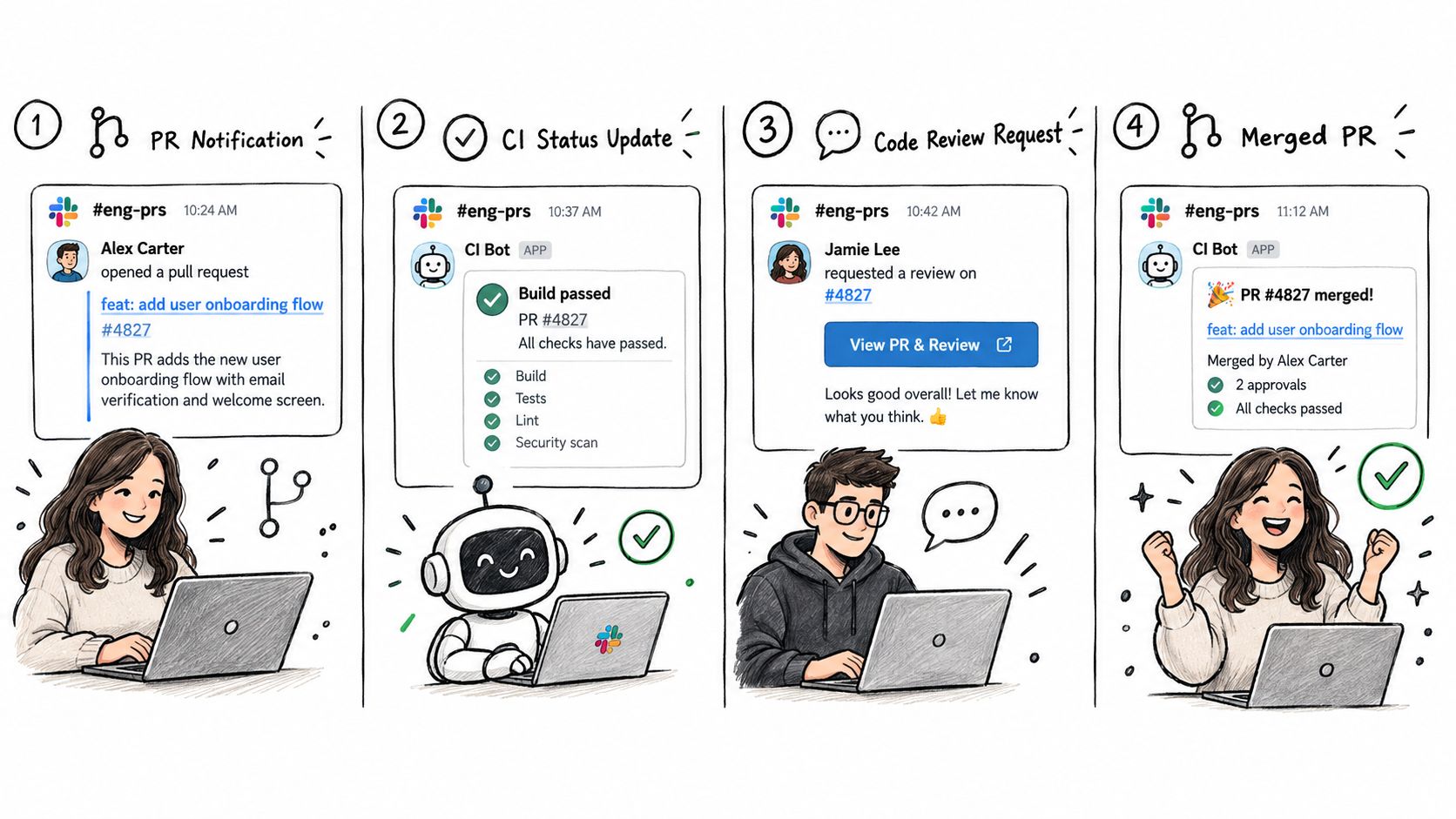
The current GitHub documentation keeps the setup path straightforward. You install the app in Slack, start a direct message with the GitHub app, authenticate, and then use slash commands like /github subscribe OWNER/REPO and /github open OWNER/REPO from the relevant channel or conversation (GitHub Slack usage guide).
<a id="start-with-the-dm-handshake"></a>
Start with the DM handshake
In Slack, find the GitHub app in the app directory and add it to the workspace. Slack will show the app's requested permissions during install. Don't just click through. Read the scope list before you approve it, especially in a workspace with private engineering channels.
After install, open a direct message with the GitHub app. That direct message is the center of the setup flow. GitHub's docs still treat it as the primary handshake point: start the DM, follow the prompt, connect your GitHub account, and complete the authorization flow.
If you're comparing setup options before you commit to the default app, it helps to look at a broader overview of GitHub integration patterns for Slack workflows.
<a id="authorize-the-github-side-correctly"></a>
Authorize the GitHub side correctly
The next decision is whether you're authorizing access for a personal GitHub account, a specific repository set, or an organization installation. In smaller teams, a user can often complete the flow directly. In larger organizations, an org admin may need to approve the app installation before channel subscriptions work.
That approval point matters because it changes who controls repo access and revocation. If the app is being used across multiple shared channels, involve the org admin early instead of waiting for the first “why isn't this posting?” ticket.
A simple first-run sequence looks like this:
Install the app in Slack: Add the GitHub app to the workspace.
Open a DM with GitHub: Follow the prompt to connect your account.
Complete GitHub auth: Approve the account or org-level installation.
Move to the target channel: Use slash commands where you want notifications to appear.
Subscribe the repo: Type
/github subscribe owner/repo.Verify the channel feed: Confirm Slack returns a success message and the channel begins receiving repo activity.
Later in the flow, it helps to see the command sequence in motion:
<iframe width="100%" style="aspect-ratio: 16 / 9;" src="https://www.youtube.com/embed/fdGYxryhCuE" frameborder="0" allow="autoplay; encrypted-media" allowfullscreen></iframe><a id="the-first-commands-to-type"></a>
The first commands to type
The shortest path to a working integration is usually:
/github signinif Slack prompts you to link your identity first/github subscribe owner/repoin the channel that should receive notifications/github subscribe listto check what that channel already follows/github open owner/repowhen you want to create an issue from Slack
GitHub's official docs describe the integration as a way to give teams “full visibility” into GitHub projects from Slack, with channel subscriptions, issue creation, and alert management handled without leaving chat (GitHub Slack integration overview).
If the first subscription succeeds but nobody knows why that channel exists, document the purpose immediately. The technical setup is only half the install.
<a id="choosing-the-right-permissions-before-you-roll-out"></a>
Choosing the Right Permissions Before You Roll Out
Most GitHub-to-Slack problems start before the first notification appears. They start when someone approves scopes too quickly.
GitHub documents that the Slack side of the integration can request access to private conversations, link previews, slash commands, workspace identity fields, and posting as the app, while the GitHub authorization side can include read access to code and write access to issues, deployments, pull requests, and workflows. That's enough surface area that a least-privilege review isn't optional (GitHub Slack permissions reference).
<a id="read-the-scope-list-like-an-operator"></a>
Read the scope list like an operator
A practical review starts with one question: what exact behavior do we need from this app in this workspace?
If all you want is repo notifications into a couple of channels, don't treat broad org access as the default. If you need issue creation, channel subscriptions, and richer interactive workflows, broader scopes may be justified. The point is to approve them deliberately, not accidentally.
Independent guidance for similar Slack-connected GitHub workflows also shows that channel access, messaging permissions, and user-info permissions often come as separate OAuth groups, with a multi-step redirect flow that can cause admins to over-grant or miss private-channel access requirements (OAuth permission guidance for Slack-connected GitHub workflows).
<a id="permission-scope-comparison-slack-vs-github-side"></a>
Permission Scope Comparison Slack vs GitHub Side
| Scope | What It Grants | Trade-off |
|---|---|---|
| Slack private conversation access | Lets the app interact with content and context in private Slack spaces where it's installed | Needed for private-channel workflows, but expands visibility concerns |
| Slack slash commands | Enables commands like /github subscribe, /github unsubscribe, and /github open inside channels | Essential for in-channel control, but creates a broader operational footprint |
| Slack workspace identity fields | Lets the app associate Slack users and workspace context during setup and interaction | Useful for matching actions to users, but more identity data is exposed |
| Slack posting as the app | Allows GitHub to post notifications and responses into channels | Core to the integration, but every subscribed event becomes channel noise if unmanaged |
| GitHub read access to code | Lets the app access repository content needed for previews and repo-aware workflows | Useful, but often broader than teams expect on first install |
| GitHub write access to issues and pull requests | Supports actions initiated from Slack, such as opening issues or interacting with PR workflows | Improves productivity, but increases blast radius if access is too broad |
| GitHub workflow and deployment write access | Enables deeper automation around deployments and workflow-related actions | Powerful for platform teams, overkill for simple notification use cases |
<a id="what-usually-works"></a>
What usually works
In practice, the cleanest rollout tends to look like this:
Start narrow: install into the workspace, but authorize only the repos the team needs.
Prefer org-managed installs for shared use: admins can see and revoke access more cleanly than with ad hoc personal setups.
Audit after setup: review both Slack app scopes and GitHub app access once the first channel is live.
Avoid repo-wide assumptions: a workspace-wide install doesn't mean every engineering channel needs every repository.
Broad scopes aren't always wrong. Unreviewed broad scopes are.
<a id="practical-workflows-for-prs-reviews-and-automated-posts"></a>
Practical Workflows for PRs, Reviews, and Automated Posts
Once the app is installed, the useful part starts. The GitHub app for Slack is strongest when you use it for repository-level collaboration inside specific channels, not as a universal stream for every engineering event. GitHub's docs make that repository focus explicit through commands like /github subscribe, /github unsubscribe, /github subscribe list, and /github open (GitHub repository collaboration in Slack).
<a id="put-pr-traffic-in-its-own-channel"></a>
Put PR traffic in its own channel
For active repositories, create a dedicated channel such as #eng-prs or #payments-prs and subscribe that channel to the repo. The default command pattern is simple:
/github subscribe owner/repo/github subscribe listto verify the channel's current subscriptions/github unsubscribe owner/repowhen a project moves or the channel no longer owns it
That basic shape is enough for many teams. If you need a refresher on the review object itself, this short guide on what a pull request is in GitHub helps newer teammates align on the workflow before you wire notifications into Slack.

The important operational move is channel separation. Don't combine review traffic with deploy announcements or issue triage unless the repo is small and the team is tiny.
<a id="use-slack-for-actions-not-just-awareness"></a>
Use Slack for actions, not just awareness
The official app is more than an inbox. You can create issues from Slack with /github open owner/repo, which is useful when bug reports show up in a thread and someone needs to formalize them without breaking conversation context.
Good recurring patterns look like this:
PR channel subscriptions: one channel per team or repo family, subscribed only to the repositories that team reviews.
Issue capture from chat: use
/github open owner/repoin bug-report threads so the issue gets created while context is fresh.Subscription cleanup: run
/github subscribe listin shared engineering channels during repo ownership changes.Alert management in place: use unsubscribe commands aggressively when a channel starts carrying work that nobody acts on.
<a id="where-automated-posts-help"></a>
Where automated posts help
A lot of teams try to make one channel do everything. Better results usually come from splitting workflows by operational purpose:
| Workflow | Channel pattern | Practical note |
|---|---|---|
| PR opened and review activity | #team-prs | Keeps review work visible to the people who can act on it |
| Deployment announcements | #team-deploys or #release-status | Better separated from review chatter |
| Issue intake from Slack | team channel or support triage channel | Best when engineers can convert chat directly into a GitHub issue |
| Repo subscription audit | existing subscribed channels | Use /github subscribe list periodically to see what the channel is really following |
Teams usually overestimate how much should be public in one shared engineering channel. Review work improves when it has a narrower audience.
GitHub also noted in its original 2018 launch materials that the Slack integration was built as an open-source bridge using public APIs, which fits the broader pattern of bot-driven workflow automation rather than one-off custom webhooks (historical Slack listing for GitHub).
<a id="cutting-down-notification-noise-without-losing-important-alerts"></a>
Cutting Down Notification Noise Without Losing Important Alerts
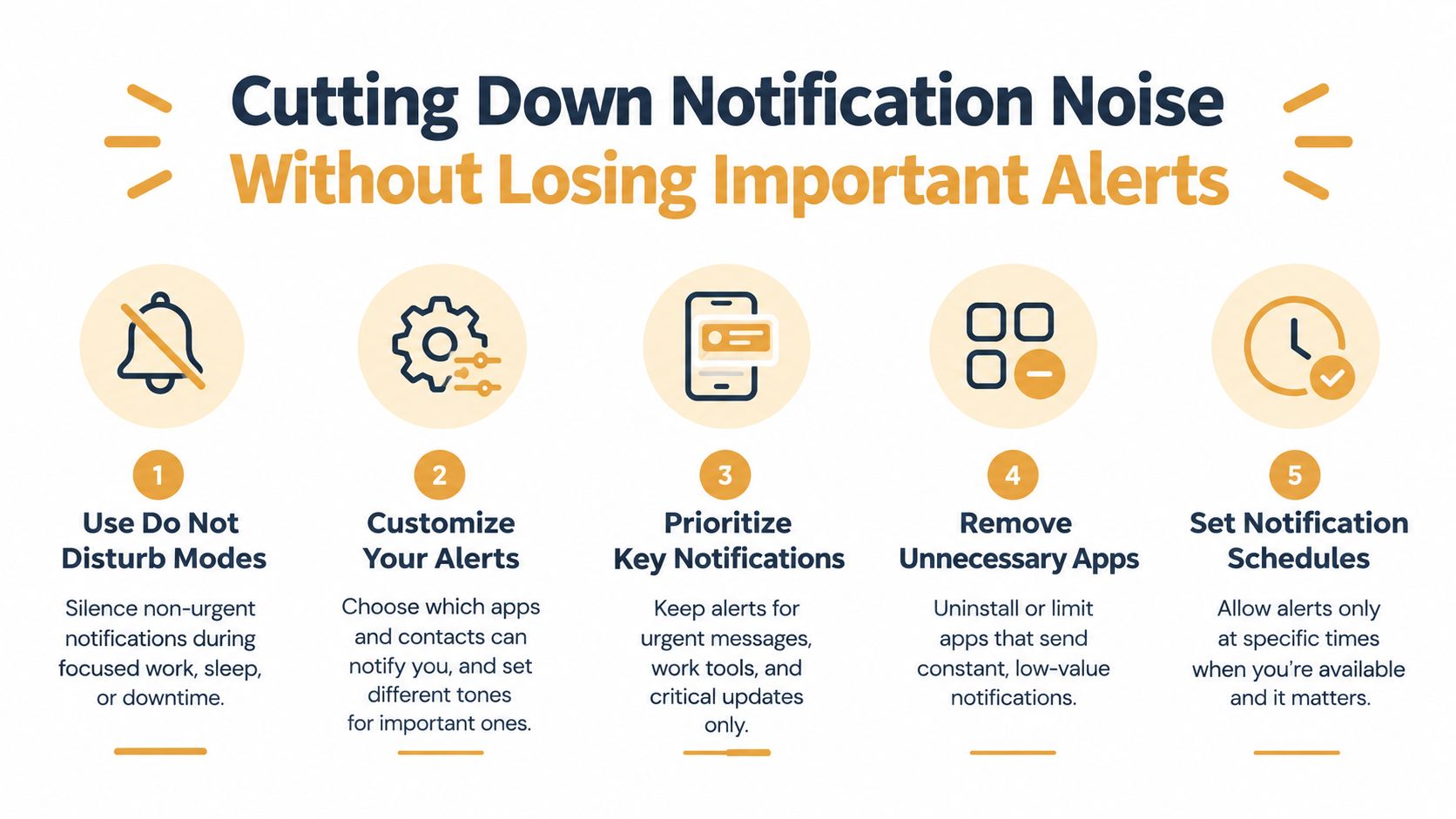
Notification overload is where most GitHub-Slack setups decay. Independent commentary on GitHub and Slack workflows points to the broader cost: developers may switch contexts 78 times per day, spend 27 minutes a day checking review notifications, and miss important GitHub notifications 3 to 4 times a week, which is a strong reminder that the integration problem is often filtering, not connectivity (analysis of GitHub-Slack notification overload).
<a id="split-channels-by-action-type"></a>
Split channels by action type
A single #github mega-channel almost always fails. Teams do better with separate channels for distinct work:
High-velocity review channels: active repos with lots of PR movement
Deploy channels: merges, releases, and production-facing status
Lower-priority digest channels: slower repos that still need visibility
Team-specific streams: a platform team doesn't need every frontend issue update
This structure lowers the chance that a critical review request gets buried under events nobody intends to act on.
<a id="subscribe-less-than-you-think"></a>
Subscribe less than you think
Another common mistake is subscribing to everything because it feels thorough. It isn't. It's just loud.
Community reports on GitHub-to-Slack setups describe notifications as sometimes significantly delayed because of asynchronous processing, queueing, and Slack rate limits. The practical mitigation is narrower event selection, focused channels, and subscribing only to repo events that matter to the people in that channel (community note on Slack notification delay and filtering).
What usually works:
Keep review-related events in review channels
Move deploy and release posts elsewhere
Unsubscribe channels that no longer own the repo
Let mentions stay loud, keep background events quiet with Slack channel settings
If nobody in the channel can take action on an event, that event probably doesn't belong there.
<a id="know-when-to-trim"></a>
Know when to trim
The integration is overloaded when engineers start asking whether the bot can be muted, when review requests get repeated manually, or when channel history shows far more bot traffic than human replies. At that point, don't tune around the edges. Unsubscribe aggressively and rebuild the feed around actions people take.
<a id="beyond-the-official-app-where-connectors-and-agents-add-value"></a>
Beyond the Official App, Where Connectors and Agents Add Value
The official GitHub app is the right starting point for a team. It's maintained, familiar, and built directly around Slack channel subscriptions and GitHub actions in chat. It also keeps evolving. GitHub's docs note a public preview Copilot experience in Slack that requires admins to enable the Copilot cloud agent policy and users to install or upgrade the GitHub app, which shows the integration expanding beyond notifications into more agent-like workflows (GitHub Slack integration and Copilot preview).
That still doesn't mean the official app fits every workflow.
<a id="official-github-app-vs-third-party-connectors-vs-agent-platforms"></a>
Official GitHub App vs Third-Party Connectors vs Agent Platforms
| Option | Best For | Strength | Trade-off |
|---|---|---|---|
| Official GitHub app | Standard repo notifications and basic in-Slack GitHub actions | Native install flow, direct slash commands, predictable repository integration | Limited when teams want cross-tool orchestration or more custom routing |
| Third-party connectors | Workspaces with multiple repos, enterprise constraints, or more tailored routing needs | Can bridge more complex notification and workflow patterns | Adds another vendor, another permission surface, and another admin layer |
| Agent platforms | Teams that want actions triggered from Slack across GitHub and other tools | Can summarize threads, create follow-on work, and coordinate across systems | More setup discipline required than a simple notification app |
Some teams need the official app plus a second layer. For example, an agent platform can take a bug report discussed in Slack, connect it to GitHub context, and trigger follow-up work across tools. One example is Sokko's Slack integration, which connects Slack with agents that can also use GitHub and other tools for workflow automation. That's a complement to the official app, not a replacement for the core repo subscription model.
The practical test is simple. If your need is “show repo activity in the right channel,” stay close to the official app. If your need is “coordinate work across Slack, GitHub, and additional systems,” connectors or agents start to earn their keep.
<a id="your-quick-reference-checklist-for-a-clean-integration"></a>
Your Quick Reference Checklist for a Clean Integration
A clean GitHub to Slack setup is easy to spot. The right people see PRs, review requests, and repo events in the right channel, and nobody reaches for mute on day two.
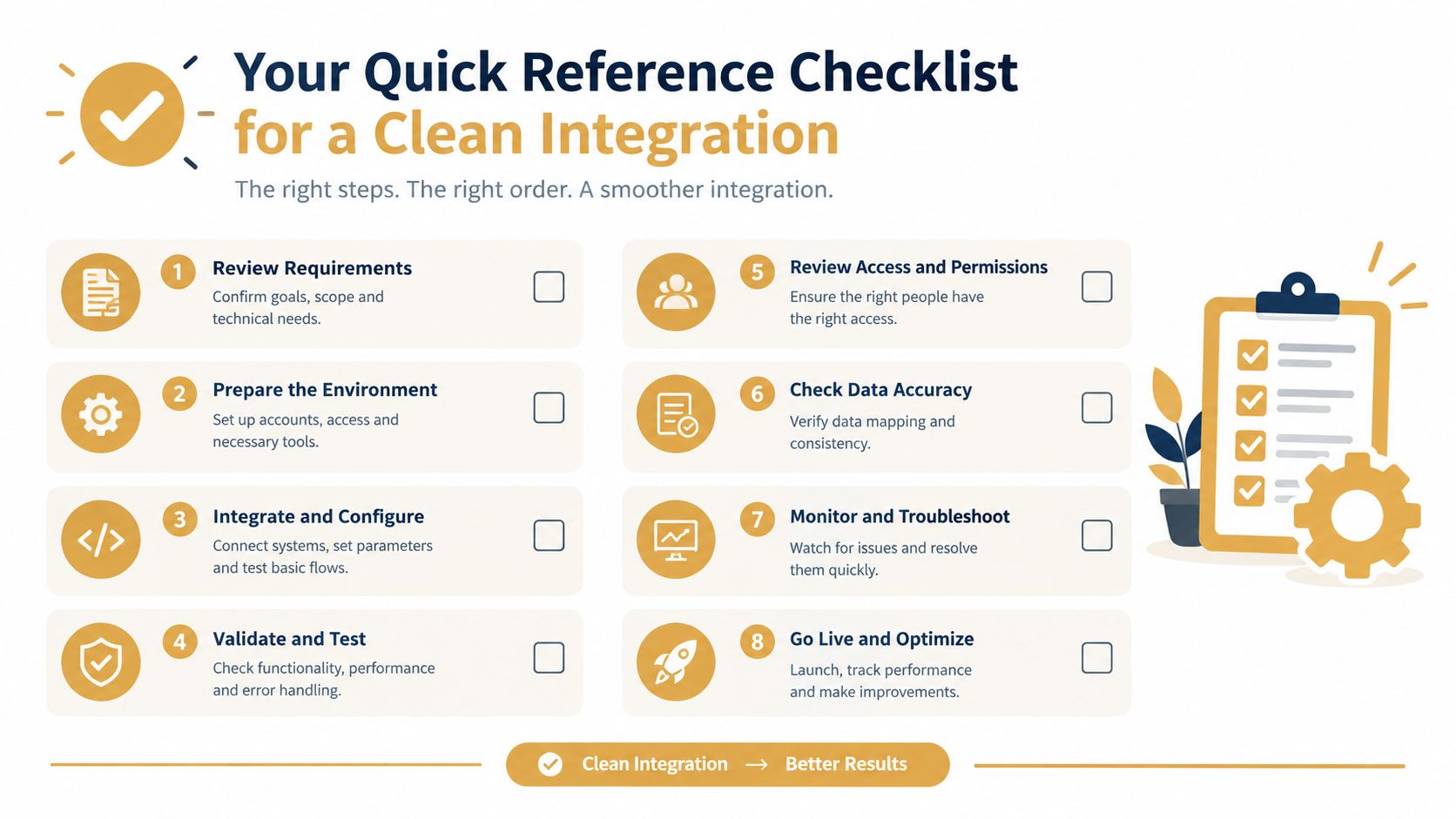
Use this checklist during setup and again after any repo transfer or org restructure.
Install the official GitHub app in the Slack workspace where engineering work already happens.
Complete the direct-message authentication flow with the GitHub app before testing channel subscriptions.
Grant repo access deliberately instead of approving broad organization coverage by default.
Run
/github subscribe owner/repoonly in channels with a clear job, such as PR review, deploy visibility, or incident response.Check
/github subscribe listafter setup so the channel is subscribed to what the team owns.Split PRs, deploys, and general repo activity into separate channels when one feed starts mixing too many event types.
Trim noisy subscriptions early if a channel starts collecting low-value events.
Assign a channel owner to clean up subscriptions when repos move, ownership changes, or team boundaries shift.
If your team needs standard repository visibility, this checklist is enough. If you also need actions to move across Slack, GitHub, and other tools, Sokko adds an agent layer on top of that workflow. You can see how that fits your setup at Sokko.