
OpenAI API keys are service-account credentials created at platform.openai.com/api-keys, and usage tracking is enabled by default for keys created after December 20, 2023. For an AI agent, the safe default is to keep that bearer credential on a backend or inside a secret manager, never in browser code, repository files, or agent memory.
A familiar failure mode starts innocently. A developer asks an agent to add an OpenAI integration, the agent writes a configuration file, and a key ends up in a pull request, preview build, or generated log. The repository may be private, but every machine, CI runner, browser session, and third-party integration that can read the project becomes part of the exposure surface.
The phrase openapi api key creates a second source of confusion. In an OpenAPI document, an API key is a reusable declaration describing where a client should send a credential. An OpenAI key is an actual platform credential that authorizes requests. Treating those as the same thing leads teams to put secrets in the wrong layer.
Table of Contents
Why API Keys Matter for AI Agents
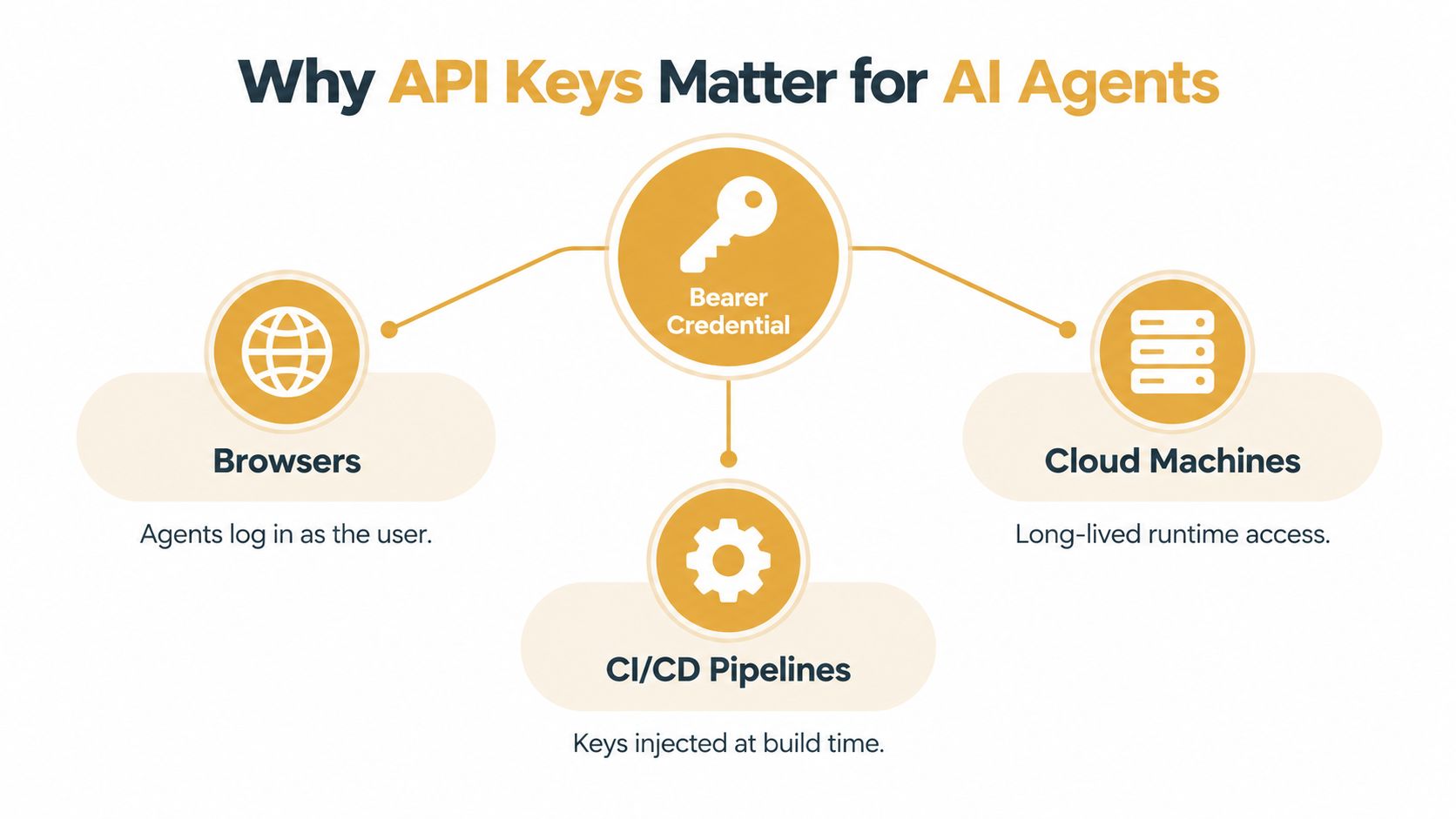
An API key is a bearer credential. Whoever possesses it can generally present it to the service, so the security question isn't only where the key was created. It's where the key travels after creation. An agent may receive it through environment injection, use it from a cloud machine, pass through a deployment workflow, or indirectly expose it while generating code and diagnostics.
Consider a branch deployment that runs an agent inside a devbox. The agent reads a Markdown configuration file, writes a client integration, and publishes build output to a preview environment. If the key appears in the source, command history, error output, or generated memory, rotating the credential later won't remove copies already collected by logs, caches, commits, or connected tools.
OpenAPI schemes are not platform credentials
The OpenAPI security documentation models an apiKey as a reusable Security Scheme Object. A specification can describe a key in a header, cookie, or query parameter, then attach that scheme globally or to a particular operation. An empty security requirement can even make an operation optional, while an operation-level requirement can override a top-level rule.
That describes an API contract. It doesn't provide a secret, define the provider's billing controls, or make a browser-safe authentication system. An OpenAPI file should say that a credential is required and how a runtime should supply it. It shouldn't contain the credential itself.
Why agent workflows increase the blast radius
Traditional application code usually has a known server boundary. Agentic systems blur it. A browser can trigger a task, CI/CD can build a branch, and a cloud machine can keep an agent running after the original developer has left the session.
Practical rule: Treat every agent runtime as an untrusted execution surface until you can prove where secrets enter, where they are consumed, and what gets logged.
OpenAI recommends keeping production traffic behind a backend, loading keys from environment variables or a key-management service, and using project-based keys for stronger organization and security controls. Its API usage documentation also describes user-level and service-account-level keys, along with usage tracking and revocation behavior. The operational lesson is simple: the key should be available to the process that calls the model, not to every person or tool that can inspect the process's files.
Creating Your First OpenAI API Key
Create the credential in the OpenAI platform dashboard, then decide whether it belongs to a person or an automated workload. OpenAI supports keys at the user level and the service-account level. A developer key can be useful for local experimentation, but a production agent should normally use a service-account identity so the workload isn't tied to an employee's personal access.
Start by opening the API keys area in the platform dashboard and choosing the appropriate project or organization context. Create a descriptive key name that identifies its purpose and environment, such as an agent role and deployment stage. Don't put the secret itself in the name, a repository file, or a ticket.

Choose the identity before the key
A user-level key inherits the practical lifecycle of the person who created it. That creates avoidable coupling. If the developer changes teams, loses access, or needs to rotate a personal credential, the agent's runtime is affected too.
A service-account key gives the workload a separate ownership boundary. You can replace it without changing a human's credentials, identify its traffic more clearly, and keep production automation distinct from local development. This isn't the same as granular OAuth authorization, so the surrounding controls still matter, but it gives operations a cleaner identity to manage.
Establish tracking and project boundaries
OpenAI says all API keys generated after December 20, 2023 have usage tracking enabled by default, while older keys require manual tracking enablement, as documented in its usage guidance. That visibility matters because an agent can generate requests without a person actively watching each call.
Use separate project contexts and credentials for development, staging, and production where your organization supports that structure. The separation makes an unexpected usage pattern easier to attribute and limits the number of systems affected by one leaked key.
Before copying the value anywhere, store it in an approved secret manager or protected environment configuration. The creation screen is the last point at which you should think of the key as a piece of setup data. After that, treat it as a production secret with an owner, an environment, a rotation path, and a revocation procedure.
Configuring Keys for Agent Platforms
The safest configuration pattern is late binding. The agent code knows the name of the credential it needs, while the deployment system supplies the value only when the process starts. This keeps the same code usable across local development, CI/CD, staging, and production without placing secrets in branches or generated files.
Environment variables are a practical starting point. A deployment can expose the key to the model client process while keeping it out of the repository. That approach still requires discipline: don't print the environment, include it in diagnostic bundles, or let an agent copy it into MEMORY.md, USER.md, or another persistent Markdown file.
Prefer a secret manager for persistent agents
For long-lived workloads, retrieve the value from a dedicated secret manager such as AWS Secrets Manager or HashiCorp Vault. The runtime should receive only the secret it needs, and the deployment identity should be allowed to read only the relevant environment's entry.
A useful configuration chain looks like this:
Name the dependency: Configure the agent to expect an environment variable or secret reference, not a literal credential.
Bind at deployment: Have the orchestrator inject the value when the process launches or restarts.
Keep logs clean: Scrub request headers, exception payloads, shell output, and generated diagnostics before they leave the machine.
Reload deliberately: Make the application read the current secret on startup or through a controlled refresh path, so a rotation doesn't require editing source code.
Platforms that support bring-your-own credentials can fit this model when the platform stores the value outside the repository and passes it to the isolated runtime. For example, Sokko's bring-your-own-keys guidance describes a deployment pattern for supplying model credentials while keeping agent and repository execution separated.
Account for region and connected tools
A key's security isn't the only deployment concern. If your organization requires EU data residency, configure the agent, model endpoint, storage, and connected services so requests do not cross the intended boundary. A region setting on the hosting platform doesn't automatically validate every external integration an agent can call.
Also map the path from browser request to agent process. A browser should call your backend or control plane, not receive the model credential. CI/CD should obtain secrets through its protected secret mechanism, not from a checked-in OpenAPI document. The OpenAPI specification can document the required header and operation security without carrying the value that satisfies it.
Securing Keys in Agentic Workflows
The most dangerous design is client-side use. OpenAI's API key safety guidance warns against exposing keys in client-side applications and recommends practices such as unique keys per team member, IP restrictions, and monitoring. Google Cloud makes the underlying risk explicit in its API key guidance: API keys are generally not considered secure because they can be client-accessible and, once stolen, don't expire unless revoked or regenerated.
That matters more for agents than for a simple server process because agents inspect and produce content. They may read tickets, open pull requests, run shell commands, stream logs, and write persistent memory. A private GitHub repository reduces public exposure, but it doesn't stop an authorized contributor, build job, integration, or compromised agent from reading a secret that was stored there.
Compare the storage choices
| Storage pattern | Operational value | Main failure mode |
|---|---|---|
| Embedded in code or an OpenAPI file | Easy to discover during development | The secret spreads through commits, forks, previews, and generated output |
| Environment variable | Keeps the value out of source and supports environment separation | Logs, debugging tools, process inspection, or careless scripts can still expose it |
| Secret manager reference | Centralizes access, auditing, and replacement | The runtime identity and retrieval path become critical dependencies |
| Browser-side credential | Convenient for direct calls | Anyone who can inspect the client can potentially recover and reuse the key |
An API key also differs from OAuth in an important operational way. OAuth usually introduces an authorization flow and token lifecycle. An API key is simpler, but that simplicity often means fewer built-in limits on what the bearer can do. Don't assume that placing a key in an OpenAPI security scheme gives it scopes or expiration.
Reduce the damage before an incident
Use a separate key for each team member when human access is required, and separate service identities for automated agents. Apply IP restrictions where the provider and deployment topology support them. Monitoring should look for activity that doesn't match the expected agent, environment, or network path, then route an alert to someone who can revoke the credential.
For CI/CD, prevent secrets from entering command output and redact authorization headers at the logging source. For agent memory, keep credentials out of Markdown and databases entirely. The agent can remember a secret's name or reference, but it shouldn't remember the secret's value.
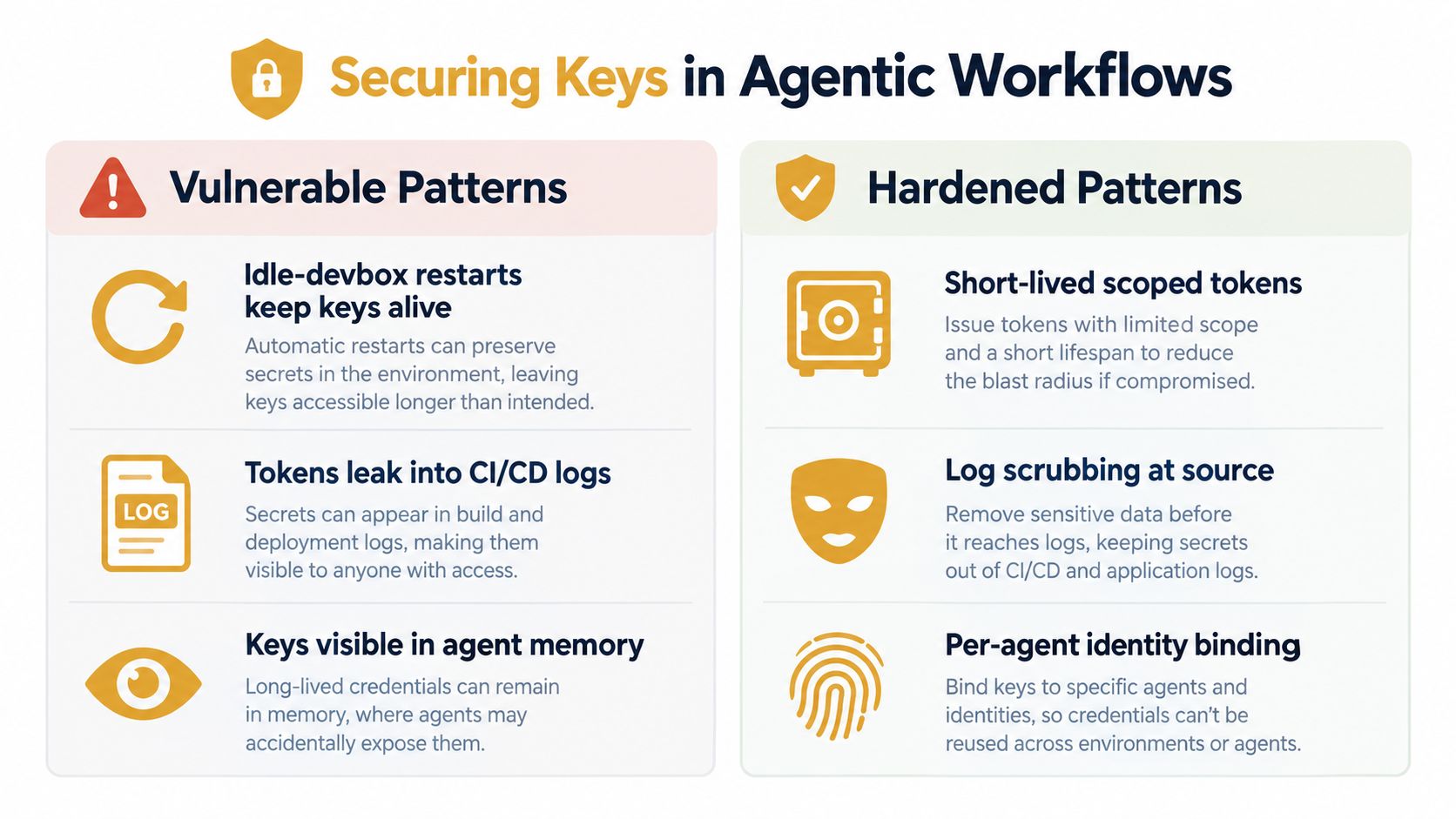
A short visual explanation can help teams identify these leaks during design reviews:
For a practical review of credentials around agent deployments, use Sokko's credential security guide. The important question isn't merely “where is the key stored?” It is “which systems can retrieve it, which systems can copy it, and how quickly can the team disable it?”
Rotating and Revoking Keys
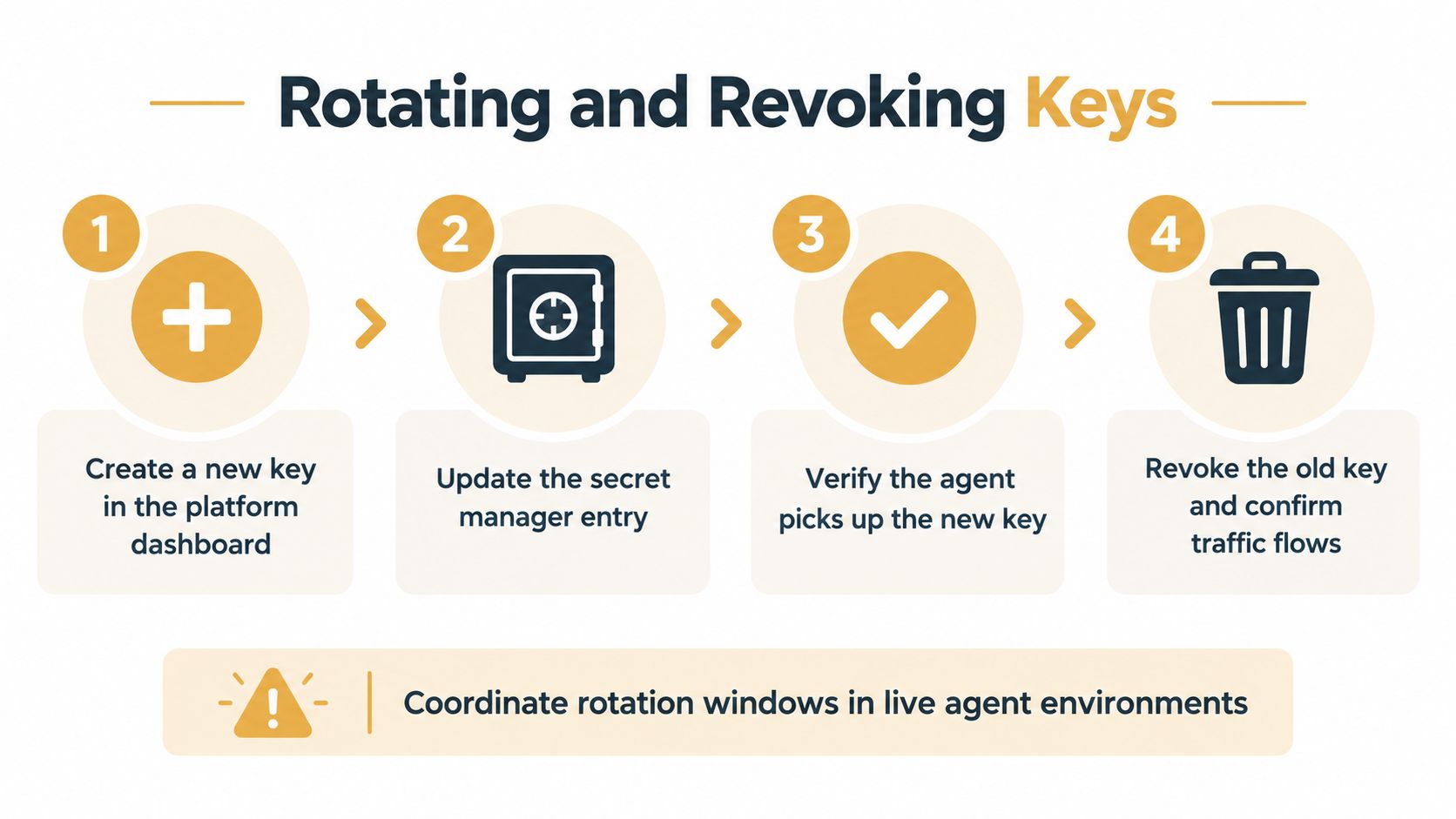
A production agent should never depend on an emergency edit in a shell. Rotation is a controlled handoff: keep the old credential available while the replacement is distributed and tested, then revoke the old key after traffic confirms the switch.
Use this sequence:
Create a replacement key with the correct project or service-account context.
Update the secret manager or protected deployment variable. Do not commit the value.
Restart or refresh the agent runtime through the normal release path. This matters when browser workers, CI runners, and local processes use separate configuration.
Send a controlled request and inspect service-side usage to verify that the replacement is active.
Revoke the old key only after the new path succeeds. Check that requests from the old identity have stopped.
OpenAI's API usage documentation indicates that key revocation takes effect within a few seconds, while other authentication changes may take up to 15 minutes to propagate. During an incident, separate provider-side rejection from stale configuration. A cached process, inactive CI runner, or browser-side workflow can continue using the old value until it reloads its environment.
For a fuller rotation playbook, see Sokko's API key rotation guide.
Troubleshoot the handoff
If an agent reports an invalid key after rotation, inspect the secret manager entry first. Then confirm that the intended runtime restarted, examine effective configuration without printing the credential, and compare deployment settings with the local shell. Check that the process is not reading a checked-in fallback value.
After suspected exposure, revoke the key immediately. Investigate source history, pull-request comments, CI logs, preview output, terminal recordings, agent memory, and third-party integrations. Set routine rotation according to workload risk, with documented schedules for highly connected agents. Any suspected disclosure requires immediate replacement and review.
Best Practices Summary
A thorough OpenAPI API key implementation separates documentation, identity, storage, and runtime behavior. The OpenAPI document describes the required authentication scheme. The platform dashboard creates the credential. A secret manager controls delivery. The agent process consumes the value without exposing it to browsers, source files, logs, or persistent memory.
Use this checklist during an architecture review:
Assign the right identity: Use service-account credentials for production agents and keep personal development keys separate.
Separate environments: Give development, staging, and production distinct configuration boundaries so one disclosure doesn't expose every runtime.
Store references, not secrets: Keep keys in environment injection or a secret manager, never in OpenAPI specs, source code, Markdown memory, tickets, or screenshots.
Protect browser workflows: Send browser requests to a backend or control plane that performs the authenticated model call.
Constrain the network: Apply IP restrictions where practical, especially for stable CI/CD and cloud execution paths.
Monitor usage: Track requests by project, service identity, environment, and expected network source. Investigate behavior that doesn't fit the agent's job.
Scrub output: Remove authorization headers and secret values before logs, traces, previews, or agent-generated reports are stored.
Test replacement: Make sure the runtime can pick up a changed secret without requiring a source-code change or manual machine access.
Revoke decisively: Maintain a runbook for suspected exposure and verify that old traffic stops after revocation.
Validate regional routing: Align hosting, storage, inference, and connected services with the residency requirements of the workload.
The key mental model is blast-radius control. You can't assume an automated workflow will never leak a credential. You can decide that one leaked key belongs to one environment, one service identity, and one narrowly defined operational path, then make replacement and revocation routine.
Teams deploying agents should review these controls whenever they add a browser integration, a CI runner, a new devbox, or a third-party connector. Generic advice such as “use environment variables” is a starting point, not an operating model for systems that generate code and move across multiple machines.
Sokko provides isolated devboxes and managed hosting for agent runtimes, with bring-your-own model keys and deployment workflows that keep repository work separate from the running service. Visit Sokko to evaluate a setup where agents can build and test branches while your team retains control of credential injection, runtime inspection, and environment boundaries.