
At 2 a.m., a deployment starts failing. You ask an AI system to inspect the logs, identify the likely cause, test a fix, and roll back the release if the error rate keeps climbing. A chatbot can explain what the log messages mean. An AI agent can go further, provided you've given it the right tools, permissions, and limits: it can investigate, make a decision, take an action, observe the result, and continue until the incident is resolved or it reaches a boundary.
That difference captures the practical AI agent meaning better than a glossary definition. The important question isn't only whether a system can produce a useful answer. It's whether the system can turn a goal into a controlled sequence of actions in the actual world.
Table of Contents
What an AI Agent Actually Means
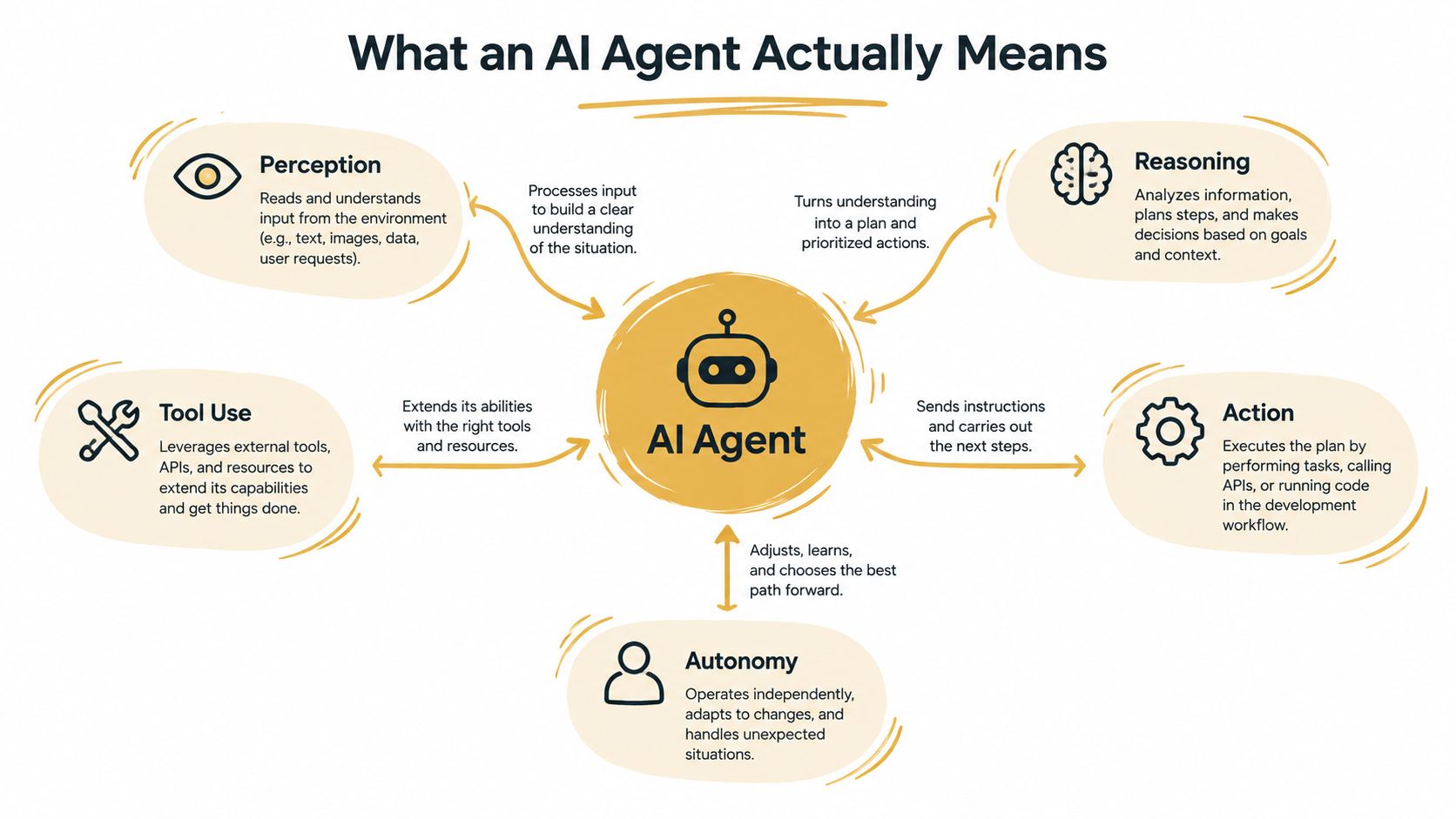
An AI agent starts with an outcome rather than a fully specified script. “Find the cause of this failed deployment and restore the service” leaves many decisions open. The agent might inspect recent commits, query logs, compare configuration, run a health check, open a branch, or trigger a rollback. It chooses the next move from the tools available to it.
The loop has three essential parts:
A reasoning model decides what to do next based on the goal and current context.
A tool layer lets the system interact with software, data, APIs, terminals, browsers, or other services.
A memory and state layer carries observations, decisions, and intermediate results from one step to the next.
A single-prompt chatbot usually receives input, generates text, and stops. It may offer excellent rollback instructions, but it doesn't automatically inspect your production logs or verify whether the rollback worked. An agent keeps the interaction open as a control loop.
The closed loop matters
A useful agent doesn't merely reason in isolation. It perceives context, selects an action, receives a result, and updates its next decision. If a test fails, it shouldn't blindly repeat the same command. It should interpret the failure, revise the plan, and either try a safer alternative or ask for approval.
Memory can be as simple as the current task state or as durable as an organizational knowledge base. That distinction matters when an agent needs to remember decisions, repository conventions, previous incidents, or user preferences. A knowledge base for AI workflows can provide the reference material, while the agent supplies the decision and execution loop.
Working definition: An AI agent is a goal-directed system that uses reasoning, tools, memory, and feedback to perform a sequence of actions with some degree of autonomy.
The phrase “some degree” is important. Autonomy isn't a switch that is either on or off. A system might freely inspect logs but require approval before changing production, or it might execute a complete staging workflow without intervention. The agent's real capabilities depend on its tool permissions, confirmation rules, memory, and operating environment.
How the Definition Evolved Over Time
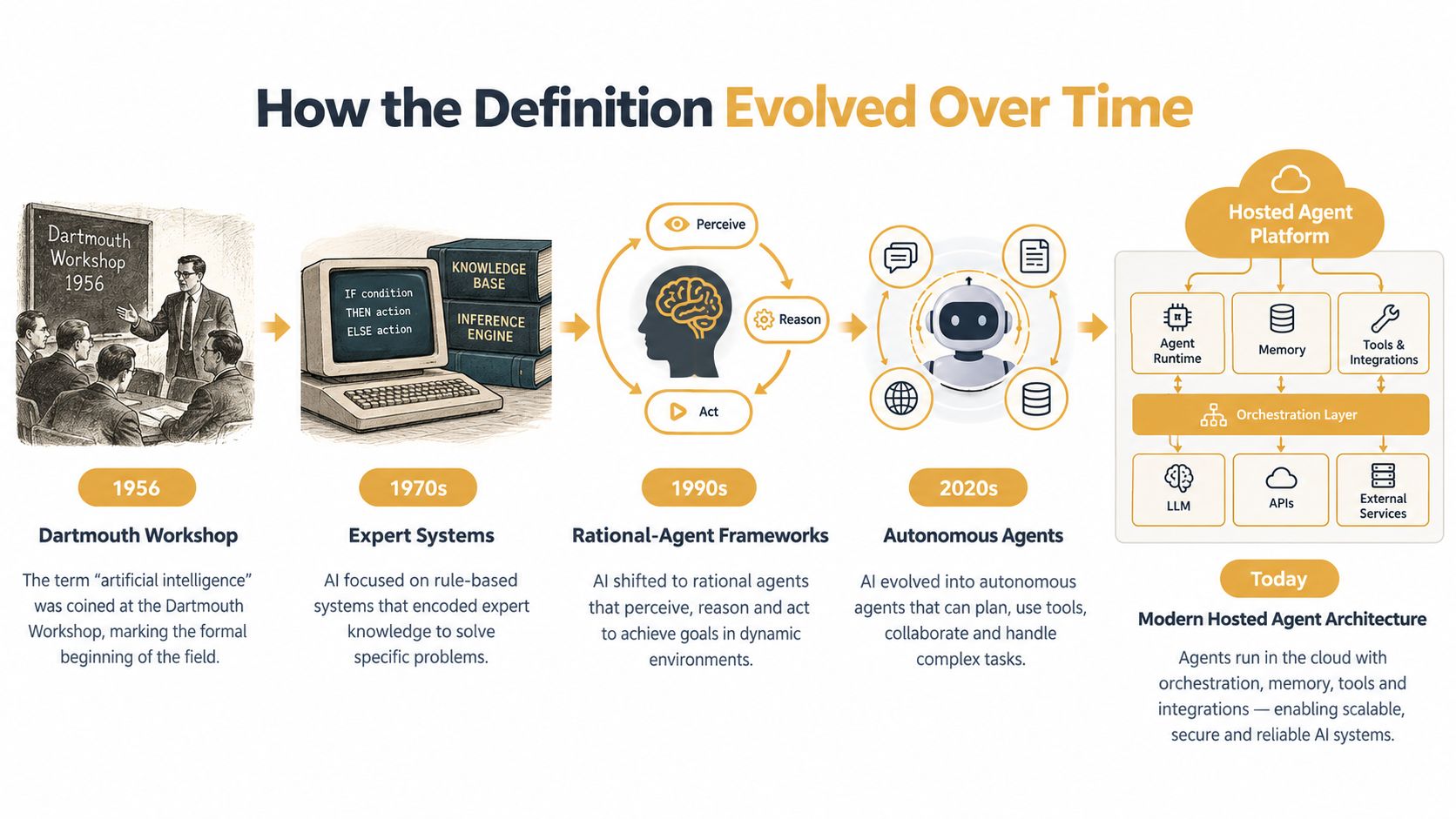
A developer in 1956 could ask an AI program to solve a structured problem, but the program generally followed representations and rules that people had encoded beforehand. The history of agentic AI traces the modern idea of an agent to this early AI lineage, although those systems looked very different from software that can use tools and act on live systems.
The distinction becomes clearer through a simple comparison. An early symbolic program worked like a rulebook: it examined a defined situation and selected an applicable rule. Its behavior depended on the knowledge and logic built into it. The system was answering, “What rule applies here?” A modern agent is closer to a worker given an outcome, who can decide which steps, resources, and checks will help achieve it.
The meaning shifted during the 1990s, as the rational-agent framework became standard in AI textbooks. A widely cited definition formalized in 1995 describes an intelligent agent as “a computer system situated in some environment that is capable of flexible, autonomous action to meet its design objectives.” The formulation made the environment central. An agent operates somewhere, receives information from that setting, and takes actions directed toward objectives.
From task allocation to learned behavior
The Contract Net Protocol, published in IEEE Transactions on Computers, addressed task allocation among autonomous nodes. Systems could announce tasks, evaluate bids, and assign work. That pattern still informs multi-agent systems, where specialized agents coordinate responsibilities instead of one process handling every task.
Stuart Russell and Peter Norvig's Artificial Intelligence: A Modern Approach further established the rational-agent abstraction as a core way to study AI. Research then moved from symbolic decisions toward learned behavior in simulated environments, followed by models able to plan across multiple steps.
The current wave adds an execution layer. Large language models make goals easier to express in natural language, yet an agent becomes operationally useful when it can call tools, retain state, inspect outcomes, and act on live systems. A model that writes a deployment plan remains useful. A system that runs checks, edits a branch, starts a preview environment, and reports what happened fits the contemporary meaning more closely. The difference lies in the closed loop between reasoning and execution, including the practical path from generated code to code running in a controlled environment.
Core Capabilities That Define a Real Agent
A language model becomes an agent through its operating loop, not through a label in a product brochure. A recent survey of autonomous and agentic AI finds that definitions commonly converge on goal-directed behavior, multi-step autonomy, tool use, persistent or semi-persistent memory, and adaptation from feedback. Each property answers a different operational question.
Consider an agent investigating a staging outage.
Five capabilities in one workflow
Goal-directed behavior means you give the agent an outcome, not every command. “Reduce the latency problem and restore the failed endpoint” leaves room for diagnosis and planning. The agent can decide whether it needs logs, traces, recent code changes, or a database check.
Multi-step autonomy lets the agent break the objective into a sequence. It may inspect the deployment, compare the last working version, reproduce the error, propose a patch, and run verification. A single response can't perform that chain unless a person manually presses the next button each time.
Tool use connects reasoning to reality. The agent might call a deployment API, run curl, inspect a repository, query a monitoring service, or create a ticket. The tool call returns a structured result, and the agent uses that result to decide what happens next.
Memory preserves relevant state. The agent needs to know which service it inspected, what the previous command returned, which hypothesis it rejected, and what the team has already tried. Persistent memory can also carry repository conventions or incident history between separate runs. A practical explanation of this layer appears in persistent memory for AI agents.
Feedback adaptation prevents the workflow from becoming a fixed script. If the proposed patch fails its tests, the agent should revise its approach. If the health check improves but doesn't recover, it might inspect a dependent service instead of declaring success.
| Capability | What It Means | Example in Practice |
|---|---|---|
| Goal-directed behavior | Works toward an outcome rather than following only fixed commands | Investigates why a staging endpoint is failing |
| Multi-step autonomy | Plans and executes several connected actions | Checks logs, compares commits, patches code, and tests the result |
| Tool use | Calls external functions, APIs, or software systems | Runs health checks and opens a pull request |
| Memory | Carries useful state across steps or runs | Remembers the failed hypothesis and previous test output |
| Feedback adaptation | Changes course when evidence contradicts the plan | Abandons a patch after a failing test and investigates another cause |
The technical distinction is a closed-loop control flow. The agent calls a tool, receives its output programmatically, and lets that output influence later reasoning. Without that return path, the system may still generate valuable text, but it isn't executing an adaptive workflow.
Single Agent vs Multi Agent Systems
A single agent is often the sensible starting point. One system owns the task, the state is easier to inspect, and the team has one place to look when something goes wrong. A deploy bot, SQL fixer, or staging triage assistant usually doesn't need a committee of agents to make progress.
That simplicity has limits. A single agent can become overloaded when a request branches across repositories, services, or specialized domains. It may spend too much time switching between planning, implementation, review, and release coordination.
| Dimension | Single Agent | Multi Agent |
|---|---|---|
| State management | One primary context and fewer handoffs | Shared state must be coordinated across participants |
| Debugging | Easier to trace from request to result | More difficult because several decisions may interact |
| Specialization | One agent handles the whole workflow | Planner, coder, reviewer, and operator can each have focused roles |
| Parallel work | Limited by one execution path | Independent tasks can run at the same time |
| Accountability | One clear owner | Responsibility is distributed across the fleet |
| Best fit | Narrow, low-branching workflows | Work that fans out across services, repositories, or disciplines |
A multi-agent setup makes sense when the workflow naturally resembles a team. One agent can create a plan, another can modify code, a third can review the diff, and a fourth can run release checks. Shared memory and a common scratch layer reduce the manual copying that would otherwise connect those roles.
The trade-off is coordination. Every extra agent introduces more messages, state transitions, permissions, and possible failure points. A fleet can parallelize work, but it can also make a simple task harder to understand.
Decision rule: Start with one agent, then split the workflow when the coordination cost of a single agent exceeds the value of keeping one owner.
The choice shouldn't be based on architectural fashion. Measure where the work branches, which steps require distinct permissions, and whether parallel execution changes the outcome. If the task remains narrow and sequential, a single agent will usually be easier to operate. If several independent workstreams need to progress together, specialization can justify the added system complexity.
Always On Hosted Agents and the Devbox Loop
A hosted agent becomes much more useful when it can run the code it creates. Without that environment, the workflow often stops at a pull request or a code snippet. Someone still has to clone the branch, install dependencies, configure services, start the application, and check whether the proposed change works.
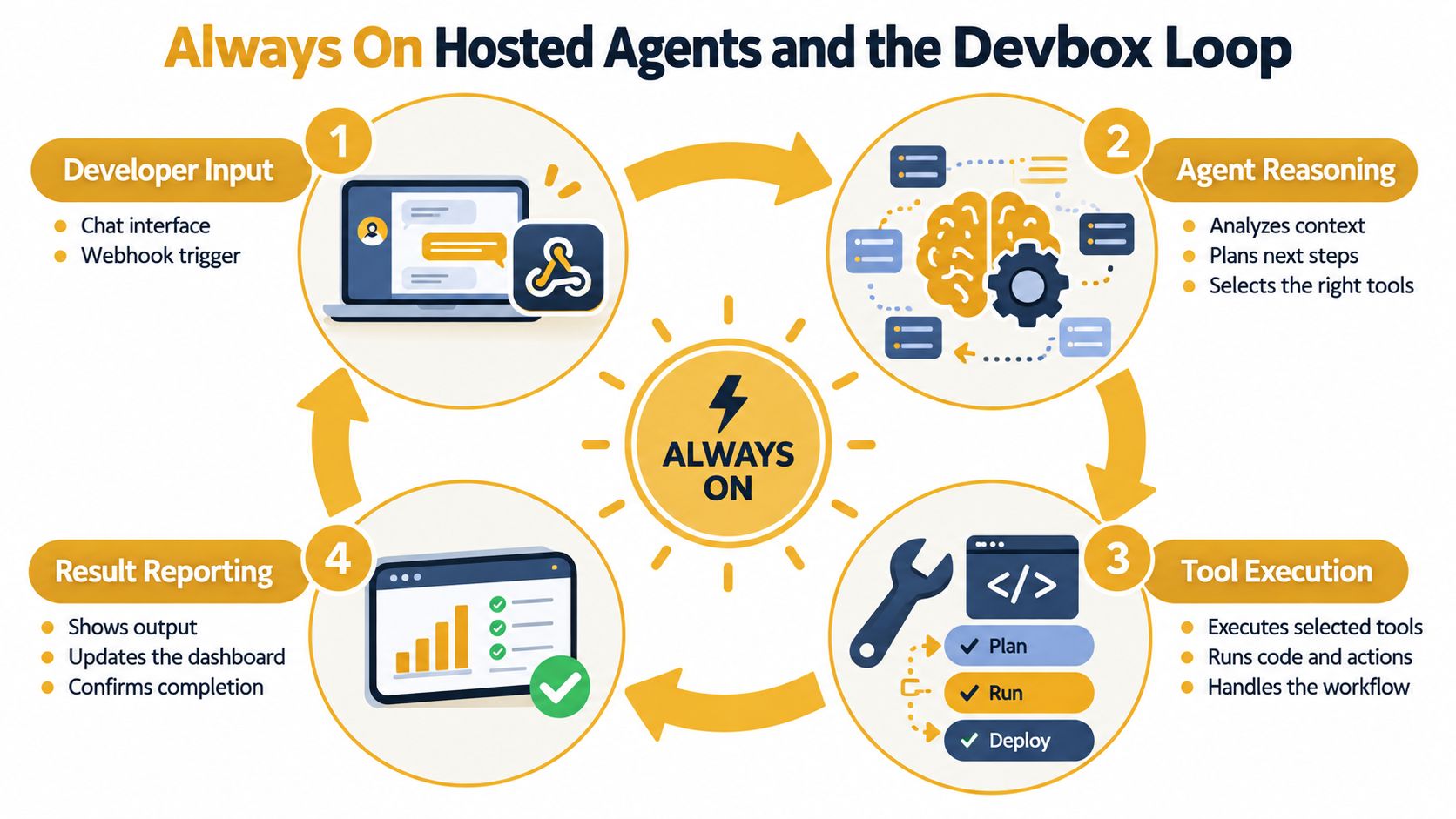
The devbox closes that gap with a disposable environment for a repository. A developer sends a request in chat or through a webhook. The agent interprets the task, creates a branch in an isolated devbox, and modifies the code against a running application rather than an abstract file tree.
Four beats of the loop
Ask: A developer describes the feature, bug, or operational task in a message.
Branch: The agent reasons about the repository, creates an isolated branch, and edits the code inside a disposable environment.
Run: The devbox starts the application, runs the build and tests, and gives the agent feedback for another iteration.
Inspect: The team receives a preview URL, a diff summary, and the available CI result before deciding whether to merge or deploy.
That last step changes the conversation. “The agent says it's done” becomes “the team can click the running branch and inspect it.” A devbox can include the application's services, databases, and queues behind a real URL, so the human review happens against behavior rather than intention.
The hosted model also changes when work can happen. An always-on agent doesn't depend on a developer's laptop being configured, awake, or available to run the next command. Each branch can live in an ephemeral sandbox that is removed after merge or expiry, which limits the accumulation of abandoned environments.
A hosted AI agent platform supplies the persistent runtime, while the devbox supplies the execution surface. Together, they turn an LLM from a code-writing assistant into an operator that can carry a task from request to running preview.
Here's the execution loop in a compact form:
The important boundary isn't whether the agent can produce syntactically valid code. It's whether the system can write, run, observe, revise, and present the result in an environment the team controls.
Agents vs Chatbots vs Copilots
These terms describe different points on a spectrum of action and autonomy. They shouldn't be treated as interchangeable names for any product with a chat box.
A chatbot is primarily reactive. It accepts text or voice, generates a response, and usually doesn't preserve operational state across sessions. It might explain a failed test, but it doesn't normally inspect the repository or execute the fix.
A copilot stays closer to the human. It may suggest code, summarize a document, or retrieve information from a connected system. The person decides when to apply the suggestion, and the system usually stops short of completing an end-to-end workflow without a trigger at each important step.
A scripted automation follows a deterministic path. It works well when the inputs and conditions are stable, but it can fail when the actual environment differs from the assumptions built into the script. It doesn't normally reinterpret the objective when a command returns an unexpected result.
| Capability | Chatbot | Copilot | Script | Agent |
|---|---|---|---|---|
| Acts or suggests | Mainly suggests | Suggests with contextual help | Acts through fixed rules | Acts toward a goal |
| Remembers state | Usually limited | Often scoped to the current context | Stores predefined variables or records | Maintains task or persistent state |
| Calls tools | Usually no | May call selected tools | Calls predefined systems | Chooses among available tools |
| Adapts to results | Limited | Limited or user-directed | Follows exception handling | Revises its plan from feedback |
| Runs unattended | Rarely | Usually not | Yes, within fixed conditions | Yes, within defined boundaries |
The practical test is simple: who presses next? If a person must approve every individual action, the system may be a copilot. If a fixed trigger always launches the same sequence, it's likely an automation. If the system receives an outcome, chooses tools, and keeps working based on observed results, the agent label is justified.
An agent can still include human checkpoints. Requiring approval before a production change doesn't make it a chatbot. It means the agent's autonomy has been deliberately scoped to the risk of the action.
Common Misconceptions About AI Agents
“Agent” can sound like marketing language because vendors use it for systems with very different capabilities. That criticism has some basis. Adoption language is moving faster than operational understanding: PwC's analysis found that 79% of US executives say AI agents are already being adopted in their companies, while 68% say half or fewer employees interact with agents in daily work. The numbers describe a gap between organizational adoption and everyday exposure, not proof that every product called an agent closes a workflow.
Trust data points to the same tension. Capgemini's 2025 research reports that 14% of organizations are implementing AI agents at partial or full scale, 23% are piloting them, and 71% say they can't fully trust autonomous AI agents for enterprise use. McKinsey's research reports that 23% of respondents say their organizations are scaling an agentic AI system in at least one business function, while no more than 10% are scaling agents in any single function.
Three myths worth removing
Myth one, an agent is just a chatbot with a new name. A chatbot can answer once. An agent maintains a loop involving decisions, tools, state, and feedback. The interface might look identical, but the operating model is different.
Myth two, tool access alone makes a system an agent. A model that can call one fixed function on command may still be a thin interface over an automation. The stronger boundary is whether it can choose actions, interpret returned results, and continue toward a goal.
Myth three, full autonomy means no oversight. Autonomy is a task-level property. Anthropic's autonomy research describes it as the degree to which an agent operates independently of human direction and oversight, shaped jointly by the model, user, and product design.
The useful engineering category is therefore narrower than the buzzword. An agent is a system that closes a loop with enough reasoning, tool invocation, memory, and adaptation to perform work rather than merely describe it. The surrounding governance determines which actions it should be allowed to take.
Choosing the Right Agent Setup for Your Team
Start the evaluation with the workflow, not the vendor's feature list. A product may call itself agentic, but the useful question is whether it can close your specific loop with appropriate controls.
Five questions for an evaluation
1. How much autonomy does the task require? Ask, “Which steps can run without approval, and which actions require confirmation?” A red flag is a product that treats autonomy as one global setting instead of separating read access, reversible changes, and high-impact actions.
2. What tools can the agent use? Ask, “Can it inspect the systems, repositories, tickets, and communication channels involved in this workflow?” A system that only produces text, or only calls one narrow integration, may not reach the execution layer you need.
3. How does memory work? Ask, “What state survives a restart, who can access it, and how can we inspect or delete it?” Be cautious when a vendor describes memory as a vague personalization feature without explaining storage, scope, retention, or retrieval.
4. Where does the agent run? Ask, “Does each agent have an isolated runtime, and can it execute code in a disposable environment?” If the answer is a shared opaque process with no shell, logs, or isolation boundary, debugging and containment become harder.
5. What can the team audit? Ask, “Can we see tool calls, decisions, configuration, outputs, and failed attempts?” A black-box interface that reports only the final answer won't give operators enough evidence to investigate an incorrect action.
Apply the checklist to two teams
An operations team running triage in Slack may need an always-on agent that reads alerts, checks logs, summarizes incidents, and opens tickets. The safest design can keep production mutations behind approval while allowing broad read access and automatic reporting.
A product team building features may need a more scoped developer agent. It can receive a task, create a branch, run tests in a disposable devbox, and return a live preview, while merge and production release remain human decisions.
The market is expanding quickly. One Grand View Research estimate places the global AI agents market at about USD 7.63 billion in 2025, with a projection of USD 182.97 billion by 2033 and a projected 49.6% CAGR from 2026 to 2033. Another estimate in the same market discussion places the category at roughly USD 7.84 billion in 2025 and USD 52.62 billion by 2030, with a projected 46.3% CAGR. The spread between forecasts is a reminder to evaluate the actual execution model, not just the size of the category.
Rule of thumb: Pick the simplest topology that closes the loop end to end, then add agents only where the loop creates measurable leverage.
Sokko provides managed, always-on hosting for AI agents and disposable devboxes where an agent can write a branch, run the application, and return a live preview URL for human testing. If your team is evaluating hosted runtimes, persistent memory, tool integrations, and the agent-to-devbox workflow, visit Sokko to explore the platform.