
A cloud AI agent is an always-on program running in managed cloud infrastructure, and the market is estimated at USD 114.26 billion in 2026, rising to USD 269.02 billion by 2031. Agentic AI itself is estimated at USD 9.89 billion in 2026 and USD 57.42 billion by 2031, which shows why hosting decisions now matter as much as model selection.
You may already have the demo. A developer asks an agent to update a repository, a support assistant drafts a useful response in Slack, or an operations bot turns a ticket into several successful API calls. Then the workflow runs overnight, a tool returns malformed data, memory contains an old instruction, and nobody can explain exactly what happened.
That's the production gap. A model can look impressive in a controlled chat while the surrounding system fails under persistent execution, concurrent events, tool permissions, storage pressure, or regional compliance requirements. The right cloud AI agent needs more than a capable model. It needs a runtime, isolated compute, governed memory, observable integrations, and a hosting setup that lets humans inspect and stop its work.
Table of Contents
<a id="what-cloud-ai-agents-actually-are"></a>
What Cloud AI Agents Actually Are
A production incident usually makes the distinction clear. A local script may update a repository when an engineer starts it. A chatbot may answer a question and forget the interaction. A cloud AI agent keeps running, receives events, uses tools, stores state, and continues a workflow after the original user has closed their laptop.
A cloud AI agent is an autonomous or semi-autonomous software system that runs an open-source or proprietary AI runtime in cloud infrastructure. It interprets goals, selects actions, calls external tools, reads and writes governed memory, and reports progress through user or system interfaces. Managed hosting replaces a notebook or one-off process with a service that can remain available, restart after failure, and interact with workflows at any time.
<a id="the-distinction-that-matters"></a>
The distinction that matters
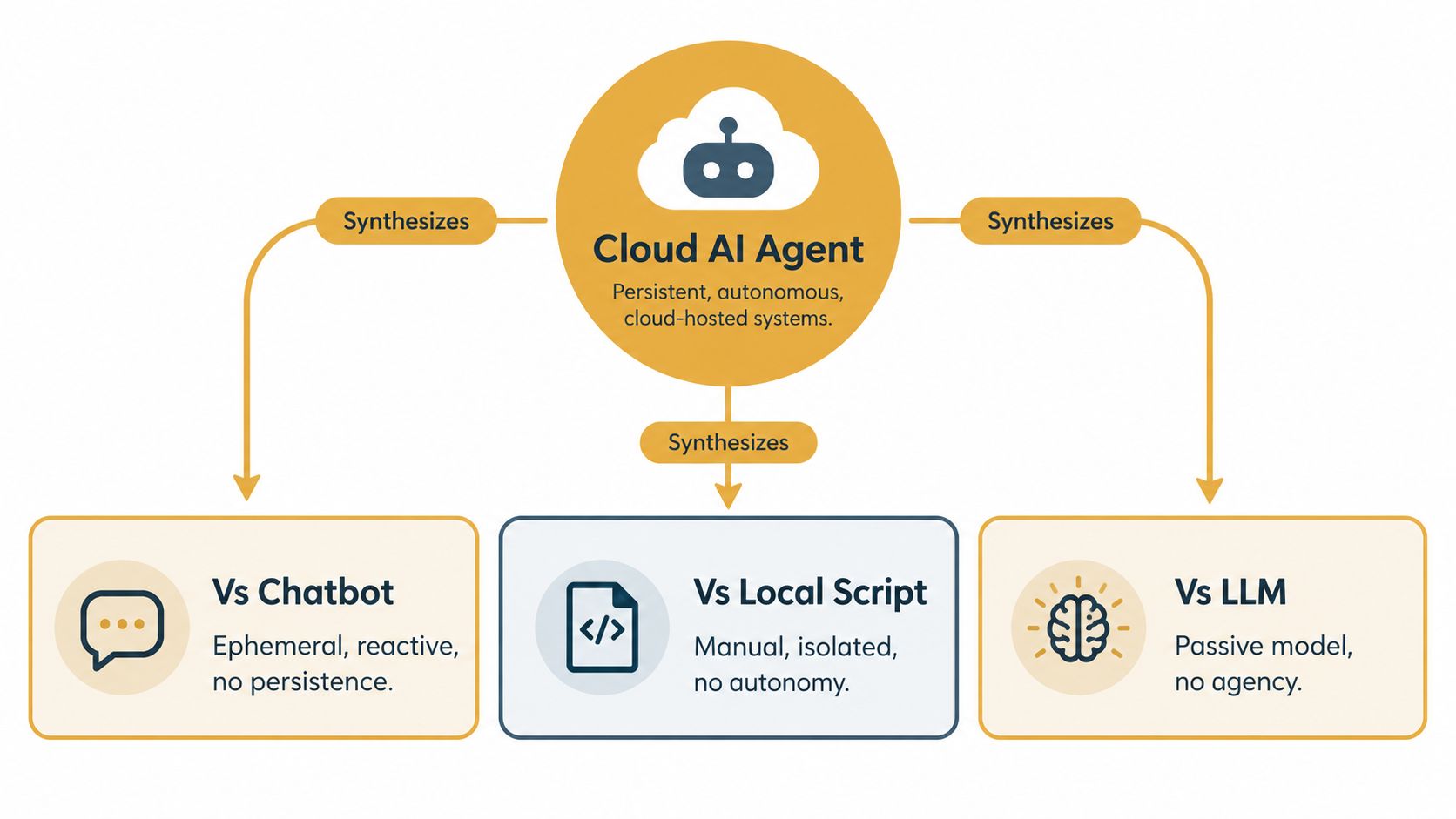
The terms often overlap, but their operational behavior differs:
A large language model generates or evaluates content. It doesn't decide what to do in an external system without an application around it.
A chatbot usually handles a reactive conversation. It may maintain conversational context, but it doesn't necessarily own a durable workflow.
A local script executes predefined logic on a machine. It can call APIs, but it normally lacks autonomous planning and persistent interaction.
A cloud AI agent combines reasoning, tools, state, event handling, and hosted execution.
That combination is useful for repository maintenance, support triage, reporting, research, and multi-step business operations. It's unnecessary for a single prompt that a person can review and execute manually. Hosting an agent adds operational responsibility, so the use case should justify persistent execution.
The market trajectory reflects that shift. One cloud AI agent market analysis estimates rapid expansion in both cloud AI and agentic AI, with cloud infrastructure acting as the practical foundation for elastic compute, managed storage, and API access. A separate timeline of agent platforms and protocols describes the movement from experimental assistants toward enterprise platforms with production revenue, shared interfaces, and measurable workloads.
Practical rule: If the system must remember, act, and be accountable after the chat ends, treat it as a hosted application, not as a prompt.
For a more concise conceptual distinction, the explanation of what an AI agent means is useful. The important decision follows from that definition: where the agent runs determines how reliably it can continue work, how safely it can access tools, and how quickly an engineer can diagnose a bad action.
<a id="how-cloud-ai-agent-architectures-are-built"></a>
How Cloud AI Agent Architectures Are Built
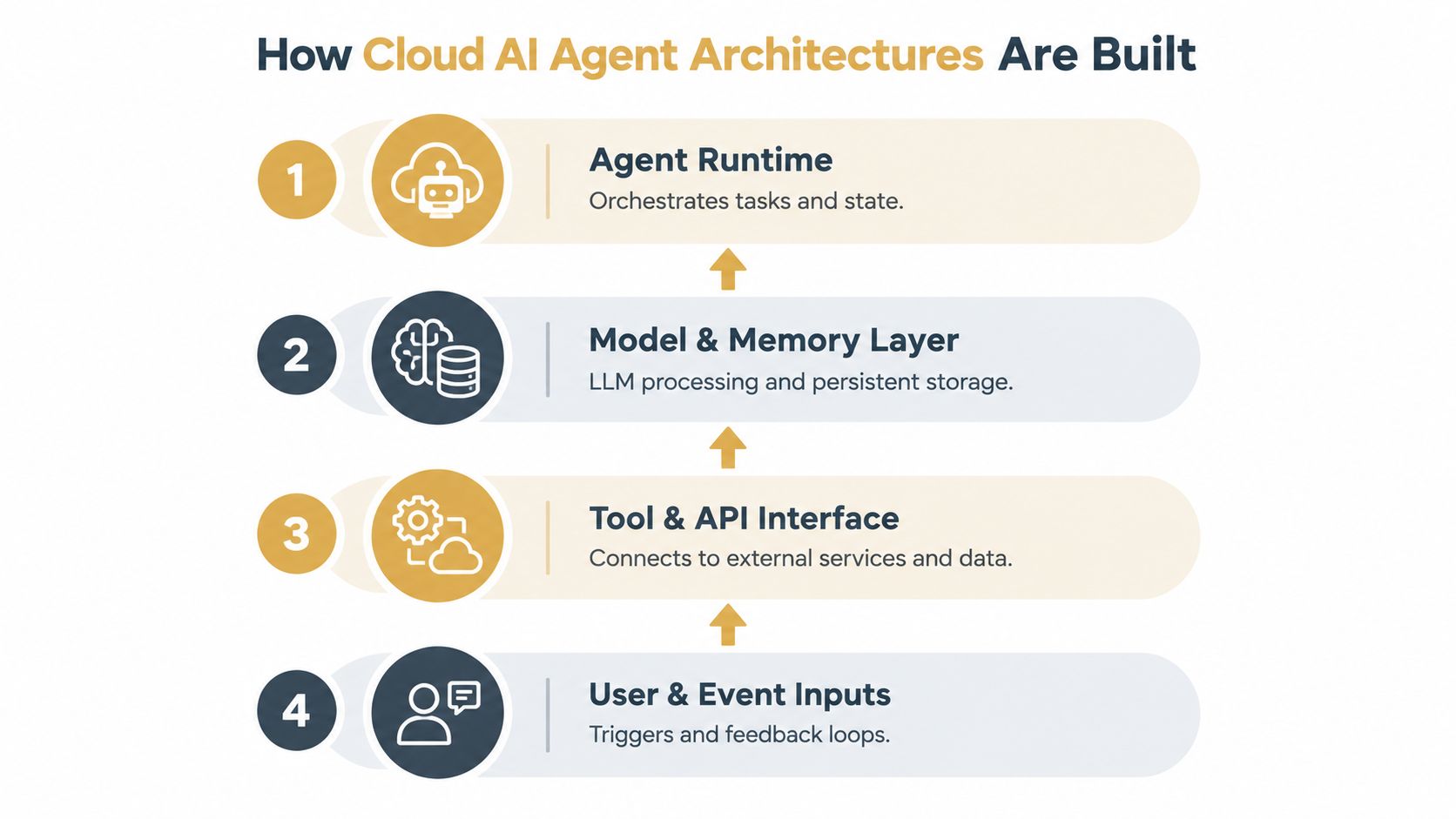
A cloud AI agent is easier to operate when its layers are explicit. Treating the whole system as a single prompt hides the boundaries where failures occur. In practice, a useful architecture separates the runtime, model and memory services, tools, and infrastructure.
<a id="the-runtime-layer"></a>
The runtime layer
The agent runtime turns a request or event into a sequence of decisions. It manages planning, tool selection, retries, context windows, task state, and handoffs between specialized agents. OpenClaw, Hermes, Paperclip, and Cursor represent different approaches to that layer. Some focus on messaging and general assistance, some on model and skill orchestration, some on multi-agent coordination, and some on coding tasks.
The runtime shouldn't own every concern. Keep deterministic operations in ordinary code. For example, let the model identify the customer and requested action, then let a validated service perform the database update. A strict schema between those steps makes the boundary testable and limits the damage from an incorrect interpretation.
<a id="models-and-memory"></a>
Models and memory
The model provides reasoning, classification, generation, or multimodal interpretation. A production agent may route different tasks to different model endpoints instead of sending every request to one expensive or slow model. That routing belongs in configuration or a service layer, not inside a fragile chain of prompts.
Memory is different from the model's temporary context. Working context helps the current task. Persistent memory stores decisions, user preferences, operating rules, and previous results that the agent may need later. If multiple agents share memory, the system needs ownership, provenance, access rules, and deletion behavior.
<a id="tools-and-infrastructure"></a>
Tools and infrastructure
The tool layer exposes GitHub, Slack, Notion, Gmail, Linear, calendars, databases, queues, and internal APIs. Each tool should define permitted operations, input validation, authentication, timeout behavior, and rollback or compensation where possible.
The infrastructure layer supplies compute, storage, networking, secrets, logs, and lifecycle control. Isolated machines reduce noisy-neighbor risk and make resource consumption easier to attribute. They also give engineers a clear place to inspect processes, files, logs, and network behavior when an agent behaves unexpectedly.
A useful evaluation question is simple: can you identify which layer failed? If the answer is only “the agent got confused,” the architecture is too opaque to operate confidently.
<a id="managed-hosting-vs-self-hosted-agent-runtimes"></a>
Managed Hosting vs Self-Hosted Agent Runtimes
Managed hosting and self-hosting solve different problems. Managed deployment removes much of the server work, while self-hosting gives the engineering team direct control over the runtime, network, storage, and security policies. Neither choice automatically makes an agent reliable.
With managed hosting, the provider typically handles machine provisioning, base images, service restarts, access controls, and some monitoring. That helps teams move from a local experiment to an always-on process without building an operations layer first. It also makes it easier to give each agent a separate machine rather than placing several unpredictable workloads on one shared host.
Self-hosting makes sense when the organization needs a specific operating system image, private network topology, custom observability stack, or precisely customized compliance controls. It can also be the right choice when the team already operates container orchestration and has a mature secret-management process. The trade-off is that the team now owns patching, capacity, failed deployments, backups, runtime upgrades, and the investigation of resource contention.
<a id="compare-the-operational-trade-offs"></a>
Compare the operational trade-offs
| Decision area | Managed hosting | Self-hosted runtime |
|---|---|---|
| Provisioning | Faster path from configuration to a running agent | Requires images, machines, deployment automation, and maintenance |
| Isolation | Depends on the provider's machine and network model | Fully controlled, but the team must implement and verify it |
| Debugging | Good platforms provide logs, terminals, and audit trails | Full access is possible, but only if the team builds usable access paths |
| Compliance | Regional hosting and documented controls may simplify review | Policies can be tailored, but evidence and enforcement are internal responsibilities |
| Customization | Constrained by supported runtimes and platform boundaries | Broad control over dependencies, networking, and execution |
| Scaling | Operational burden is reduced, but provider limits still apply | Capacity, scheduling, and cost allocation remain engineering work |
<a id="visibility-beats-abstraction"></a>
Visibility beats abstraction
The dangerous managed platform is not the one with fewer settings. It's the one that hides execution. Engineers need to see tool calls, process output, memory changes, failed requests, and the exact configuration used for a run.
A self-hosted system can fail in the opposite direction. It exposes everything, but an operator may need to connect through several layers before finding the relevant log. A managed system with a live terminal, readable configuration, and downloadable audit records can be more useful in practice than a fully controlled cluster that nobody can inspect quickly.
The practical distinction between AI agent hosting approaches comes down to that operational balance. Choose managed hosting when speed, isolation, and routine maintenance dominate. Choose self-hosting when infrastructure control is itself a hard requirement, not merely a preference.
<a id="always-on-agents-and-devbox-preview-workflows"></a>
Always-On Agents and Devbox Preview Workflows
An agent that changes code should produce something a person can open and test. A pull request alone doesn't prove that the application starts, the database migration works, or the user flow remains intact. The most useful hosted workflow connects the agent to a disposable environment where its branch becomes a running preview.
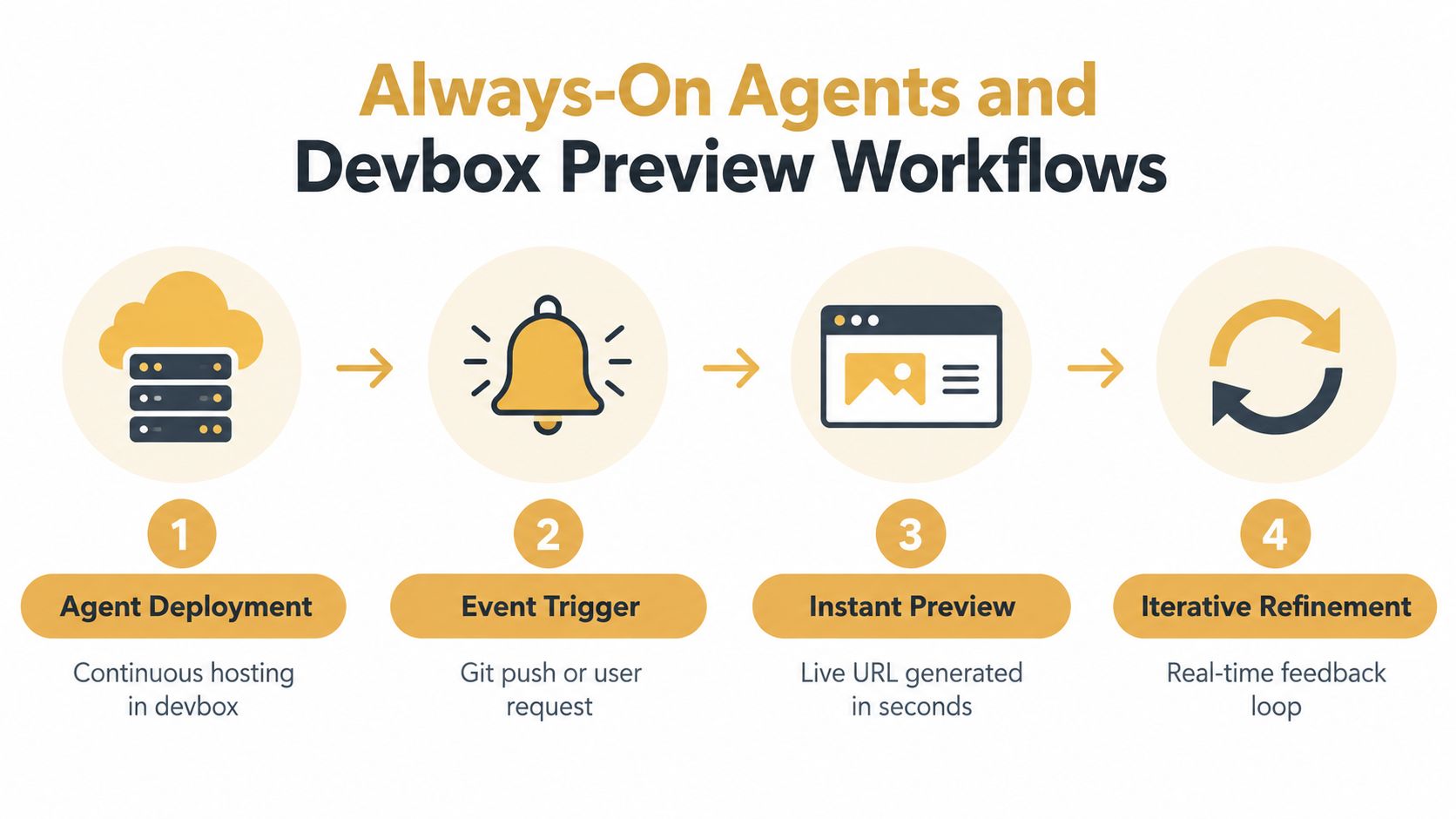
Consider a repository agent that receives a request to add a billing filter. The agent creates a branch, edits the application, updates tests, and asks the hosting platform to create a devbox. That devbox runs the branch with its application services and exposes a team-accessible preview URL.
The engineer can then test the feature in a browser instead of trusting the agent's completion message. If the filter fails on a particular screen, the engineer reports the behavior in the same workflow. The agent reads the feedback, commits another change, and refreshes the preview. The loop stays grounded in observable output.
<a id="a-safe-hosted-loop"></a>
A safe hosted loop
Start with a bounded request. Give the agent a defined repository, acceptance criteria, and permitted tools. Don't grant broad production credentials just because the task is convenient.
Create a branch and isolated environment. The branch gives reviewers a diff. The devbox gives them a live application and separates experimental dependencies from production services.
Run deterministic checks before review. Tests, linting, migrations, and health checks should run through ordinary tools. The model can interpret failures, but it shouldn't decide that a failing test is acceptable.
Review the live result. A preview URL exposes layout issues, broken routes, missing environment variables, and integration failures that static review can miss.
Expire or destroy the environment. Disposable infrastructure prevents abandoned experiments from becoming invisible long-lived systems. Preserve useful logs and artifacts before teardown.
Always-on hosting matters here because the agent can receive a Git event, continue a queued task, or respond to feedback without a developer leaving a workstation running. Lifecycle controls still matter. Idle environments should stop or expire according to policy, while repositories, secrets, and review artifacts follow explicit retention rules.
A preview is not a production release. It's a controlled observation point between generated code and human approval. That distinction keeps the agent productive without allowing an unverified change to become an irreversible action.
<iframe width="100%" style="aspect-ratio: 16 / 9;" src="https://www.youtube.com/embed/qfK8Gbu21EE" frameborder="0" allow="autoplay; encrypted-media" allowfullscreen></iframe>The same pattern works beyond coding. A support agent can draft a response in a sandboxed ticket workflow, an operations agent can produce a report against read-only data, and a research agent can assemble a reviewable artifact before anyone publishes it. The principle is consistent: make the agent's output observable before granting the next level of authority.
<a id="integrations-memory-and-operational-governance"></a>
Integrations, Memory, and Operational Governance
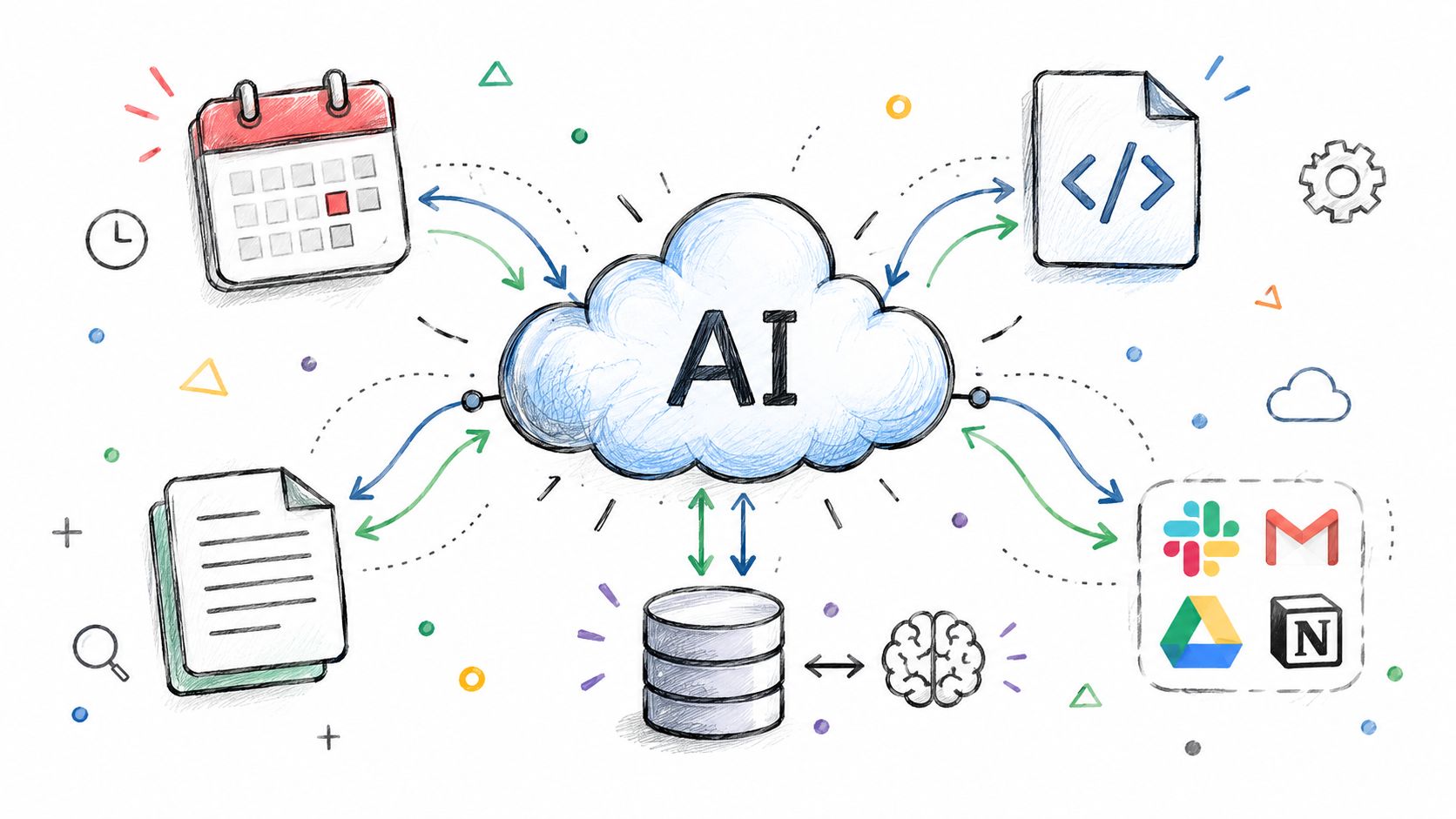
A cloud AI agent becomes operationally useful when it can read and change the systems where work already happens. Slack and Telegram provide interaction channels. GitHub and Linear expose work queues. Notion, Gmail, calendars, databases, and internal APIs supply context and actions. Each integration expands capability, but also increases the impact of a bad tool call.
A practical hosted-agent loop is straightforward: receive an event, load only the approved context, select a tool, execute within its scope, record the result, and wait for approval when the action carries material risk. Under continuous load, failures usually come from unclear ownership, stale context, missing traces, or excessive permissions rather than from the model alone. The runtime needs enough access to debug the loop without giving the agent unrestricted access to adjacent systems.
Memory coordinates work across tasks and agents. A Markdown file can hold readable preferences, identity details, operating instructions, and durable decisions. The file format does not define governance. The platform still needs to record who created each entry, which tenant owns it, when it expires, and which agents can read or change it.
<a id="treat-memory-as-governed-state"></a>
Treat memory as governed state
Teams designing persistent memory architecture for AI systems should isolate memory by user, agent, and tenant. Enterprise guidance on memory architecture also calls for provenance on reads and writes, retention and deletion policies, and logs containing identity and timestamp context.
Shared memory therefore needs explicit boundaries. A fleet can use common operating knowledge, but one undifferentiated store can transfer one customer's preferences into another customer's workflow. Separate namespaces, permissions, and reviewable file changes matter more than whether storage uses a database, object store, or versioned Markdown directory.
A workable governance model includes:
Tool scopes: Give each agent only the operations its role requires, such as creating a pull request without merging it.
Memory provenance: Record the origin of a fact and the agent or user that changed it.
Action traces: Store the request, selected tool, arguments, response, and resulting state.
Human checkpoints: Require approval before destructive, financial, public, or production actions.
Rollback paths: Define how operators undo a change before the first production run.
Retention rules: Remove credentials, stale context, and personal data according to policy.
Security has two layers. Cloud security guidance for AI agents separates model-layer controls, including prompt-injection defenses and tool-call authorization, from infrastructure controls, including execution isolation, secrets management, RBAC, and audit logging. Sandboxed runtimes should also enforce CPU, memory, network, and filesystem limits so generated code cannot reach adjacent systems.
The production gap appears in accountability as well as capability. A Cloud Security Alliance report says 85% of organizations report using AI agents in production, while more than two-thirds cannot clearly distinguish agent actions from human actions. It also reports that 68% allow at most 10 steps before human intervention, with reliability identified as the primary deployment barrier.
Trace every meaningful action, attribute it to an agent identity, and set an explicit autonomy limit. An agent that runs continuously but cannot explain its decisions is not ready for unattended operation.
<a id="how-to-choose-a-cloud-ai-agent-platform"></a>
How to Choose a Cloud AI Agent Platform
Start with the workload, not the model catalog. A repository agent needs filesystem access, Git credentials, branch operations, logs, and preview environments. A support agent needs channel connectors, tenant separation, durable customer context, and approval workflows. A multi-agent orchestrator needs role boundaries, budgets, handoffs, and a full action history.
Then test the platform against a failure rather than a happy path. Stop the runtime during a tool call. Send malformed data. Remove a secret. Fill the memory store with conflicting instructions. Ask the operator to identify what happened without opening the provider's internal ticket system. The answers reveal more than a feature list.
<a id="questions-worth-asking"></a>
Questions worth asking
Can each runtime run on an isolated machine or equivalent boundary? Shared compute may be adequate for light workloads, but persistent agents need predictable resource behavior.
Can an engineer inspect the process directly? A browser terminal, live logs, and readable configuration reduce time spent diagnosing opaque failures.
How does memory work? Look for tenant isolation, provenance, retention, deletion, and a way to share approved context without mixing identities.
What happens after a crash? Automatic restart is useful, but the system must preserve enough state and logs to explain the interruption.
Which actions require approval? Tool permissions should be narrower than the agent's natural-language ability.
Can you choose a region? Regional storage, memory, and inference policies may affect privacy reviews and customer commitments.
Can the agent's output become a testable artifact? For coding workloads, a live branch preview is more informative than a completion status.
Can you leave? Git-friendly configuration, portable memory files, and bring-your-own model keys reduce lock-in.
A platform designed around isolated agent machines, always-on runtimes, shared persistent memory, live terminals, plain-Markdown configuration, and disposable devboxes fits a specific class of production workflow. It gives repository agents a place to run continuously and gives reviewers a URL where they can inspect the branch before approval. It also supports a clearer separation between the agent machine and the environment used to test the code.
Regional governance deserves its own review. Google Cloud's AI infrastructure outlook reports that 83% of organizations require infrastructure upgrades for production-grade agentic AI, 81% cite operational complexity as a hidden scaling cost, and 79% identify security, governance, and MLOps as top challenges. The same source says cost management is the top public-cloud issue for 31% of enterprises, while 62% are highly concerned about generative AI and agentic AI infrastructure costs.
Those figures reinforce a non-obvious selection criterion: ask how the provider measures and limits always-on work across regions. A platform that makes runtime, memory, storage, inference, and preview lifecycles visible is easier to budget and govern than one that reports only a monthly aggregate.
<a id="deploying-cloud-ai-agents-with-confidence"></a>
Deploying Cloud AI Agents with Confidence
The reliable path from prototype to production is a sequence of controlled boundaries. Select a runtime that matches the work. Put it on isolated infrastructure. Connect only the tools it needs. Give it governed memory. Send generated changes to a disposable preview. Capture the trace. Require human approval before irreversible actions.
That sequence also changes how teams debug. Don't begin with the prompt when an agent fails. Check the event payload, runtime state, model response, parsed tool arguments, authorization decision, external API response, memory read, and final side effect. Each stage should produce a record that another engineer can interpret.
<a id="a-deployment-checklist"></a>
A deployment checklist
Define the action boundary. List what the agent may read, create, modify, publish, and delete.
Separate reasoning from execution. Use the model for interpretation and planning, then use deterministic code for calculations, validation, and writes.
Isolate the runtime. Limit network, filesystem, CPU, memory, credentials, and access to neighboring workloads.
Version configuration and memory. Review changes to system instructions, tools, permissions, and durable context like code.
Instrument every tool call. Capture identity, arguments, response status, latency, retries, and resulting state.
Bound the workflow. Add step limits, timeouts, approval gates, and stop controls.
Test with realistic failures. Include expired credentials, conflicting memory, unavailable APIs, partial writes, and malformed responses.
Review a live artifact. For code, open the branch preview. For business workflows, inspect the generated record or draft before release.
Measure total operating cost. Include compute, storage, model calls, observability, idle environments, regional duplication, and human review.
The main lesson is simple. Model quality influences what an agent can reason about, but hosting quality determines whether the system can keep running, stay within bounds, and explain its actions. A cloud AI agent becomes production software only when its infrastructure, memory, integrations, and audit model are designed with the same care as its prompts.
Sokko provides managed, always-on hosting for open-source AI runtimes, isolated agent machines, persistent shared memory, live terminals, integrations, and devboxes that turn repository branches into reviewable preview URLs. Visit Sokko to evaluate a practical hosted workflow for deploying agents with clearer isolation, debugging access, and human review.